
11 Best Encrypted Cloud Storage Services in 2026

Encrypted cloud storage falls into two categories. Most services such as Google Drive, Dropbox, OneDrive, and Box, encrypt your files on their servers and hold the decryption keys, so the company can technically access what you store.
A smaller group, including Internxt, Tresorit, and Sync.com, encrypts files on your device before upload, using keys only you control. The provider receives data it cannot read, and cannot hand anything over, even under a legal order.
Internxt is the strongest pick in the second category: your files are encrypted before they leave your device, and an independent security firm confirmed this in 2026; it meets healthcare data protection requirements (HIPAA), and it holds international security certification (ISO 27001:2022).
This guide covers Internxt alongside 11 other services across both categories to meet your cloud storage requirements for encryption, pricing, compliance, and practical use cases.
Quick comparison: encrypted cloud storage in 2026
The most important column below is whether the company can read your files, the real difference between "encrypted" and "actually private."
| Service | Free storage | Cheapest paid plan | Can the company read your files? | Best for |
|---|---|---|---|---|
| Internxt | 1 GB | From €1.99/month (1 TB) | No | Maximum privacy, HIPAA compliance |
| Tresorit | 3 GB | From $4.75/month | No | Business and legal teams |
| Sync.com | 5 GB | From $4.80/month (2 TB) | No | Simple private backup |
| pCloud | 10 GB | From $4.17/month (500 GB) | Yes, unless you pay for the Crypto add-on | Lifetime plans, media playback |
| MEGA | 20 GB | From €9.99/month (2 TB) | No | Largest free tier |
| Filen | 10 GB | From $1.99/month (200 GB) | No | Budget zero-knowledge, EU-based |
| Icedrive | 10 GB | From $4.92/month (1 TB) | Only in the encrypted folder (paid plans) | Affordable storage |
| Nextcloud | Self-hosted | Self-hosted | Depends on your setup | Full data sovereignty |
| Box | 10 GB | From $10/month (100 GB) | Yes | Enterprise content management |
| Google Drive | 15 GB | From $1.99/month (100 GB) | Yes | Collaboration, Google ecosystem |
| Koofr | 10 GB | Annual plans vary | Only with optional Vault feature | Managing multiple cloud accounts |
What is encrypted cloud storage?
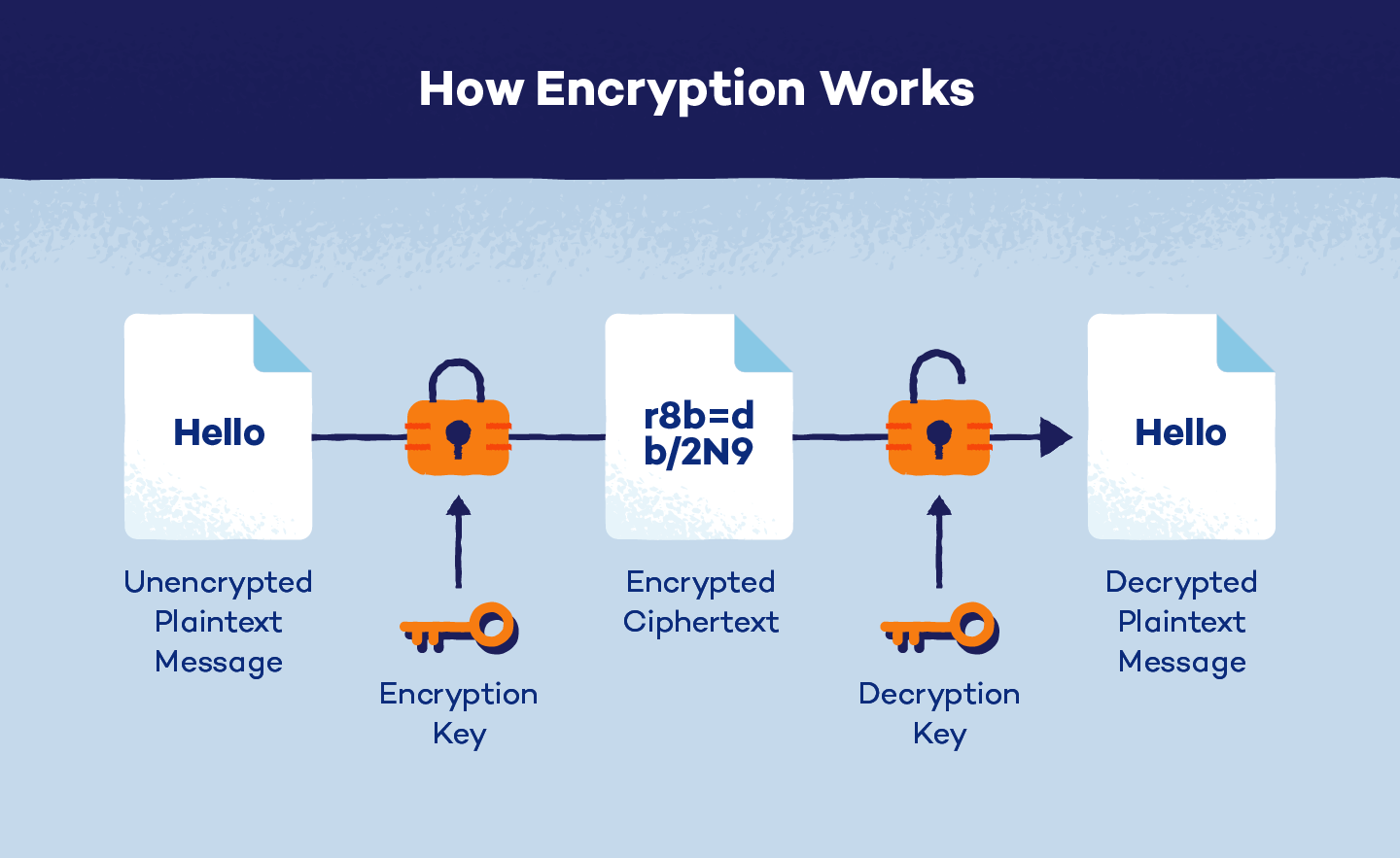
When you upload a file to the cloud, it gets scrambled into unreadable data before sitting on a server. Without the right key to unscramble it, the file is useless to anyone who intercepts it. The part most people miss is who holds that key.
Encrypted cloud storage stores your data on remote servers and protects it from unauthorized access by transforming the plain text (your file) into cipher text. This encrypted format makes it unreadable to hackers.
Standard encryption vs. zero-knowledge encryption
Most cloud services encrypt your files but keep a copy of the key themselves. Google, Microsoft, Dropbox or Terabox, or other companies without ZKE can technically unscramble your files if required to. Their security keeps outside attackers away, but the ability to access your data exists.
Zero-knowledge encryption works differently: your files are encrypted on your own device before they ever leave it. The company receives already-scrambled data and never holds your decryption key. Even under a legal order, they have nothing readable to hand over.
Other options include using third-party encryption tools, like Cryptomator, to encrypt files on your device before sending them to platforms like Google or OneDrive.
| Standard encryption | Zero-knowledge encryption | |
|---|---|---|
| Where does encryption happen? | On the company's servers, after upload | On your device, before upload |
| Who holds the key? | The company | Only you |
| Can the company read your files? | Yes, technically | No |
| Can files be handed to law enforcement? | Yes | No. The company has nothing to hand over |
| Works with web-based file preview? | Yes | Limited |
| Examples | Google Drive, Dropbox, OneDrive | Internxt, Tresorit, Sync.com, Filen |
Standard encryption works for most people. If your concern is a server breach, standard encryption stops that. Zero-knowledge goes further and protects your files from the company itself. This matters for medical records, legal documents, and anything you would not want a third party to ever access.
Encryption standards explained
AES-256 is the current industry standard, used by governments, banks, and every service on this list except MEGA, which uses AES-128. The 256-bit key length makes brute-force attacks computationally infeasible with current hardware.
TLS protects files in transit from your device to the server. Internxt uses TLS 1.3, the most recent version. Post-quantum encryption is designed to withstand attacks from future quantum computers. Internxt is the only service on this list with it deployed as a default across all plans.
The 11 best encrypted cloud storage services in 2026
1. Internxt
Internxt is a privacy-focused cloud storage service built in Valencia, Spain, with data centers in Europe.
It is the first cloud storage with post-quantum and zero-knowledge encryption, and encrypts your files directly on your device before uploading. You manage the keys, so nobody except you can view your files, Internxt, nor anybody else has the technical ability to access your files.
It is the only company on this list offering this type of encrypted cloud storage for all plans, including free accounts.
You manage the keys, so nobody except you can view your files, Internxt, nor anybody else has the technical ability to access your files.
Internxt has successfully passed two independent security audits by Securitum, the same company that audits Proton Drive, and others. To verify its security, all of Internxt's code is open-source and available to the public to view on the Internxt GitHub page.
You can also share encrypted cloud storage with friends with the Internxt referral scheme. With it, your friends will get an 85% discount on any plan, and you can earn up to €100.
Security: AES-256 and Kyber 512 client-side encryption before upload, transferred over TLS 1.3. ISO 27001-certified, HIPAA-compliant, SOC 2-compliant, and GDPR-aligned through European data centers.
Features: Available on Windows, macOS, Linux, iOS, and Android. Supports WebDAV, Rclone, and NAS for home server and multi-platform integrations. Encrypted file sharing with password protection.
Automatic backups, Antivirus, PC cleaner, VPN, Mail, and Meet for paid plans.
Internxt also offers an enterprise cloud storage solution with its S3 object storage plans, at a flat cost of €7/TB/month, with no additional data transfer fees, meaning you can scale your storage to meet your needs at up to 80% cheaper than AWS, Azure, or Google Cloud.
Pricing:
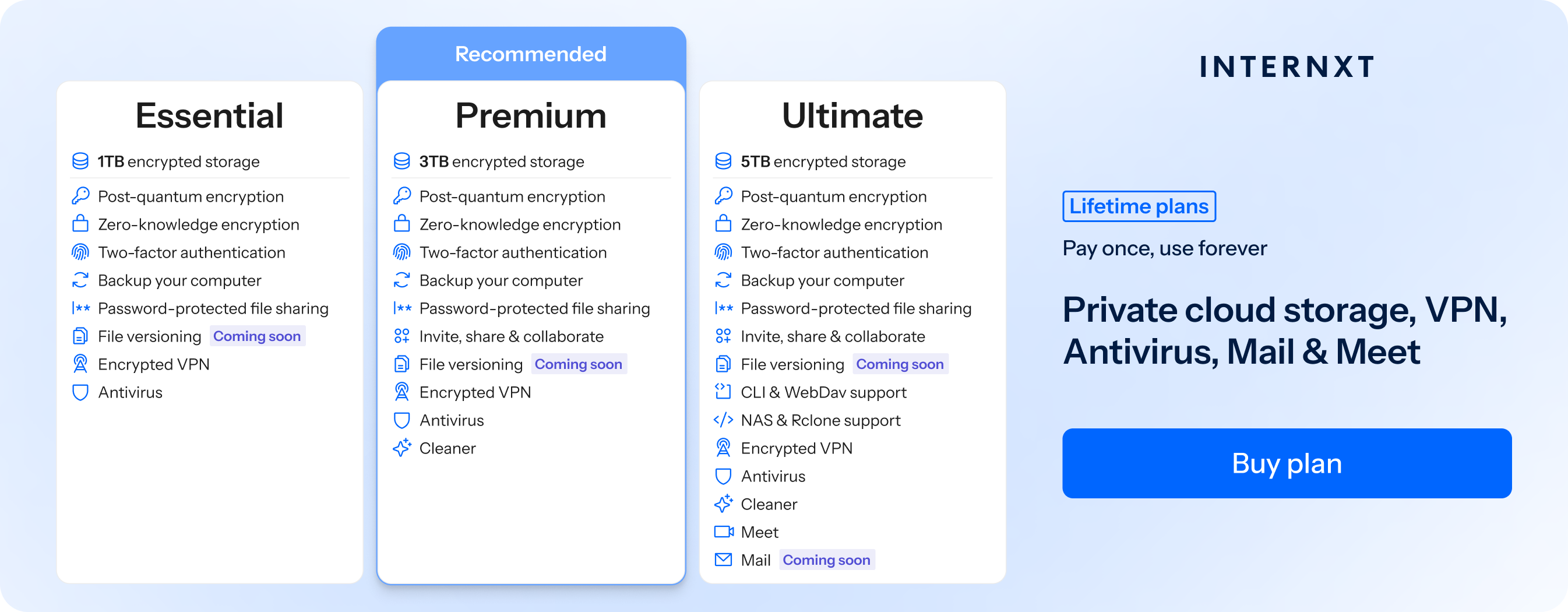
| Plan | Storage | Features | Annual (Paid monthly) | Lifetime Cost |
|---|---|---|---|---|
| Essential | 1TB | €9.99/month | €380 | |
| Premium | 3TB |
|
€19.99/month | €580 |
| Ultimate | 5TB | €29.99/month | €780 | |
| *Prices are correct at the time of writing and are subject to change. For latest prices, check https://internxt.com/pricing | ||||
Pick this if you want verified post-quantum and zero-knowledge encryption, multiple compliance, and a full privacy suite to protect you online.
2. Google Drive
Google Drive is the default cloud storage for billions of people and the easiest option if you live inside the Google ecosystem. Its real-time collaboration supports up to 100 simultaneous editors, the strongest of any service on this list.
Security: AES-256 at rest, TLS in transit. Google holds the encryption keys and can technically read your files if required by law or their terms of service. This is disclosed openly in Google's privacy policy. No zero-knowledge option available on any plan. HIPAA compliance requires a Google Workspace subscription and a signed BAA.
Features: Google Docs, Sheets, Slides, and Meet built in. 15 GB free across Gmail and Photos. Gemini AI integration on higher plans. Offline access across every platform and browser.
Pricing:
- Free: 15 GB
- 100 GB for $1.99/month
- 2 TB for $9.99/month
- Google AI Pro (2 TB + Gemini): $19.99/month
Pick this if collaboration and Google ecosystem integration matter more than privacy. For sensitive documents you would not want Google to ever be able to access, a zero-knowledge service is the correct choice.
3. Tresorit
Tresorit offers encrypted cloud storage and other features to prioritize security, privacy, and compliance in document management and email communication.
Tresorit is a Swiss-founded encrypted cloud storage service with a strong record in enterprise security. Founded in 2011, it serves law firms, healthcare organizations, and financial teams that cannot afford data exposure. Beyond file storage, it covers encrypted data rooms, e-signature workflows, and encrypted email attachments via Microsoft Outlook.
Security: Zero-knowledge encryption on all paid plans. ISO 27001 certified, HIPAA compliant, with BAA available. EU data centers. Closed source, so the implementation cannot be independently audited the way Internxt or Filen can.
Features: Encrypted sharing links with expiry and access controls, version history, and remote device wipe. Microsoft Outlook integration for encrypted email attachments. eIDAS-compliant electronic signatures for EU legal workflows.
Pricing:
- Free: 3 GB
- Personal Lite from $4.75/month
- Business plans from $19/user/month (billed annually)
- 14-day free trial
Pick this if you run a business that handles sensitive client documents and needs a legally compliant e-signature workflow, or works in a regulated industry. The compliance features justify the higher cost for professional use.
4. pCLoud
pCloud is a cloud storage solution offering robust file access and backup capabilities across devices and secure file-sharing services.
Additionally, it provides the option to enhance security with pCloud Pass, which you have to purchase separately from a paid pCloud plan.
Furthermore, pCloud is not open source, meaning its source code is not publicly accessible for independent review or modification, leaving many wondering is pCloud safe for private files.
Security: Standard server-side encryption by default, meaning pCloud holds the keys and can technically access your files.
Zero-knowledge encryption requires the pCloud Crypto add-on, a separate add-on: $3.99/month billed annually (~$48/year) or $150 as a lifetime purchase. Not open source. Despite marketing that references Swiss privacy standards, it operates under Bulgarian jurisdiction.
If you're considering pCloud vs other competitors, such as Filen, then we cover this in our Filen vs pCloud article.
Features: Apps for all major platforms including a desktop virtual drive. Built-in media player for music and video. pCloud Transfer for large file sends. Lifetime plans for 500 GB and 2 TB.
Pricing:
- Free: 2 GB, chance to get up to 10GB
- Premium 500 GB from $4.17/month (billed annually)
- Premium Plus 2 TB from $8.33/month (billed annually)
- Lifetime plans from $199 one-time (500 GB)
- Crypto add-on: ~$49.99 one-time
Pick this if you want lifetime pricing and a polished media experience and are fine adding the Crypto add-on separately. Not the right choice if you want zero-knowledge privacy included without an extra step.
5. Icedrive
Icedrive is an encrypted cloud storage provider distinguished by its use of Twofish encryption, offering strong security measures for storing and accessing files.
Icedrive is a Welsh cloud storage service built around a clean interface and a drive-mounting feature that makes your cloud storage appear as a local drive on your computer.
Security: Uses Twofish encryption rather than AES-256. Twofish is secure but slower and less widely tested in practice.
Zero-knowledge encryption applies only to a single designated folder on paid plans. Zero-knowledge encryption is not available with free plans.
There are no independent security audits published regarding Icedrive security.
Icedrive is based in Wales, so GDPR applies, though it has no other compliance.
Features: Desktop drive mounting is the headline feature. Media streaming for photos and videos. Apps for Windows, macOS, and mobile. No Linux desktop app. No real-time collaboration.
Pricing:
- Free: 10 GB (no zero-knowledge)
- Lite: 100 GB for $2.99/month
- Pro I: 1 TB for $4.92/month (billed annually)
- Pro III: 3 TB for $9.92/month (billed annually)
- Lifetime plans available
Pick this if you want affordable storage with a polished interface and drive-mounting. The encryption limitations make it unsuitable if full account-wide zero-knowledge protection is a requirement.
6. Nextcloud
Unlike mainstream providers, Nextcloud allows users to host their cloud storage, privately giving them complete control over their data.
Nextcloud is different from everything else on this list. There is no company holding your files. You download the software and run it on your own server. You own the hardware, the data, and the configuration entirely.
Security: Supports AES-256 server-side encryption and client-side encryption via a separate app. Encryption is not enabled by default. You configure it yourself. Security depends on how well you maintain your server. Two-factor authentication, audit logging, and brute-force protection are available. Fully open source.
Features: Nextcloud Files for storage and sync, Talk for encrypted video and messaging, Groupware for calendar and contacts, and Office for collaborative document editing. Runs on Linux servers. Extensive app ecosystem.
Pricing:
- Community edition: Free (you cover server costs)
- Enterprise support from €36/user/year
Pick this if you are technically confident enough to run your own server and want total data sovereignty. Not practical for most individuals.
7. Box
Box is an enterprise content management platform built for team collaboration, workflow automation, and compliance in large organizations, not personal use.
Security: AES-256 at rest, TLS in transit. HIPAA compliant with BAA available. ISO 27001 certified. Box does not offer zero-knowledge encryption by default. Box KeySafe, an enterprise add-on, allows customer-managed keys (closer to zero-knowledge) but requires contacting sales for pricing.
Security features include multifactor authentication, file access controls, and trusted device verification. Box Keysafe offers end-to-end encryption with user-controlled encryption keys for those requiring heightened security, although specific pricing details require contacting Box sales.
Box.com is well-suited for businesses needing centralized content management and secure collaboration tools. However, individual users or those seeking simpler storage solutions may find other alternatives more suitable.
Box pricing
- Individual: Free (single user)
- Personal Pro: 100GB, €12 per month (single user)
- Business Starter: 100GB, €6 per user/month (min 3 users)
8. Sync
Sync is an encrypted cloud storage and collaboration platform prioritizing privacy and security. Since 2011, Sync offers a zero-knowledge encrypted service, ensuring that only the user has access to their data.
Security features include AES-256 encryption for data at rest and in transit, along with additional safeguards like Two-Factor Authentication (2FA) and local drive encryption, which are valuable features to secure your files.
Sync cloud storage also provides backup capabilities with up to 365-day file history retention, protecting against data loss from accidental deletion or cyberattacks.
Sync supports file syncing and sharing across Windows, Mac, and mobile platforms, but it lacks Linux support. Collaboration features allow users to manage permissions, share files securely with external parties, and utilize an admin console for team management.
However, Sync's apps are not open-source, which limits transparency compared to fully open-source alternatives. Despite this, Sync adheres to global privacy laws and does not collect or sell user data, maintaining a strong commitment to user privacy.
Sync is ideal for individuals and businesses seeking robust security measures and privacy assurances in their cloud storage and collaboration tools. Exploring alternatives may be advisable for those prioritizing open-source solutions for maximum transparency.
Sync pricing
- Free: 5GB storage
- PRO, Solo Basic: 2TB storage, $96 billed annually / $8 per month
- PRO, Solo professional: 6TB storage, $240 billed annually / $24 per month
9. MEGA
MEGA, launched in 2013, emerged as a significant player in cloud storage, succeeding Megaupload with a robust zero-knowledge, end-to-end encrypted service. It offers a range of features including free and paid plans, synchronization, and compatibility across Windows, Mac, Linux, Android, and iOS platforms.
In addition to its core storage capabilities, MEGA also incorporates advanced features like encrypted chat and video call functionalities, enhancing its utility as a collaborative platform. Moreover, MEGA supports object storage, allowing users to manage and store unstructured data efficiently within its ecosystem.
Despite its popularity, MEGA has faced criticism, notably from its founder Kim Dotcom, who expressed distrust after leaving the company. Security concerns heightened with revelations of fundamental encryption flaws in June 2022.
Researchers identified vulnerabilities such as RSA key recovery, plaintext recovery, framing attacks, integrity attacks, and GaP-Bleichenbacher attacks, undermining its security claims and leaving many users wondering is MEGA safe for their files.
In response to these vulnerabilities, users concerned about the security of what they are storing in the cloud may wish to seek more secure and private alternatives.
For users prioritizing security and seeking dependable cloud storage alternatives to MEGA, Internxt provides a compelling solution and MEGA alternative alternative with comprehensive privacy and robust encryption measures.
MEGA pricing
- 2TB: €9.99
- 8TB: €19.99
- 16TB: 29.99
10. Filen

Filen, founded in 2020 in Recklinghausen, Germany, is a cloud storage service committed to offering users complete privacy through zero-knowledge and end-to-end encryption technologies.
Filen implements client-side encryption, ensuring that data is encrypted on the user's device before transmission, thereby preventing Filen from accessing unencrypted data.
Filen supports file syncing and backup across Windows, MacOS, Linux, and mobile platforms. Users can share files securely via encrypted links, with options to set passwords, expiration dates, and download permissions.
Five sync modes provide flexibility depending on user needs, from two-way syncing to cloud or local backups.
In conclusion, Filen presents a robust option for users prioritizing data security and privacy, particularly within the EU regulatory framework.
However, potential users should consider an alternative to Filen if they want more advanced encryption, and a more complete product suite to protect their privacy online.
Filen pricing
- Pro I, 200 GB, $1.99, monthly
- Pro II, 500 GB, $3.99, monthly
- Pro III, 2TB, 8.99, monthly
11. Koofr

Koofr, a cloud storage service from Slovenia, allows users to store files, videos, and photos across various web platforms, including Windows, Mac, Linux, iOS, and Android. However, Koofr lacks robust privacy measures such as zero-knowledge encryption on free accounts, potentially compromising user data security.
The platform supports document collaboration and integrates with Dropbox, Google Drive, and OneDrive for seamless file migration. Koofr's upload and download speeds have been noted to be slightly slower than those of other providers.
Additionally, free accounts receive autogenerated weak passwords for file sharing, raising security concerns when sharing files securely online.
Pricing includes a free tier with limited storage and paid plans starting from €1.67 per month for 25 GB up to €8.33 per month for 250 GB.
While Koofr offers accessibility and basic functionalities, users prioritizing privacy and stronger security measures may prefer alternatives with more comprehensive encryption and password protection features at no additional cost.
For an alternative to Koofr with an exclusive discount, visit our website below.
Finding the right encrypted cloud storage for your privacy
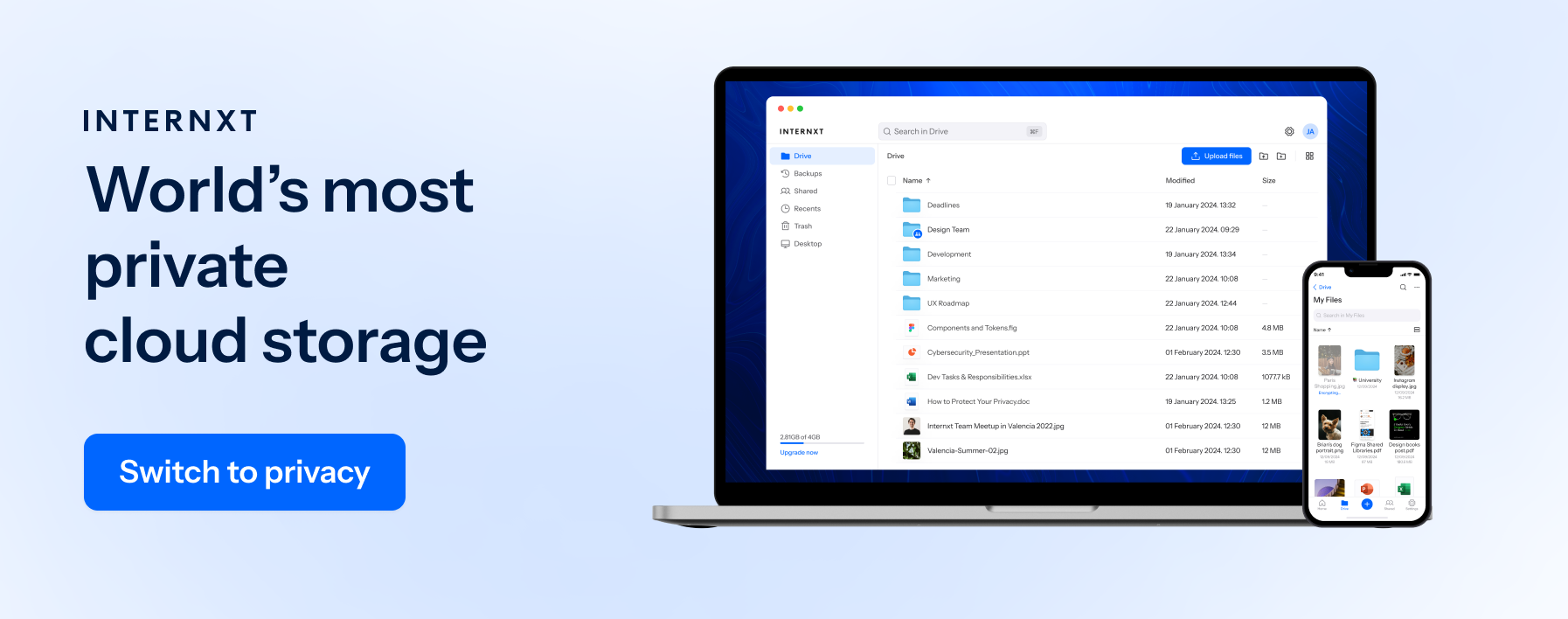
As we have found out, choosing the proper encrypted cloud storage requires the following features:
- Open source
- Security audited
- Zero-knowledge encryption (included for free)
- End-to-end encryption