
10 Best Photo Sharing Apps (2026): Security, Privacy & Features Compared

Since the popularity of social media, photos have become an essential part of our lives. We can now effortlessly share our precious moments with the world in a few simple clicks, thanks to the power of photo sharing apps.
With numerous options to send a large amount of photos, it's crucial to find either an app or photo sharing website that suits your needs; that's why we created this list for people who are looking to:
- Create a portfolio to showcase their professional photos
- Grow their social media presence
- Securely share photos with others
From social sharing to private storage, different photo apps serve different needs. This comparison covers 10 options, including secure cloud storage that prioritize encryption and privacy, so you can make an informed choice.
Quick Comparison: 10 Best Photo Sharing Apps
| App | Free Storage | Max Storage | Starting Paid Plan | Encryption | Best For |
|---|---|---|---|---|---|
| Internxt | 1GB | 5TB | €3.49/month | Zero-knowledge (AES-256) | Privacy & security |
| Adobe Creative Cloud | None | 10TB | $67.57/month | Standard encryption | Professional photographers |
| Google Photos | 15GB | 2TB | $1.99/month | Standard encryption | Android users, collaboration |
| iCloud Drive | 5GB | 2TB | $0.99/month | End-to-end encryption | Apple ecosystem |
| OneDrive | 5GB | 6TB | €1.99/month | Standard encryption | Microsoft 365 users |
| Dropbox | 2GB | 3TB | €11.99/month | Standard encryption | Cross-platform syncing |
| Amazon Photos | 5GB (Unlimited for Prime) | 1TB | $1.49/month | Standard encryption | Amazon Prime members |
| SmugMug | None (14-day trial) | Unlimited | $16/month | Standard encryption | Professional portfolios |
| Flickr | 1,000 photos | Unlimited | $8.25/month | Standard encryption | Photography community |
| Unlimited | Unlimited | Free (€9.99 ad-free) | Standard encryption | Social sharing |
Security & Privacy: Photo Sharing App Comparison
Here's the thing about photo app security: Google Photos and Internxt both use "encryption," but the difference in who can access your photos is massive.
One provider holds your encryption keys (and can technically view your files), the other encrypts everything on your device before upload (making it impossible for them to access anything).
If you're storing vacation photos, this might not matter. If you're storing medical records or legal documents, it absolutely does.
Which photo sharing apps are most secure?
Every app on this list uses encryption—but that doesn't mean your photos are equally protected. The real question isn't "is it encrypted?" (they all are), it's "who holds the keys?"
| App | Encryption Type | Provider Can Access Photos? | Security Certifications | Best For Privacy? |
|---|---|---|---|---|
| Internxt | Zero-knowledge (AES-256, client-side) | No | ISO 27001:2022, HIPAA, Securitum audit | ✅ Highest privacy |
| iCloud Drive | End-to-end (for some data types) | No (for E2E enabled data) | ISO 27001, SOC 2 | ✅ High privacy (Apple users) |
| Google Photos | Standard (AES-256, server-side) | Technically yes | ISO 27001, SOC 2 | ⚠️ Standard privacy |
| Dropbox | Standard (AES-256, server-side) | Technically yes | ISO 27001, SOC 2 | ⚠️ Standard privacy |
| OneDrive | Standard (AES-256, server-side) | Technically yes | ISO 27001, SOC 2 | ⚠️ Standard privacy |
| Adobe Creative Cloud | Standard (AES-256, server-side) | Technically yes | ISO 27001 | ⚠️ Standard privacy |
| Amazon Photos | Standard (AES-256, server-side) | Technically yes | SOC 2 | ⚠️ Standard privacy |
| SmugMug | Standard (HTTPS/TLS) | Technically yes | Not disclosed | ⚠️ Standard privacy |
| Flickr | Standard (HTTPS/TLS) | Technically yes | Not disclosed | ⚠️ Standard privacy |
| Standard (server-side) | Yes (stated in TOS) | Not disclosed | ❌ Limited privacy |
Understanding encryption types
Zero-knowledge encryption (Internxt):
- Files encrypted on your device before upload
- You hold the encryption keys—provider never has access
- Provider cannot decrypt your files, even if legally compelled
- Trade-off: Limits server-side features like web preview, facial recognition
- Best for: Sharing photos online privately, or other sensitive documents (medical, legal, confidential)
End-to-end encryption (iCloud - selective):
- Similar to zero-knowledge for supported data types
- Apple offers E2E for some iCloud data, but not all photos by default
- Requires Advanced Data Protection enabled
- Best for: Apple users who enable Advanced Data Protection
Standard encryption (most apps):
- Files encrypted on provider's servers using AES-256
- Provider holds encryption keys and can technically access files
- Allows convenient features: web editing, AI organization, facial recognition
- Providers state they don't access files except for legal compliance or terms violations
- Best for: General photo sharing where convenience outweighs maximum privacy
When is standard encryption sufficient?
For most people sharing vacation photos or everyday family moments, standard encryption from Google, Microsoft, or Dropbox works perfectly fine.
These companies use AES-256 encryption, undergo regular third-party audits (ISO 27001, SOC 2), and have entire security teams monitoring for breaches. Your photos are protected from hackers breaking into servers.
The trade-off? Their architecture means they could access your photos if legally compelled or for terms of service enforcement. For casual photo sharing, that's typically an acceptable trade-off for the convenience features you get (facial recognition, web editing, AI organization).
When should you choose zero-knowledge encryption?
If you're storing medical records, legal case files, proprietary business images, or anything you never want anyone else accessing (even the provider), zero-knowledge encryption like Internxt or end-to-end encryption like iCloud with Advanced Data Protection is the way to go. As verified in Internxt's 2024 Securitum security audit, zero-knowledge architecture makes it technically impossible for the provider to access your files—even if they wanted to.
Privacy policy considerations
Beyond encryption, here's what you should know about how these apps actually handle your data:
Google Photos uses your photo data for features like facial recognition and search, and may use metadata for advertising.
Instagram states in their terms that they retain certain rights to content you share. Dropbox can access files for abuse prevention and legal compliance.
iCloud has privacy-focused policies but can still access files not covered by Advanced Data Protection.
Internxt's zero-knowledge architecture makes it technically impossible for them to access files—their privacy policy reflects this limitation.
Best Photo Sharing Apps by Use Case
Not sure which app fits your needs? Quick navigation:
- Privacy & Security → Internxt
- Families & Groups → Google Photos, iCloud Drive
- Professional Photographers → SmugMug, Adobe Creative Cloud, Flickr
- Social Sharing → Instagram
- Free Storage → Google Photos, Flickr
- Cross-Platform (iPhone & Android) → Google Photos, Dropbox, Internxt
10 Best Photo Sharing Apps You Need to Try
The following list contains photo sharing apps designed to make your photos the star of the show so you can proudly showcase them to the world.
To help you decide the right app for you, the following list takes a look at the features and pricing of the best apps to share your photos, so you can make an informed decision on which is the best photo sharing platform for you.
If you're interested in learning more about the best photo sharing sites and apps, keep scrolling!
Internxt
It might be cheeky to put us first, but Internxt outshines other photo sharing apps such as Google Drive or Photos with its commitment to providing a service focused on complete privacy and security.
Internxt is the ideal solution if you want your files to be encrypted and secure from hackers, as Internxt takes measures to protect your data and privacy. If you wish to share photos with someone, Internxt provides a secure and encrypted link to access the files securely and privately.
Furthermore, you can enjoy taking and sharing your memories straight from your smartphone, and they will be automatically backed up and secured in the cloud. Meaning you will have access to your files even if your device is lost, stolen, or broken.
For more information on how Internxt can offer the best and secure platform for your photos, find more information from our cloud storage for photos page.
Internxt Pricing
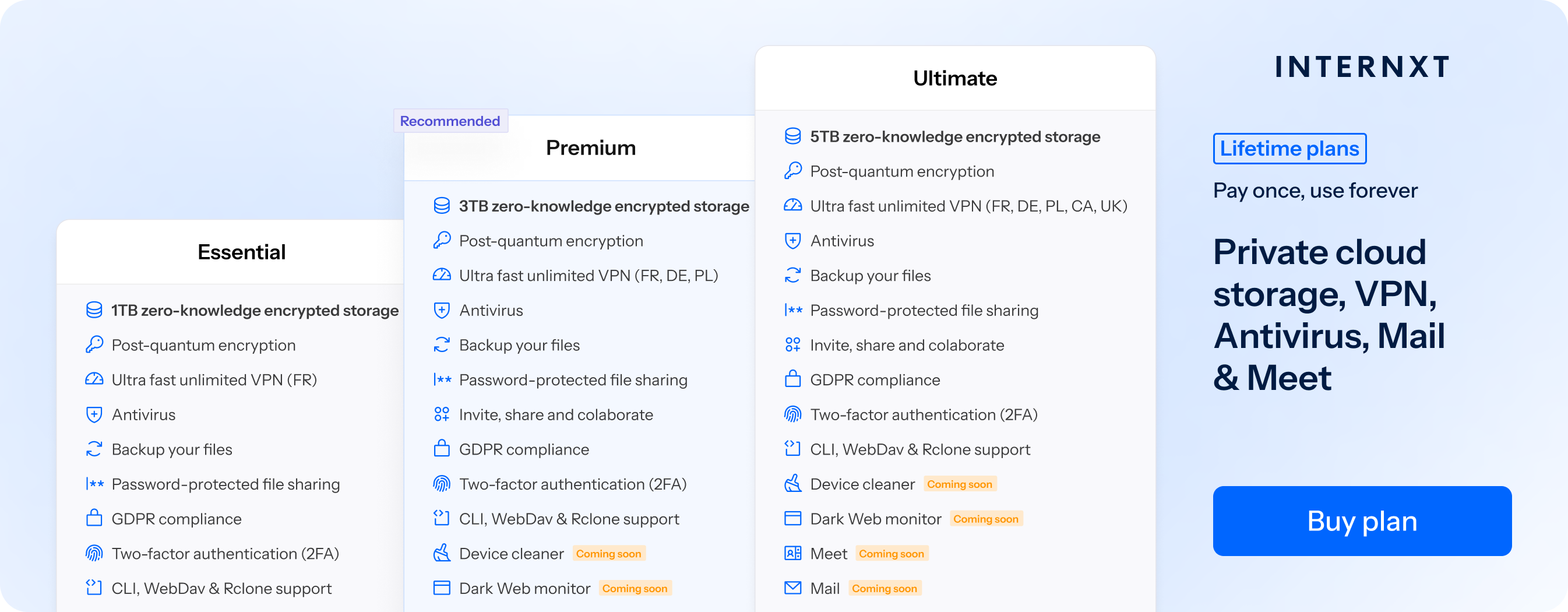
Internxt has flexible subscription and lifetime storage plans available. With lifetime plans, you can stack your storage to get as much storage as you need. All paid plans include Internxt VPN, and Antivirus included, with Meet and Mail available later this year for Ultimate plans.
Prices start at just €3 per month, and you can choose from any of these plans:
Annual plans
Essential, €9.99 per month (billed annually)
Includes:
- 1TB zero-knowledge encrypted storage
- Ultra-fast unlimited VPN for 1 location
- Antivirus
- Backups
- Premium
Premium, €19.99 per month (billed annually)
Includes:
- 3TB zero-knowledge encrypted storage
- Ultra-fast unlimited VPN for 3 locations
- Antivirus
- Backups
- Cleaner
Ultimate, €29.99 per month (billed annually)
Includes:
- 5TB zero-knowledge encrypted storage
- Ultra-fast unlimited VPN for 5 locations
- Antivirus
- Backups
- Meet
- File versioning and Mail (coming soon)
Lifetime plans:
- Essential: 1TB: €180
- Premium: 3TB: €380
- Ultimate: 5TB: €580
Adobe Creative Cloud
Adobe creative cloud is consider the best photo sharing platform for professional photographers or serious photography hobbyists, as they offer up to 10TB of storage. You will have to pay for the service to gain the full benefits of Adobe, however, as no free plan is available.
Choosing Adobe as your photo sharing website provider means you can also take advantage of their other apps, such as Lightroom, Photoshop, and Adobe Portfolio, to share your work, build a website, and get feedback from Adobe’s vast community of photographers.
These are great features to have if you are interested in a photosharing website that can showcase your work professionally to other photography enthusiasts.
Still, photo sharing is not the platform's main focus, but it may be the best photo sharing platform if you are interested in photo editing. If not you may wish to choose from other photo sharing sites from this list, or apps, if you want a more social media-like aspect to your photo sharing needs.
Adobe Creative Cloud Pricing
- 30-day free trial
- All Creative Cloud apps for $67,57, billed monthly
- Costs for individual apps differ
Google Photos
Google Photos is one of the most popular photo sharing website and app that starts with 15GB of free storage and a maximum plan of 2TB, including other benefits such as a VPN, photo editing features, and more.
Google Photos makes sharing your photos easy by integrating iOS, Android, and web platforms. Your photo syncs to your account automatically, and you can invite users to collaborate in shared albums, perfect for working on projects or sharing your photos with family members.
Another attractive feature Google offers is facial recognition. If it detects a specific person’s face from your contacts, it will offer you to share this image with that user.
It is important to note, however, that there have been instances where Google collects your data, and, in theory, photos stored in Google's servers may be viewed by Google.
If maintaining privacy is a significant aspect for you regarding photo sharing applications, you might want to consider opting for an alternative to Google Photos.
Google Photos Monthly Pricing
- 15GB free plan
- 100GB Basic plan, $1.99
- 200GB Standard plan, $2.99
- 2TB, Premium plan, $9.99
iCloud Drive
The iCloud drive is Apple’s addition to the photo sharing apps space. It is the default cloud storage for iOS and Mac, meaning photos taken with your Apple device are synchronized automatically across all Apple devices.
It is also a secure photo sharing app as it utilizes end-to-end encryption of its files, so only you and those you share your files with can view and access them, making iCloud one of the most secure photo sharing apps available.
Apple makes sharing photos with friends and family easy; you need to tag the person in the picture by adding them to your contacts, allowing them to add photos to your iCloud drive, leaving you with photo albums stored full of happy memories.
If you are not an Apple user, however, these functionalities are limited, although there is a basic Android and web interface, iCloud drive was designed by Apple, for Apple. The limited 5GB of storage may also not be enough and can run out quickly, meaning you will have to choose an iCloud storage plan that is right for you.
iCloud Storage Pricing
- 5GB Free plan
- 50GB: $0.99
- 200GB: $2.99
- 2TB: $9.99
OneDrive
Microsoft OneDrive is similar to iCloud Drive in the sense that it is primarily used as a file-storing service, but OneDrive does share some features with other photo sharing apps that you can use.
Having a Microsoft account grants you 5GB of free storage shared across attachments in Outlook and Microsoft Office, so this can run out quickly if you are a frequent user of these services.
Some valuable photo sharing features Microsoft offers include the memories feature, allowing you to view past albums, look back on special events, and share them with others.
Photos are backed up and synched automatically with OneDrive, and you can enable restrictions to your folder to manage who can edit, upload, and contribute to your files.
Restrictions are also an important feature to note with OneDrive, as the encryption method that controls who can view your files is powered by Microsoft. This could be problematic, as Microsoft could theoretically view your private files.
Therefore, Microsoft utilizes powerful encryption methods for its service, but it can also decrypt the data and view its users' files, limiting your online privacy.
OneDrive Monthly Pricing
- 5GB - Free
- 100GB - €1.99/month
- 1TB with Microsoft 365 - €6.99/month or €69.99/year
- 6TB with Microsoft 365 - €9.99/month or €99.99/year
Dropbox
Dropbox is a popular cloud storage service that can also be utilized as a photo sharing app. It uses two-factor authentication to keep your files secure. It is well known for its functionality across different platforms, from iOS to Linux, which automatically syncs and backs up your files.
A useful feature of Dropbox is its space-saving smart sync option. This will take your files and lower the resolution to save you storage space, which will come in handy, as Dropbox only offers 2GB of free storage, so you will have to upgrade to its more expensive but generous storage plans.
Another limitation of Dropbox is that it does not currently have the auto-tagging or facial recognition offered by other photo sharing sites or apps such as Google Photos. If you enjoy the convenience of this feature and want cheaper storage options, then there are alternatives to Dropbox to consider.
Dropbox Monthly Pricing:
- 2GB - Free
- 1TB - €11.99/month
- 3TB - €22/month
Amazon Photos
Next up we have the humble addition of Amazon Photos. This is one of the photo sharing apps that have more basic features, so it is a suitable option for those looking to simply take and store photos.
What’s more, if you are a member of Amazon Prime, you can use Amazon Photos free of charge; if not, you get 5GB of free storage and the option to upgrade to paid plans.
Included in the Amazon Photos service is its Family Vault service. With this, you can share photos with up to 5 family members and friends to share memories of special events or occasions.
If you are a Prime member, you can take advantage of Amazon’s photo sharing app at no extra cost, and it would be well worth it, but if you want additional features you may wish to go with another option.
Amazon Photo Monthly Pricing
- 5GB Free plan
- 100GB: $1.49
- 1TB: $7.99
- Unlimited storage and 5GB of video storage: free for Prime members
SmugMug
If you are serious about sharing your photos with others, you may want to try SmugMug. SmugMug is a photo-sharing website that allows you to share your photos with the world and sell them.
SmugMug offers you unlimited storage of your photos in full resolution, which you can simply store for yourself or create professional and easy-to-share galleries to start your photography business and showcase your work to potential clients.
There is no free plan with SmugMug, but it may be the best photo sharing platform to build your photography portfolio to share or sell your work, as opposed to your more conventional photo sharing app.
SmugMug Pricing Plan
- Free 14-day trial
- Power: Unlimited storage, $16.00
- Portfolio: Unlimited storage, $34.00
- Pro: Unlimited storage, $54.00
If you are interested in selling your photos, you can view the full features of SmugMugs services on their website.
Flickr
With over 60 million users, Flickr is another photo sharing website where photographers can look for inspiration, connect and engage with like-minded individuals and share their photos. It has a generous free plan for users, who can upload up to 1000GB of high-resolution photos for free.
If you have a particular area of interest, you can join Flickr's communities and groups, participate in challenges and discussions with other members, or explore popular genres of photography.
Flicker integrates well with other popular photosharing sites, allowing you to share your images via Facebook, Twitter, Tumblr, Pinterest, and email. You can also control the privacy settings of your photos to ensure that you have control of the privacy of your social media presence.
Flickr is still a popular photo sharing website and app, especially among photographers, because of its community, simple UI, and easy organization of files. Although many hobbyists in photography may consider it as the best photo sharing platform, it still faces stiff competition from our next and possibly most recognizable entry.
Flickr Monthly Pricing
- 1000GB Free plan
- Flickr Pro: Unlimited storage, $8.25, plus tax/Monthly
- Flickr Pro: Unlimited storage, $71.99, plus tax/Annually
- Flickr Pro: Unlimited storage, $132.99, plus tax/2 year plan
Last but certainly not least, we have Instagram. Possibly the most well-known photo sharing apps with over 1 billion users as of 2023. Instagram is the go-to choice for general users, hobbyists, professional photographers, and celebrities.
If you are interested in reaching a wide audience or sharing your photos or scheduling Instagram reels with friends and family, the social media aspect of likes and comments will help you achieve your goal of sharing your photos with the world.
Instagram's privacy setting allows you to control who can interact with and view your photos, which is recommended for controlling who can see, view and interact with the information you share online.
It is also important to familiarize yourself with Instagram's privacy policy, as Instagram retain certain rights to the photos you share, leading to controversies surrounding their privacy and data handling policies.
Despite its popularity, Instagram does not offer the safety and privacy of other, more secure photo apps that keep your photos and other files private and secure so if you lose your account. It is possible that if you lose access to your Instagram account, you also lose your photos.
Instagram Pricing
- Instagram has the option to subscribe to your favorite creators at a cost they choose if you are one of their loyal followers.
- As Instagram is part of Meta, the service has introduced a new subscription tier that allows you to use Meta for free, and won't sell your information for ads.
- In Europe a Meta subscription will cost: €9.99 per month on the web or €12.99 on iOS or Android for ad free browsing on the Facebook and Instagram.
Frequently Asked Questions About Photo Sharing Apps
Which is the best photo sharing app?
The best app depends on your priority: Internxt for maximum privacy (zero-knowledge encryption), Google Photos or iCloud for families (collaborative albums), SmugMug or Adobe for professional photographers (selling/editing tools), and Instagram for social reach. No single app is universally best—choose based on whether you prioritize privacy, features, cost, or social engagement.
What is the best free photo sharing site?
Google Photos offers the most generous free tier with 15GB storage (shared with Gmail and Drive) plus automatic backup, facial recognition, and collaborative albums. Flickr provides 1,000 high-resolution photos free with community access, while Internxt offers 1GB with zero-knowledge encryption for privacy-focused users.
Which photo sharing app is most secure and private?
Internxt provides the highest privacy with zero-knowledge encryption (verified by ISO 27001:2022, HIPAA compliance, and Securitum audit) where photos are encrypted on your device before upload, making it technically impossible for the provider to access them. iCloud with Advanced Data Protection enabled offers similar end-to-end encryption for Apple users, while all other major apps (Google Photos, Dropbox, OneDrive) use standard server-side encryption where providers hold keys and can technically access photos.
What is the best photo sharing app for families?
Google Photos excels for families with mixed devices (iPhone and Android), offering shared albums, facial recognition, 15GB free storage, and seamless cross-platform syncing. iCloud Drive is ideal for all-Apple families with Family Sharing integration for up to 6 people, automatic syncing across Apple devices, and optional end-to-end encryption with Advanced Data Protection.
Can I share photos between iPhone and Android?
Yes, Google Photos, Dropbox, Internxt, and Amazon Photos all work seamlessly across iPhone and Android with full feature parity and automatic syncing. iCloud has limited cross-platform support—Android users can view shared albums through web links but cannot easily contribute photos.
What is the best photo sharing app for photographers?
For selling work and client galleries, SmugMug ($16-$54/month) offers e-commerce tools, custom domains, and unlimited storage, while Adobe Creative Cloud ($67.57/month) provides 10TB storage plus Lightroom and Photoshop integration for seamless editing workflow. Flickr ($8.25/month) offers unlimited storage with access to a 60-million-user photography community for feedback and portfolio showcase.
How do I choose a photo sharing app with privacy features?
Prioritize apps with zero-knowledge encryption (Internxt) or end-to-end encryption (iCloud with Advanced Data Protection) where the provider cannot access your photos, and look for security certifications like ISO 27001, HIPAA compliance, or independent security audits. Review each app's privacy policy to understand data usage—apps with standard encryption (Google Photos, Dropbox, OneDrive) can technically access photos and may use data for features or advertising.
Which photo sharing apps work best for groups and events?
Google Photos excels for group events with collaborative shared albums where anyone can add photos, automatic grouping by date and location, and cross-platform support (iPhone and Android) with 15GB free storage. Dropbox works well for organized group projects with shared folders and granular permissions, while iCloud is ideal for all-Apple friend groups with seamless shared album features.
Which Is the Best Photo Sharing App?
Now that you are aware of the most popular photo sharing apps and photo sharing sites out there and the variety of services they offer, your decision should be based on which of these apps meet your requirements.
Many photo-sharing apps allow you to send private photos straight from your smartphone, but sometimes, there's a joy in flipping through a real photo album.
For such moments, you can use photo book creators to make your memories truly unforgettable.
If you value privacy and want your photos or any of your other files to be kept under lock and key through secure encryption methods, then consider Internxt as your next cloud storage and photo sharing app that puts the privacy of you, the user, back in your hands.