
Is Google Drive Safe for Your Private Files?

Google Drive is the most popular cloud storage solution in the market with over 2 billion users worldwide.
Despite this, due to recent concerns and more interest in online privacy, more people are asking is Google Drive secure for their files, photos, and videos.
Of course, Google Drive and Google One offer advanced security and privacy features, but it falls short in privacy.
In this article, we will examine:
- Is Google Drive secure?
- Safety vs security vs privacy
- Privacy problems with Google Drive
- Private alternative to Google Drive
- How to migrate files from Google Drive
We will also outline what makes Internxt the best cloud storage and privacy suite to protect your files, data, and online presence with Internxt Drive, Meet, Mail, and more.
Table of contents
- The difference between safety, security, and privacy
- Is Google Drive safe?
- Privacy concerns with Google Drive
- Google Drive vs Internxt
- How to migrate your files from Google to Internxt Drive
- Related articles
- Frequently asked questions
The difference between safety, security, and privacy
Google Drive is the biggest cloud storage provider on the market, so the safety and security of your files are almost guaranteed, provided you apply the right settings.
The privacy of your cloud storage, however, can’t be guaranteed with Google Drive.
Before we found out why, let’s make clear the difference between safety, security, and privacy in the context of cloud storage.
Is Google Drive safe?
Cloud storage safety is about protecting your files and your use of the service from accidental data loss, damage, and protection against cyberattacks such as phishing or spyware that could compromise your accounts.
For Google Drive and other popular cloud services, such as Dropbox, the safety of your files includes measures to:
- Preventing accidental deletion of files via cloud storage backups
- Recovering data after crashes or failures
- Protecting users from scams and malicious files
- Security and redundancy methods for data centers

Examples:
- Being able to restore deleted files from a recycle bin
- Automatic backups
- File version history
Is Google Drive secure?
Cloud security protects your account and files from hackers, cybercriminal groups, or unauthorized access.
Cloud storage security includes:
- Password protection
- Two-factor authentication
- Encryption
- Monitoring suspicious activity of your accounts
Examples:
- Password protection ensures only authorized users can access your cloud account
- Two-factor authentication adds an extra verification step to prevent unauthorized access
- Encryption protects your files by converting them into secure, unreadable formats during storage and transmission
- Monitoring suspicious activity detects unusual account behavior to prevent potential security breaches
Google Drive privacy
Privacy in cloud storage is about who has access to your data and how the company keeps it private, or, in the case of Google Drive, how they benefit from it.
In cloud storage, privacy includes:
- Whether employees can view your files
- Whether your data is scanned for ads
- Whether files are shared with third parties
- How long is your data kept
- Whether you can delete your data permanently
- Whether your activity is tracked
Examples:
- Choosing who can access your folders
- Choosing cloud storage with zero-knowledge encryption
- Controlling public sharing links
Is Google Drive safe for your files?
Yes, Google Drive is safe.
Google Drive encrypted folders use the industry-standard AES-256 encryption and the following measures to keep your Drive account secure:
- Encryption for files both in transit and at rest (AES-256)
- Two-factor authentication
- Continuous monitoring for suspicious activity
- Password-protected files
- Advanced permissions
- Account recovery and backup codes
However, safety ≠ privacy.
Google Drive and, by extension, its other products, such as Google Photos, have privacy concerns you should be aware of if you’re choosing to store your files or if you want to migrate your data from Google Drive.
If you store a lot of documents or spreadsheets with Google but want more privacy, then we offer the best alternative to Google Sheets and best alternative to Google Docs to help you move away from Google's products and achieve more privacy.
If you already have a Google Drive account and store a lot of files, then the best option to ensure the privacy of your files is to encrypt them in a secure vault with tools like Cryptomator.
If you want zero-knowledge encryption as standard for your cloud storage, then the best Cryptomator alternative is Internxt Drive, which includes post-quantum and zero-knowledge encryption for all plans.
Below you will learn everything you need to know about is Google Drive safe for you if you value the privacy of your files.
Privacy concerns with Google Drive
Google collects your data
Here is a list of the data Google collects when you sign up for its accounts. Although they offer a generous amount of free cloud storage, which can be appealing, you pay for this data.
- Unique identifiers
- Browser type and settings
- Device type and settings
- Operating system
- Mobile network information, including the telecom company and phone number
- Application version number
- IP geographic location
- Regional geographic location
- Preferred language information
- Search terms on Google
- Videos you watch
- Views and interactions with content and ads
- Voice and audio information when you use audio features
- Purchase activity
- People you communicate with or share content with
- Activity on third-party sites or apps that use Google Services
- Chrome browsing history when synced with your Google Account
- Page-view data
- Website analytics: Sessions by page, users by location, pageviews by device, average time on page by channel, bounce rate by channel
- Campaign data
- Browser properties
- Visitor IDs
Google holding this data has several risks for your online privacy, including:
- Viewing your activity across devices and websites
- Makes targeted scams and phishing more likely
- Showing where you live, work, or travel
- Revealing personal interests, worries, and intentions
- Targeted advertising and manipulation
- Loss of anonymity
To learn more about the information Google collects, visit our website below.
What can I do? Fortunately, if you have a Google account, there are measures you can take to protect your privacy, including monitoring app permissions, managing activity controls, and turning off personalized ads.
To monitor your Google account activity, visit our blog article for all the information you need.
Google can view your files
When considering is Google Drive secure for your files, it uses end-to-end AES-256 encryption, so it’s secure, safe, and protects your files from hackers... but not from Google.
Google does not use zero-knowledge encryption for your files, so the encryption process happens on Google’s servers, which means Google controls the encryption keys, which has the following disadvantages:
- Google employees can access certain files for legal, security, or service-related reasons
- Your data may be reviewed if required by law enforcement or court orders
- If Google’s systems are ever compromised, encrypted data could be more vulnerable
- You must trust Google to handle your private files responsibly
What can I do? There are third-party tools that exist that encrypt your files before uploading them to Google. For a simpler solution, use cloud storage with zero-knowledge encryption, like Internxt Drive, that encrypts files directly on your device, ensuring nobody but you can access them.
Lack of transparency
Google keeps the code it uses to build its software hidden, known as closed-source or proprietary software.
As a result, it’s impossible to know how Google handles your data, how it uses it, or what backdoors there are to give access to your sensitive information.
It also prevents security experts from reviewing the code, so any security vulnerabilities or outdated software could be a risk to the platform.
Instead, users must rely entirely on Google’s claims about privacy and security, which have the following disadvantages:
- Not you nor anyone else can verify how your data is processed or stored
- You cannot check whether hidden tracking or data collection exists
- You must trust Google to follow its privacy policies
- Changes to data handling can happen without user control
- Independent audits are limited and not fully transparent
What can I do? Choose open source alternatives and platforms that are independently audited. Internxt is both; you can view our source code from our GitHub, and the summary of our latest security audit report below.
Activity monitoring
Reviewing Google’s terms and conditions and privacy policy, we found the following relevant extracts, which confirm that Google collects and uses your data to profile and monitor your activity online.
Here is a general summary of Google’s current privacy policy:
- Updates to reflect how services work: You give Google permission to store your content, make it accessible, and show it to others if you choose (like sharing photos). Google might also make minor changes to your content.
- AI Content: Google will not claim ownership of original content generated by their AI-powered services.
- Clarity on abusive activity: Google details how they use automated systems and algorithms to analyse and monitor your content for spam, malware, and illegal content.
- Content sharing: Google can share your content in limited ways: with other users and companies helping them manage the services. Including personalization (ads based on your interests).
Other excerpts from its policy include data collected such as:
“The basic stuff like which language you speak, to more complex things like which ads you’ll find most useful, the people who matter most to you online, or which YouTube videos you might like.”
For Google Drive, it also collects information on
“[...]the content you create, upload, or receive from others when using our services. This includes things like email you write and receive, photos and videos you save, docs and spreadsheets you create, and comments you make on YouTube videos.”
Google Drive also tracks
"Activity information from your use of Google Drive, such as the time, date, and duration of your activity, as well as search queries."
What can I do? You can monitor and edit your privacy controls via your settings, and withdraw from the contract within 14 days without giving any reason via email, (account-withdrawal@google.com) phone, or by letter from its Privacy & Terms page.
Compliance fines
The total cost of fines Google has paid for multiple compliance fines regarding mishandled user data is over €100 million.
These cases are due to violations related to:
- Misinformedonsent, data deletion, and data protection
- Difficult for users to refuse tracking cookies,
- Placed cookies without valid permission
- Shared personal information without consent
- Displayed ads in ways that violated privacy rules
- Failed to fully remove information when people asked to be forgotten.
What can I do? Choose European tech companies that comply with the GDPR. Check what data Google has on you and request it be deleted.
For extra security, you can choose companies with multiple compliance standards, such as Internxt, which complies with GDPR, ISO 27001, SOC2, and HIPAA, protecting your files and data no matter the industry.
Internxt vs Drive safety comparison
| Feature | Internxt | Google Drive |
|---|---|---|
| Zero-knowledge encryption | ✔ | ✖ |
| Two-factor authentication | ✔ | ✔ |
| Backup key | ✔ | ✖ |
| Security audits | ✔ | ✔ |
| Data redundancy | ✔ | ✔ |
| Advanced permissions | ✔ | ✔ |
| GDPR | ✔ | US based |
Internxt vs Drive security comparison
| Feature | Internxt | Google Drive |
|---|---|---|
| Encryption | Post-quantum, zero-knowledge | AES-256 |
| Unauthorized login protection | ✔ | ✔ |
| Access controls | ✔ | ✔ |
| Audit logs | ✔ | ✔ |
| Intrusion detection | ✔ | ✔ |
| Antivirus app | ✔ | ✖ |
| Open source | ✔ | ✖ |

Internxt vs Google Drive privacy comparison
| Feature | Internxt | Google Drive |
|---|---|---|
| Files encrypted on your device | ✔ | ✘ |
| You control your data | ✔ | ✘ |
| Data advertising or profiling | ✘ | ✔ |
| Full ownership of your data | ✔ | ✘ |
| Control who sees your files | ✔ | ✘ |
Google Drive vs Internxt
So, is Google Drive secure for your files? Yes.
Is Google Drive safe if you want to store your files in privacy? No.
For that, the best option for secure and private cloud storage is Internxt Drive. With post-quantum and zero-knowledge encryption, Internxt gives you total control of your privacy, ensuring only you can view your files.
With GDPR and other compliance certifications, Internxt is the best cloud storage to keep your files private, but also to keep your online data secure from big tech.
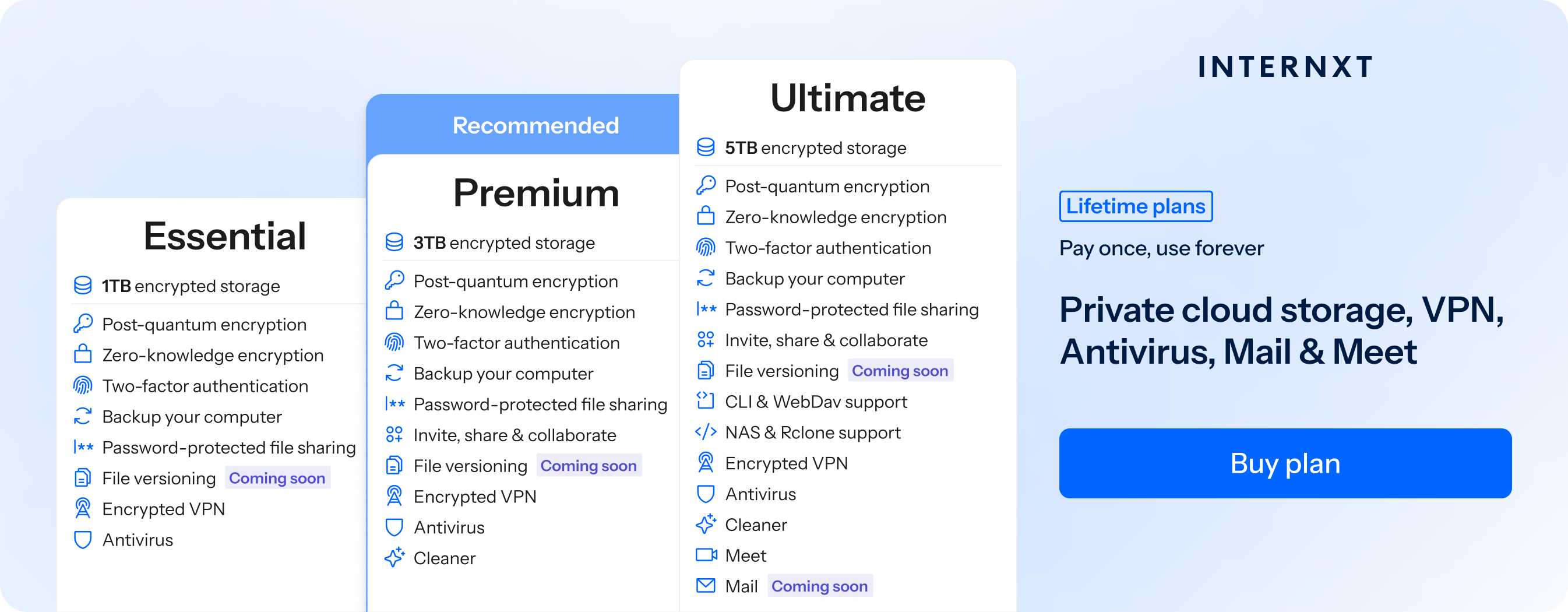
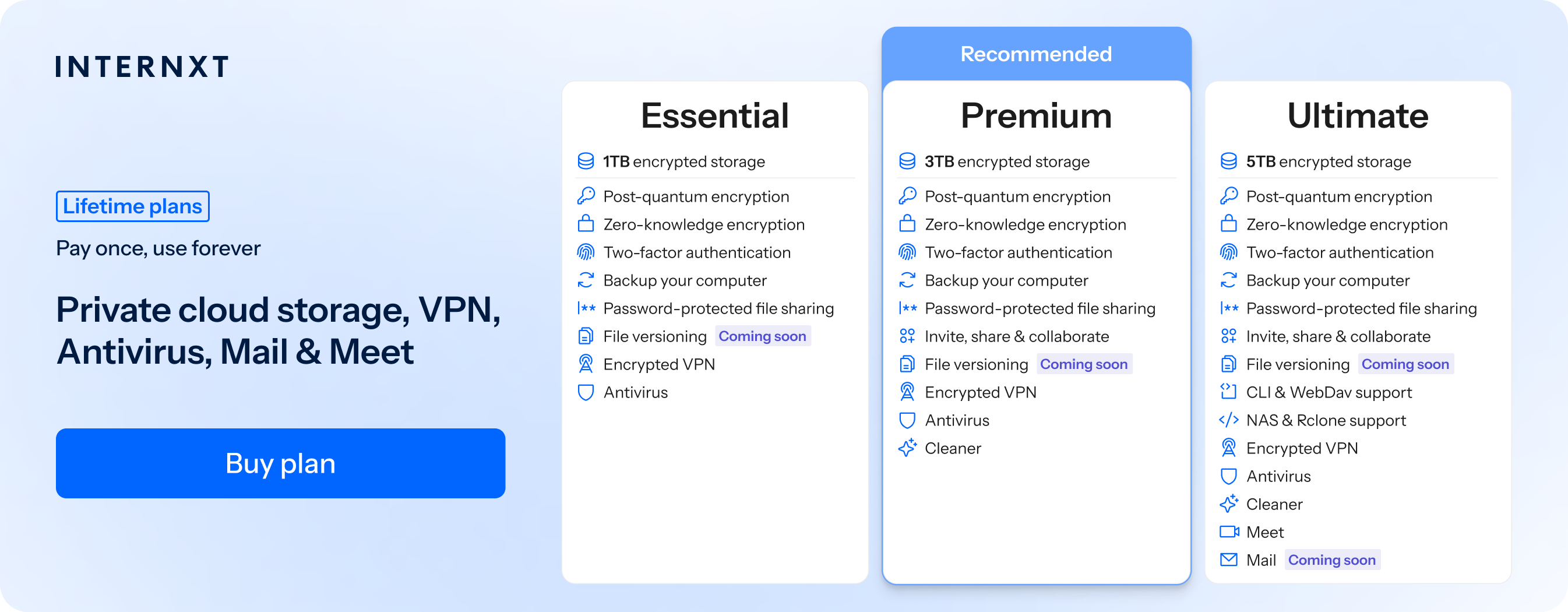
Internxt offers annual and lifetime plans, which now have 85% off on our website, and aside from cloud storage, you also get many features such as video conferencing, VPN, and Antivirus to keep your data, device, and online activities secure and private.
Below are the features of Internxt Drive.
| Plan | Storage | Features | Annual Cost | Lifetime Cost |
|---|---|---|---|---|
| Essential | 1TB |
|
€18 | €285 |
| Premium | 3TB |
|
€36 | €435 |
| Ultimate | 5TB |
|
€54 | €585 |
Choose your perfect plan with Internxt below!
How to migrate your files from Google to Internxt Drive
Once you have your Internxt plan, you can download our apps for Mac, Windows, or Linux, and follow these steps to migrate your files from Google Drive to Internxt.
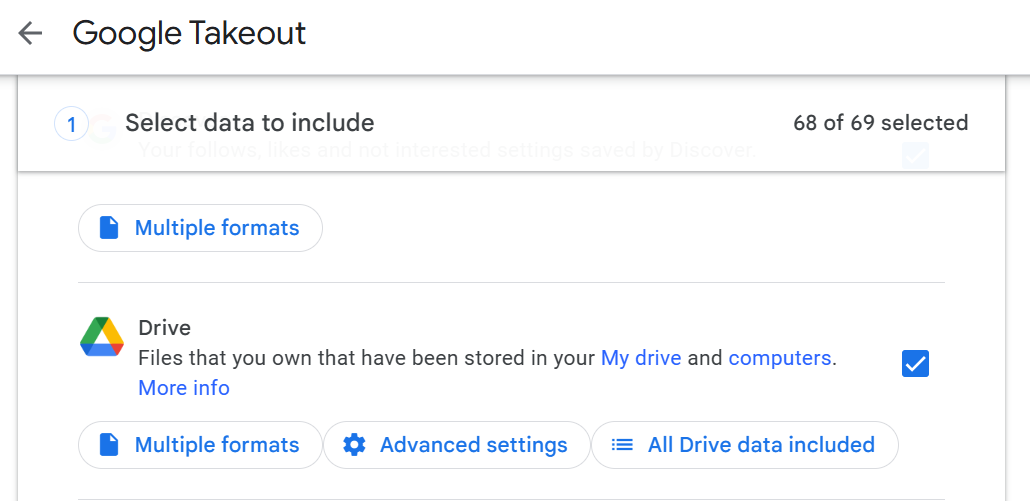
- Visit https://takeout.google.com/ and log in to your account.
- Select the data you would like to include; this can be all your data, Photos, or just Google Drive.
3. Click "Next step" and select file type (zip) and size
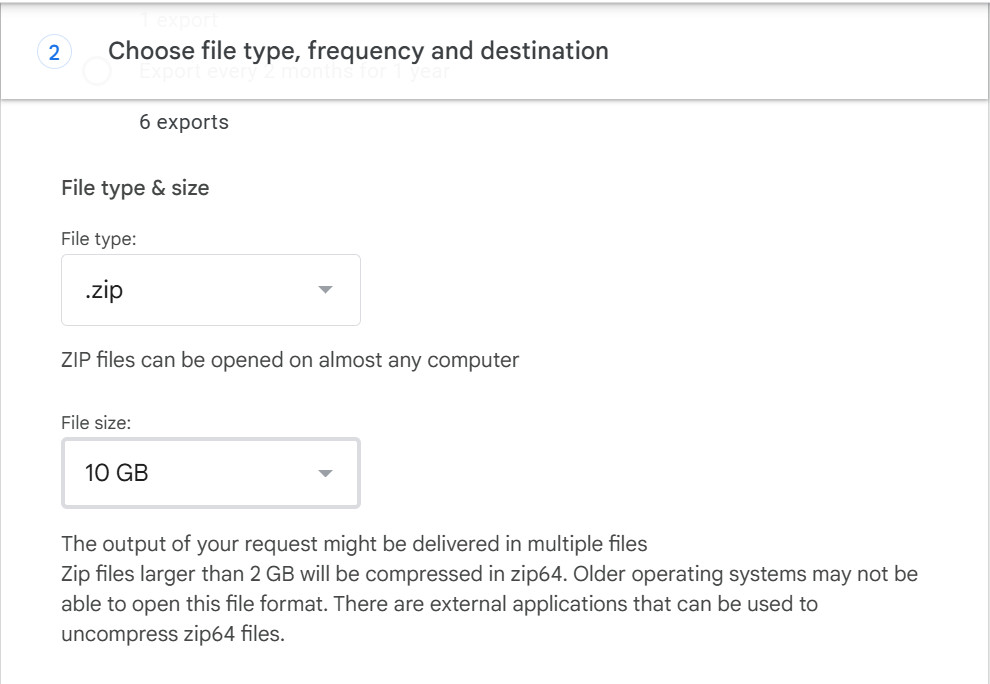
4. Click "Create export" to receive a link to your email. Depending on the size of your files, it may take longer.
Once you have received your email, download the file, and you will have all the files available to upload to Internxt Drive!
Related articles
Frequently access questions
Is Google Drive secure for my files?
Yes. Google Drive uses encryption (AES-256), two-factor authentication, and continuous monitoring to protect your files from hackers and accidental loss.
Is Google Drive private?
No. Google does not use zero-knowledge encryption, which means Google can access your files for legal, security, or service purposes. Your data may also be scanned and used for personalized services or advertising.
Can Google employees see my files?
Yes, Google can access certain files if required by law, security investigations, or to maintain the service.
Does Google track my activity?
Yes. Google collects a wide range of data, including search terms, browsing history, device information, location, and interactions with Google services.
Is Internxt a secure alternative to Google Drive?
Yes. Internxt Drive is the only cloud storage to use zero-knowledge and post-quantum encryption, meaning only you can access your files, and they are designed to protect your privacy fully.
Also of interest to you...