
Xiaomi Cloud Pricing Guide: Mi Cloud Plans, Security & Alternatives

You bought a Xiaomi device because you're smart with your money. Why overpay for Samsung or Apple when you can get flagship specs at half the price? Now you're facing the same question with cloud storage: stick with Mi Cloud at $0.99/month, or is there something better?
Here's the thing nobody tells you. Mi Cloud's pricing looks competitive, but the real question isn't "how much does it cost?", it's "who can access my files, and do I care?"
Most cloud storage comparisons stop at price per gigabyte. This one explains what server-side encryption actually means (spoiler: Xiaomi holds the keys to your files), compares Mi Cloud to secure cloud storage like Internxt and mainstream options like Google Drive, and tells you which one makes sense based on whether you prioritize cheap storage, collaboration features, or actual privacy.
We'll walk through Mi Cloud's pricing, security model, and features. Then show you how it stacks up against alternatives. By the end, you'll know exactly which option fits your needs.
Table of contents
- Xiaomi Cloud Storage: Plans, Pricing, and Features
- Mi Cloud Security & Privacy: What You Need to Know
- Alternatives to Mi Cloud: Privacy-Focused and Mainstream Options
- Pros and Cons of Using Xiaomi Cloud for Storage
- Tips for Maximizing Your Mi Cloud Subscription
- Factors To Consider Before Choosing a Cloud Storage Service
- Is Mi Cloud Right for You?
- Frequently Asked Questions
- Is Xiaomi Cloud Storage Worth the Investment?
Xiaomi Cloud Storage: Plans, Pricing, and Features
Mi Cloud is Xiaomi's cloud storage service built specifically for their device ecosystem. Before deciding if it's worth paying for, you need to understand what you're actually getting, both in terms of features and pricing. Let's break it down.
What Mi Cloud Offers
Mi Cloud storage offers users a safe and secure way to store their data in the cloud, including photos, videos, and documents. This allows users to access their data from anywhere and any time, as long as they have an internet connection.
The basics are what you'd expect: encryption for your data, two-factor authentication for your account, and access through either Xiaomi's built-in apps or a web browser. Nothing groundbreaking, but it works.
Here's what you get with Mi Cloud:
Storage and backup: Your photos, videos, contacts, and messages sync automatically across devices (assuming you turn it on). Change something on your phone? It updates on your tablet. Delete a photo? Gone everywhere.
Sharing: Generate share links for files and folders. Pretty standard. Nothing fancy like Dropbox's collaboration tools, but it gets the job done for sending files to family or friends.
Security: Two-factor authentication is available (and you should absolutely enable it). Mi Cloud uses encryption for data in transit and at rest, though the important detail (who holds the encryption keys) we'll cover in the security section.
Device tracking: The "Find device" feature is legitimately useful if you lose your phone. Works across Xiaomi's ecosystem, which is handy if you're all-in on their hardware.
Bottom line: Mi Cloud does what most cloud storage services do. Backup, sync, share. Nothing revolutionary, but for Xiaomi users, it's convenient and integrated. The question is whether convenience is worth the trade-offs, which we'll get to.
Mi Cloud Pricing Plans
Here's where things get messy. Mi Cloud pricing varies wildly depending on your region, and Xiaomi doesn't make it easy to find official pricing pages.
What we can tell you: there's a free 5GB tier, then paid plans for 50GB, 200GB, and potentially 1TB (some regions may differ). The prices you'll actually pay? That depends on where you are.
| Plan | Storage | Reported Annual Pricing | Notes |
|---|---|---|---|
| Free | 5GB | $0 | Everyone gets this |
| Premium | 50GB | $12-20/year | ~$1-1.67/month equivalent |
| Mega | 200GB | $40-60/year | ~$3.33-5/month equivalent |
| Ultra | 1TB | $120+/year | ~$10+/month equivalent |
Mi Cloud pricing is billed annually and varies by region. Some sources report monthly options, but annual billing appears standard. Prices shown reflect the range found across different markets.
Why the confusion? Xiaomi bills in Hong Kong Dollars, offers different plans in different regions, and doesn't publish a global pricing page. Some regions get monthly plans, others annual only. Exchange rates fluctuate. It's a mess.
Mi Cloud is generally cheaper than mainstream alternatives. iCloud charges $0.99/month ($11.88/year) for 50GB. Google Drive charges $1.99/month ($23.88/year) for 100GB. Even at the high end of reported pricing, Mi Cloud undercuts both.
The real question isn't whether Mi Cloud is cheap (it is). It's whether cheap is worth it when you factor in who can access your data, regional availability, and the fact that you're locked into annual billing with no clear refund policy. Speaking of data access, let's talk about how Mi Cloud actually protects your files.
Mi Cloud Security & Privacy: What You Need to Know
Cheap cloud storage is great until you realize you don't know who else can access it. Mi Cloud's pricing is competitive, but the security model is what actually matters for your files. Let's break down how Mi Cloud protects your data and what that means in practice.
How Mi Cloud Protects Your Data
Mi Cloud uses AES-256 encryption for files at rest (stored on servers) and standard encryption for files in transit (when uploading or downloading). You can enable two-factor authentication for account security. Xiaomi's privacy policy states they don't access user data without consent. On paper, this sounds secure. And for most everyday uses, it is. The encryption is solid, the infrastructure is professional, and your files aren't sitting around in plain text waiting for hackers.
But the marketing glosses over something critical: encryption method matters less than who holds the keys.
Server-Side vs Zero-Knowledge Encryption
Most cloud storage (Mi Cloud, Google Drive, Dropbox, OneDrive) uses server-side encryption. You upload a file, the provider encrypts it on their servers, they store both the encrypted file AND the encryption keys, and when you request the file, they decrypt it using their keys and send it to you.
This protects against hackers breaking into servers. But the provider can still access your files because they hold the keys. Government requests, court orders, internal policies can all compel them to decrypt your files.
Zero-knowledge encryption works differently. Files are encrypted on your device BEFORE upload. Only you hold the encryption keys, not the provider. The provider stores encrypted files but cannot decrypt them. Even if legally compelled, breached, or hacked, your files remain encrypted because only you have the keys.
The provider can't access your files even if they wanted to. They don't have your keys, so they can't decrypt anything. Simple as that.
Who Can Access Your Mi Cloud Files?
| Feature | Mi Cloud | Internxt | Google Drive | Dropbox |
|---|---|---|---|---|
| Encryption at rest | AES-256 | AES-256 | AES-256 | AES-256 |
| Encryption in transit | TLS | TLS 1.3 | TLS | TLS |
| Encryption model | Server-side | Zero-knowledge (client-side) | Server-side | Server-side |
| Provider holds keys? | Yes | No | Yes | Yes |
| Provider can access files? | Yes (technically) | No (impossible) | Yes (technically) | Yes (technically) |
| Independent security audit | Not publicly disclosed | Securitum (2025) | Internal | Internal |
| ISO 27001 certified | Unknown | Yes (2022) | Yes | Yes |
| HIPAA compliant | No | Yes | Workspace only | Business only |
| Open-source code | No | Yes (GitHub) | No | No |
With server-side encryption (Mi Cloud, Google Drive, Dropbox), the company can access your files if legally required or if their encryption keys are breached. With zero-knowledge encryption (Internxt), files are encrypted on your device before upload.
Even if the provider is hacked, breached, or legally compelled, your files remain encrypted because only you hold the keys. For most users storing everyday photos and documents, server-side encryption is adequate.
For sensitive data (medical records, legal documents, financial information), zero-knowledge encryption provides an additional privacy layer where the provider cannot access your files.
Privacy Considerations for Mi Cloud Users
Xiaomi has faced scrutiny over data collection practices. In 2020, security researchers discovered Xiaomi browsers collecting extensive browsing data, including URLs and search queries, even in incognito mode.
Mi Cloud's privacy policy allows data collection for service improvement and personalization. For Western users concerned about Chinese tech companies' data handling, this matters.
Not because Mi Cloud is necessarily less secure than Google or Dropbox (they all use server-side encryption), but because trust varies based on jurisdiction and corporate transparency.
Government data requests: Providers with server-side encryption can (and legally must) provide decrypted files. Zero-knowledge providers can only provide encrypted files, which are useless without your keys.
Data breaches: If hackers steal encryption keys from Mi Cloud, Google Drive, or Dropbox servers, your files are exposed. With zero-knowledge encryption, stolen files remain encrypted.
Corporate changes: If Mi Cloud or any provider is acquired or changes privacy policies, your files remain accessible to the new owner. With zero-knowledge encryption, files stay encrypted regardless of corporate changes.
Mi Cloud’s security is standard for mainstream cloud storage. If you’re comfortable with Google Drive or Dropbox’s privacy model, Mi Cloud’s is similar.
If you handle sensitive data, work in regulated industries (healthcare, legal, finance), or value privacy as a principle, zero-knowledge encryption from providers like Internxt offers mathematical privacy guarantees.
Most users don't need zero-knowledge encryption, but understanding the architectural difference helps you make an informed choice about who can access your files.
Alternatives to Mi Cloud: Privacy-Focused and Mainstream Options
Mi Cloud locks you into Xiaomi's ecosystem with unclear regional pricing and a privacy model where the company can technically access your files. Before you commit, it's worth knowing what else is out there.
Why Look Beyond Mi Cloud?
Mi Cloud works fine if you're already locked into Xiaomi's ecosystem and comfortable with its privacy model. But there are solid reasons to consider alternatives:
- Limited regional availability,
- lack of third-party app integration,
- annual billing lock-in,
- and the broader question of whether you want a Chinese tech company with access to your files.
The cloud storage market offers two paths: mainstream services (Google Drive, Dropbox, iCloud) that prioritize features and integration, and privacy-focused services (Internxt) that prioritize zero-knowledge encryption. Your choice depends on what matters more to you.
Internxt: Zero-Knowledge Privacy for Xiaomi Users
If you're evaluating Mi Cloud specifically because of privacy concerns about Xiaomi's data practices, Internxt Drive addresses those concerns through architectural design, not policy promises.
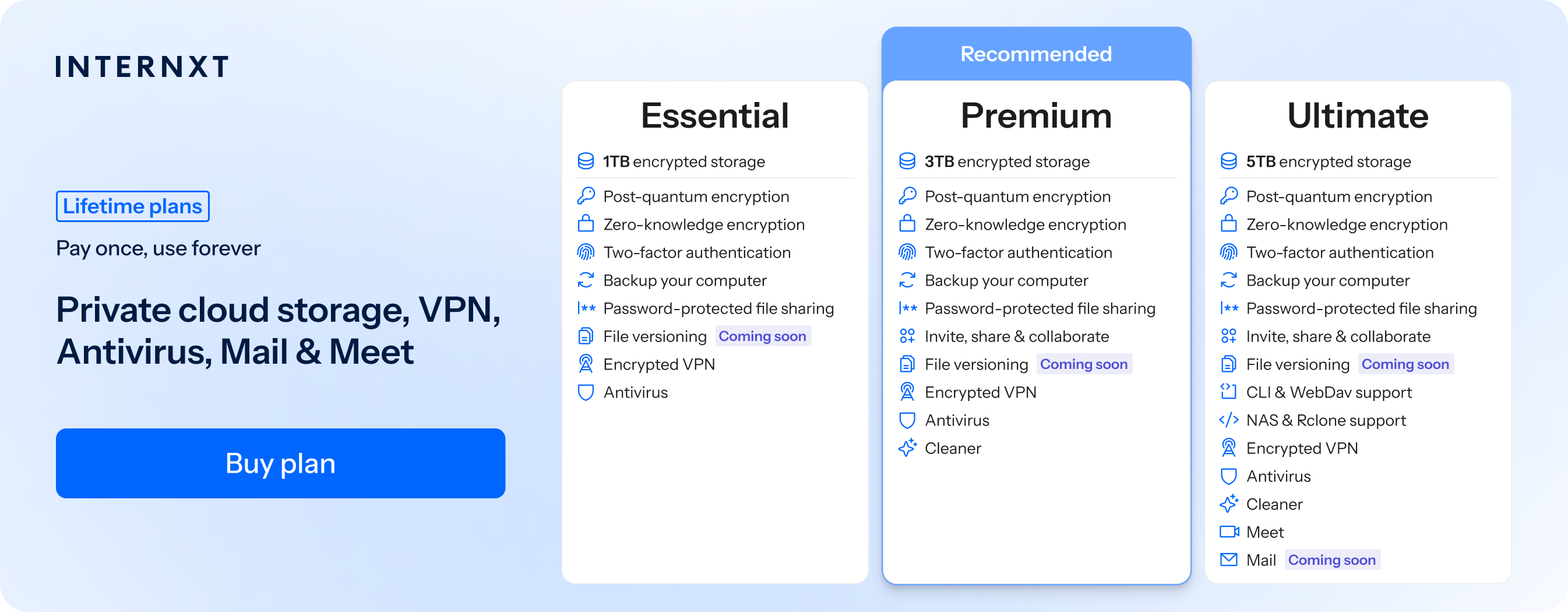
How Internxt works: Files are encrypted on your device before upload using AES-256 encryption. You hold the encryption keys, not Internxt. The company mathematically cannot access your files even if legally compelled, breached, or acquired. This is zero-knowledge encryption, the same architecture privacy advocates use for sensitive data.
Verified security: Internxt has passed independent security audits by Securitum, a European pentesting firm that also audits Proton. The audit verified no critical vulnerabilities in Internxt's infrastructure. All code is open-source on GitHub, meaning security researchers can verify the encryption implementation themselves.
Compliance for regulated industries: Internxt holds ISO 27001:2022 certification for information security management and is HIPAA compliant for healthcare data. These aren't marketing claims, they're third-party verified standards that require ongoing audits. For comparison, Mi Cloud's compliance status is unclear, and mainstream services like Google Drive and Dropbox only offer HIPAA compliance on business tiers.
Pricing comparison
Here's what you actually pay at each storage level:
If you need around 200GB-1TB:
- Mi Cloud: ~$40-60/year for 200GB (pricing varies by region)
- Google Drive: $30/year for 200GB
- iCloud: $36/year for 200GB (monthly billing only, no annual option)
- Internxt: $20/year for 1TB
Internxt gives you 5x the storage for less money. It's not even close.
If you need around 2-3TB:
- Google Drive: $100/year for 2TB
- Dropbox: $120/year for 2TB
- iCloud: $120/year for 2TB (monthly billing only)
- Internxt: $39/year for 3TB
Internxt costs 60% less and gives you 50% more storage.
If you need 5TB or more:
- Internxt: $59/year for 5TB
- Everyone else: Doesn't offer affordable 5TB annual plans
Lifetime plans: Internxt lets you pay once instead of forever. $474 for 3TB. After 5 years, you're ahead. After 10 years, you've saved $526 compared to Google Drive.
What's included: All Internxt plans include encrypted VPN, antivirus, file cleaner, and backup tools at no extra cost. Google Drive, Dropbox, and iCloud charge separately for VPN and security features (or don't offer them at all). Zero-knowledge encryption means Internxt can't access your files. The trade-off is no real-time collaboration like Google Docs or Dropbox Paper.
Other Cloud Storage Options
Google Drive
Offers 15GB free storage and the best collaboration features in the industry. Real-time editing with Google Docs, Sheets, and Slides supports up to 100 simultaneous editors. Integration with Gmail, Google Photos, and Google Workspace makes it ideal for teams already using Google's ecosystem.
The downside: Google holds encryption keys and can access your files. For most collaboration use cases, this trade-off is acceptable.
Dropbox
Pioneered file syncing and still does it well. Smart Sync lets you see all files on your desktop while only downloading what you need. The integration ecosystem spans 300,000+ apps, more than any competitor.
Dropbox Paper offers collaborative document editing. At $120/year for 2TB, it's more expensive than alternatives, but the syncing technology and third-party integrations are hard to beat.
iCloud Drive
The obvious choice if you use iPhones, iPads, and Macs exclusively. Files sync across Apple devices automatically. Integration with apps like Photos, Notes, and Pages is seamless.
The limitation: iCloud only offers monthly billing (no annual discount), and desktop support for Windows is clunky. If you're in Apple's ecosystem, it works. If you use Android or Windows primarily, it's frustrating.
Our iCloud vs Google Drive comparison covers ecosystem lock-in and cross-platform trade-offs in detail.
Quick guidance on alternatives:
- Need real-time collaboration? → Google Drive for team editing
- Deep in Apple's ecosystem? → iCloud Drive for device integration
- Need file syncing across devices? → Dropbox for Smart Sync
- Privacy is the priority? → Internxt Drive for zero-knowledge encryption with compliance certifications
Pros and Cons of Using Xiaomi Cloud for Storage
As with any storage service, there are both pros and cons to using Mi Cloud.
One of the most significant advantages of Mi Cloud is its affordability. Mi Cloud's pricing is significantly lower compared to other cloud storage services such as Dropbox or Google Drive. Additionally, Mi Cloud offers a generous amount of storage for its pricing plans.
Another advantage of Mi Cloud is its integration with Xiaomi devices. If you're an avid Xiaomi user, Mi Cloud seamlessly integrates with your devices, allowing for easy backup and syncing of your data.
However, one of the biggest downsides of Mi Cloud is its limited availability. Currently, Mi Cloud is only available in select countries, so if you're not located in one of those countries, you won't be able to use the service.
Another downside to Mi Cloud is its lack of third-party app integration. Unlike other cloud storage services, Mi Cloud does not integrate with many third-party apps, which can be a dealbreaker for some users.
Mi Cloud Privacy and Security
Mi Cloud allows users to store their photos, videos, contacts, messages, notes, and more. The service is available on various Xiaomi devices, including smartphones, tablets, and laptops. While Mi Cloud is a convenient and reliable service, it is crucial to understand its privacy and security features.
When it comes to privacy, Xiaomi takes the protection of user data seriously. The company uses encryption to protect user data, which means that data is converted into a code only authorized parties can read.
Additionally, Xiaomi has strict data privacy policies outlining how user data is collected, stored, and used. Users can also control their data privacy settings, such as choosing which data to back up and which not to back up.
In terms of security, Mi Cloud provides multiple layers of protection to ensure user data is safe. Users are required to sign in with their Mi account, which provides an added layer of security. Mi Cloud also uses two-factor authentication, which requires users to provide two forms of identification before accessing their data. This helps prevent unauthorized access to user data.
One concern users may have with Mi Cloud is pricing. While the service is free to use, additional features come with a cost. For example, users can purchase extra storage space if they need more than the free allotment.
The pricing for additional storage varies depending on how much storage is needed. However, it is essential to note that users can still access their data even if they do not purchase additional storage.
Customer Reviews and Experiences With Mi Cloud Pricing
To better understand how Mi Cloud's pricing plans stack up, we looked at customer reviews and experiences. Overall, customers seem to be satisfied with Mi Cloud's pricing, citing its affordability and generous storage offerings.
However, some customers are frustrated with Mi Cloud's limited availability and lack of third-party app integration.
Tips for Maximizing Your Mi Cloud Subscription
If you do decide to go with Mi Cloud, there are several tips to help you make the most of your subscription:
- Enable automatic backup for all your devices to ensure your data is always backed up.
- Take advantage of Mi Cloud's sharing capabilities to easily share files with friends and family.
- Take advantage of Mi Cloud's sharing capabilities to easily share files with friends and family.
- Utilize Mi Cloud's "Find device" feature to locate your lost or stolen device.
Is Mi Cloud Right for You?
Here's how to decide based on what actually matters to you, not what marketing teams want you to think matters.
Choose Mi Cloud if:
You're locked into Xiaomi's ecosystem. If you own multiple Xiaomi devices (phone, tablet, laptop) and rarely use anything else, Mi Cloud's integration is seamless. Photos sync automatically, contacts update across devices, and Find My Device works reliably. The pricing is competitive, and you don't need to install third-party apps.
Privacy isn't your top concern. If you're comfortable with Google Drive or Dropbox's privacy model (the company can technically access your files), Mi Cloud works the same way. For most personal photos and documents, this is fine. You're trading some privacy for convenience and lower prices.
You don't need compliance certifications. If you're not handling regulated data (healthcare records, legal documents, business files requiring HIPAA or ISO compliance), Mi Cloud's lack of certifications doesn't matter.
Choose Internxt if:
You handle sensitive data. Healthcare professionals with patient records, legal teams managing case files, financial advisors with client information. Zero-knowledge encryption means nobody but you can access your files. Not Internxt, not hackers who breach servers, not governments with legal orders.
You need verifiable compliance. If your industry requires HIPAA, ISO 27001, or documented security audits, Internxt provides all three with independent verification. Mi Cloud and mainstream alternatives (except business tiers) don't.
Privacy is a principle, not just a preference. If you switched from Google to privacy-focused alternatives because you don't want companies accessing your data, zero-knowledge encryption is the architecture that matches your values. Server-side encryption (Mi Cloud, Google Drive, Dropbox) requires trusting the company's policies. Zero-knowledge encryption requires trusting math.
You want lifetime pricing. Pay $474 once for 3TB instead of $100+/year forever. After 5 years, you break even. After 10 years, you've saved $526 compared to Google Drive's annual fees.
Choose mainstream alternatives (Google Drive, Dropbox, iCloud) if:
Collaboration is critical. Google Drive's real-time editing with 100 simultaneous users beats everyone. Dropbox's Smart Sync and app integrations (300,000+ apps) are unmatched. iCloud's Apple ecosystem integration is seamless if you're all-in on Apple devices.
You need specific features. Web preview without downloading, server-side search across file contents, collaborative document editing. Zero-knowledge encryption providers can't offer these because they don't have your encryption keys. The trade-off is feature richness vs privacy architecture.
Frequently Asked Questions
Can Xiaomi access my Mi Cloud files?
Yes. Mi Cloud holds the encryption keys, so Xiaomi can access your files if they want to or if legally required. Same deal with Google Drive, Dropbox, and iCloud.
How much does Mi Cloud storage cost?
Depends where you live. 200GB costs $40-60/year in most places, but the pricing changes by country and currency.
Can I access Mi Cloud from my computer?
Through i.mi.com in a browser, but there's no desktop app. You have to manually upload and download files instead of automatic syncing like Google Drive or Dropbox.
What happens when Mi Cloud storage is full?
Everything stops syncing until you upgrade, delete stuff, or switch providers. Your phone will spam you with "storage full" warnings.
Is Mi Cloud secure enough for sensitive files?
For personal stuff, sure. For work files that need HIPAA or ISO 27001 compliance (healthcare, legal, business records), no. Xiaomi can access your files and doesn't offer compliance certifications.
What are the best alternatives to Mi Cloud?
Google Drive for team collaboration, iCloud if you're all-in on Apple, Dropbox for the best desktop syncing, Internxt for the most secure cloud storage with actual compliance certifications.
Is Xiaomi Cloud Storage Worth the Investment?
So, is Mi Cloud worth the investment? Ultimately, it depends on your storage needs and preferences.
If you're looking for an affordable cloud storage service with generous storage offerings and are located in one of the countries where Mi Cloud is available, then Mi Cloud may be a solid option.
However, consider other cloud storage services such as Internxt and Dropbox or other alternatives if you require third-party app integration or more advanced features.
Also of interest to you...