
Is Outlook Secure and Should You Use It for Private Emails?

Outlook is part of the Microsoft ecosystem of OneDrive, Teams, SharePoint, Word, Excel, PowerPoint, and Copilot.
It offers plans for individuals, families, and businesses and cloud storage of up to 6TB. For this article, we will cover is Outlook secure for your needs, whether you need an email service with end-to-end encryption for your privacy needs, and the following topics.
- How secure is Outlook email?
- Outlook security features and settings
- How to encrypt emails in Outlook
- How to secure your Outlook account
- Encrypted email alternative to Outlook
Table of contents
- How secure is Outlook email?
- Is Microsoft Outlook private?
- How to send an encrypted email with Outlook
- Is Outlook secure for my personal data or private emails?
- Is Outlook secure? An overview of the biggest privacy risks
- How to secure your Outlook account
- Alternative to Microsoft Outlook
- Related products
- Frequently asked questions
How secure is Outlook email?
Yes, Outlook is secure and has various built-in and personalized security features you can configure to ensure the security of your Outlook email.
For email, cloud storage, or any other services that take potentially confidential information to send over the internet, there are two things to consider: security and privacy.
So is Microsoft Outlook secure? Yes, it has various security features including:
- Encryption: Outlook uses encryption to help protect your emails and data during transmission and storage.
- Multi-factor authentication: Adds an extra layer of protection by requiring additional verification when signing in, making it harder for someone to access your account even if they know your password.
- Spam filtering: Automatically detects and filters unwanted or suspicious emails to reduce the risk of spam and malicious messages reaching your inbox.
- Phishing protection: Helps identify suspicious emails and links that may attempt to steal passwords, financial information, or other personal data.
- Malware protection: Scans emails and attachments for potentially harmful content, helping protect users from viruses and other malicious software.
- Suspicious activity detection: Microsoft monitors accounts for unusual sign-in activity and can alert users when potentially unauthorized access is detected.
Is Microsoft Outlook private?
Is Outlook a secure email? Yes.
Outlook uses encryption in transit and at rest to help protect your emails and data, but Outlook security and privacy are two different things, similar to other services which don't use end-to-end encryption, like Gmail and Yahoo email.
Security is about protecting your Outlook account and emails from threats such as hackers, malware, phishing, and unauthorized access.
Privacy is about controlling who can access, process, or use your data, including whether the service provider itself can access your email content.
Because Outlook is not end-to-end encrypted, Microsoft can still access and process the contents within its systems.
How to send an encrypted email with Outlook
If you have a paid OneDrive plan, you can encrypt the message before sending it to prevent the recipient’s email provider from accessing the encrypted content in the following steps:
- Open Outlook and select New mail.
- Compose your email and add the recipient.
- Select Options or the three-dot menu in the message window.
- Select Encrypt.
- Choose the available encryption option, such as Encrypt or Do Not Forward.
- Finish your message and select Send.
- The recipient receives the protected message and may need to authenticate with Microsoft or use a one-time passcode to view it.
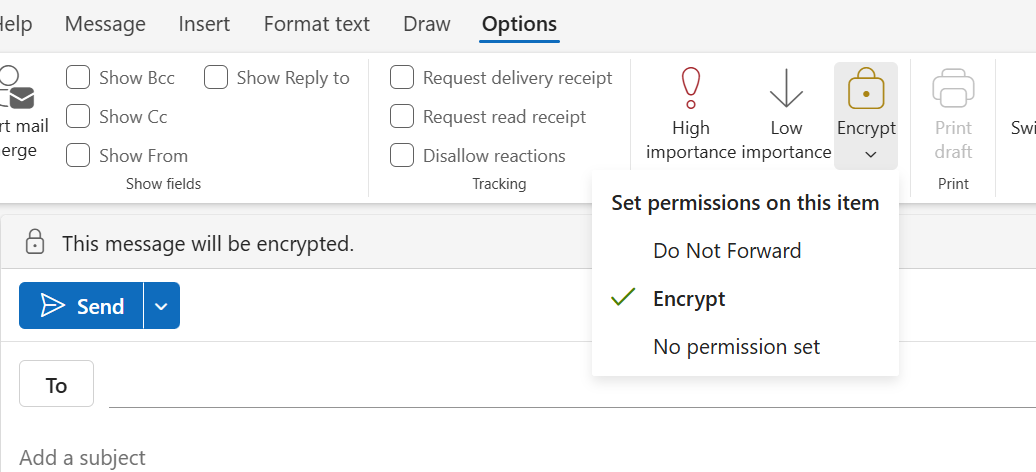
From there, you have the following encryption options to choose from:
- Do Not Forward: Keeps the email encrypted and prevents recipients from copying or forwarding it. Microsoft Office attachments remain encrypted after download, while PDFs and images may be downloaded without encryption.
- Encrypt: Keeps the email encrypted within Microsoft 365. Recipients can access the message and attachments through Outlook or a Microsoft 365 Message Encryption portal.
- No permission set: The default option. Outlook uses opportunistic TLS to encrypt the connection between Microsoft and the recipient's email provider.
These options, however, still use Microsoft-managed encryption to protect the message and restrict access. Microsoft retains control of the encryption keys, so the message is not encrypted in a way that only the sender and recipient can decrypt.
For true end-to-end encrypted email that encrypts files on your device and ensures only you and your recipient can read its contents, you need a private email like Internxt Mail.
Outlook encryption overview
Is Outlook secure for my personal data or private emails?
Outlook can process your email content
Microsoft's privacy statement says it collects information about people's interactions with its products and services, including diagnostic and usage information, and explains that personal data can be processed to provide, secure, and improve its products and services.
Here is the direct passage from Microsoft’s terms and conditions:
“We use the data we collect to provide you with rich, interactive experiences. In particular, we use data to:
- Provide our products, which includes updating, securing, and troubleshooting, as well as providing support.
- Improve and develop our products.
- Personalize our products and make recommendations.
- Advertise and market to you…”
In Outlook, this information can include:
- Suggested Replies
- Rich locations
- Calendar-related functionality
- Online services
- Other cloud-backed features
To turn off this setting, follow these steps:
- Open Outlook
- Click the View tab
- Select View settings
- Select General
- Select Privacy and data
- Select Privacy settings
- Find Connected experiences
- Turn off / uncheck “Turn on experiences that analyze your content”
- Click OK
- Restart Outlook
How secure is Outlook email with Copilot?
If Copilot AI is available in Outlook, it can potentially use relevant emails and other Microsoft 365 information to answer a question or summarize information.
For AI, Microsoft goes on to say:
“Our processing of personal data for these purposes includes both automated and manual (human) methods of processing [...]
“As part of our efforts to improve and develop our products, we may use your data to develop and train our AI models.”
This information can include:
- emails
- files
- Teams chats
- meetings
- people
- other organizational information
To prevent Outlook from processing your email content, follow these steps:
- Open Outlook in your browser
- Click the ⚙️ Settings icon in the top-right
- Select Copilot
- Find Turn on Copilot
- Switch it Off
- Close and reopen Outlook if necessary
Security for business and school accounts
If you use Outlook with a work or school account, your mailbox is part of your organization’s Microsoft 365 environment.
This means you should not treat it like a completely private personal email account. This means that the organization has administrative and compliance capabilities to allow authorized access to your data when necessary.
As a result, you should not assume that a work or school Outlook mailbox is private, even if you are the only person who normally accesses it.
Is Outlook secure for free plans?
Outlook offers 15GB of storage and 5GB of free cloud storage for OneDrive, with OneDrive paid annual and monthly plans available for up to 6TB for individuals, families, or businesses.
For free Outlook.com accounts, advertising and your privacy are major factors to take into consideration, as all free accounts display ads in your Outlook account.
These ads can use your searches, past purchases, use of Microsoft products, online activity, and data associated with your Microsoft account to personalize ads.
Despite this, your email content is not shared with advertisers, and these vendors do not receive the content of your emails, and advertisers don't get your personal Outlook information.
You can turn off personalized advertising by going to Settings > General > Advertising Preferences. This does not remove the ads, but the ads you do see may be less relevant.
Is Outlook secure? An overview of the biggest privacy risks
When analyzing is Outlook a secure email, the answer is yes, but privacy is another matter, as we have covered in this article.
Below you can find the overview of the biggest privacy risks for Outlook when considering the question of how secure is Outlook email in relation to your privacy.
Highest:
- There is no default end-to-end encryption: Although Microsoft 365 protects data with encryption, ordinary messages remain accessible to Microsoft’s service infrastructure.
- Work or school accounts aren't truly private because your organization can have extensive administrative, compliance, and eDiscovery capabilities.
- Copilot can use authorized Microsoft 365 content, including your email, as grounding/context.
Medium:
- Some connected experiences analyze Microsoft 365 content.
- Microsoft collects service and diagnostic information, with some controls available to users.
- Advertisements for free Outlook.com accounts, although Microsoft explicitly says it doesn't scan email contents to target Outlook ads.
Lowest:
- Data collection: Microsoft collects basic information associated with your Microsoft account, such as your name, contact details, account information, and preferences to operate and manage your account.
- Third-party services: If you connect Outlook to third-party applications or services, those services may receive or process information from your account according to their own privacy policies. The privacy implications therefore depend partly on which integrations you enable.
- Cookies: Outlook uses cookies and similar technologies for functions such as authentication, preferences, security, analytics, and advertising.
How to secure your Outlook account
When securing any of your online accounts, the basic security settings you should use are a strong password combined with multi-factor authentication.
For Outlook specifically, you can increase the security and privacy settings of your account by following the recommendations below.
Alternative to Microsoft Outlook
Now that we have covered is Outlook secure for your private emails and how to modify your Outlook settings, if these settings still aren’t enough and you want a fully end-to-end encrypted email, free from AI, ads, and Big Tech surveillance, then Internxt Mail is the best alternative to Outlook.
Internxt Mail uses post-quantum end-to-end encryption that encrypts your emails on your device before sending, meaning nobody but you and your recipient can access the contents. This means you can send confidential documents, photos, and private emails to anyone, knowing they cannot be hacked or seen by unauthorized parties.
For businesses, Internxt is GDPR, ISO 27001, HIPAA, and SOC 2 compliant, so you get secure cloud storage with Drive, combined with the best privacy for your business emails.
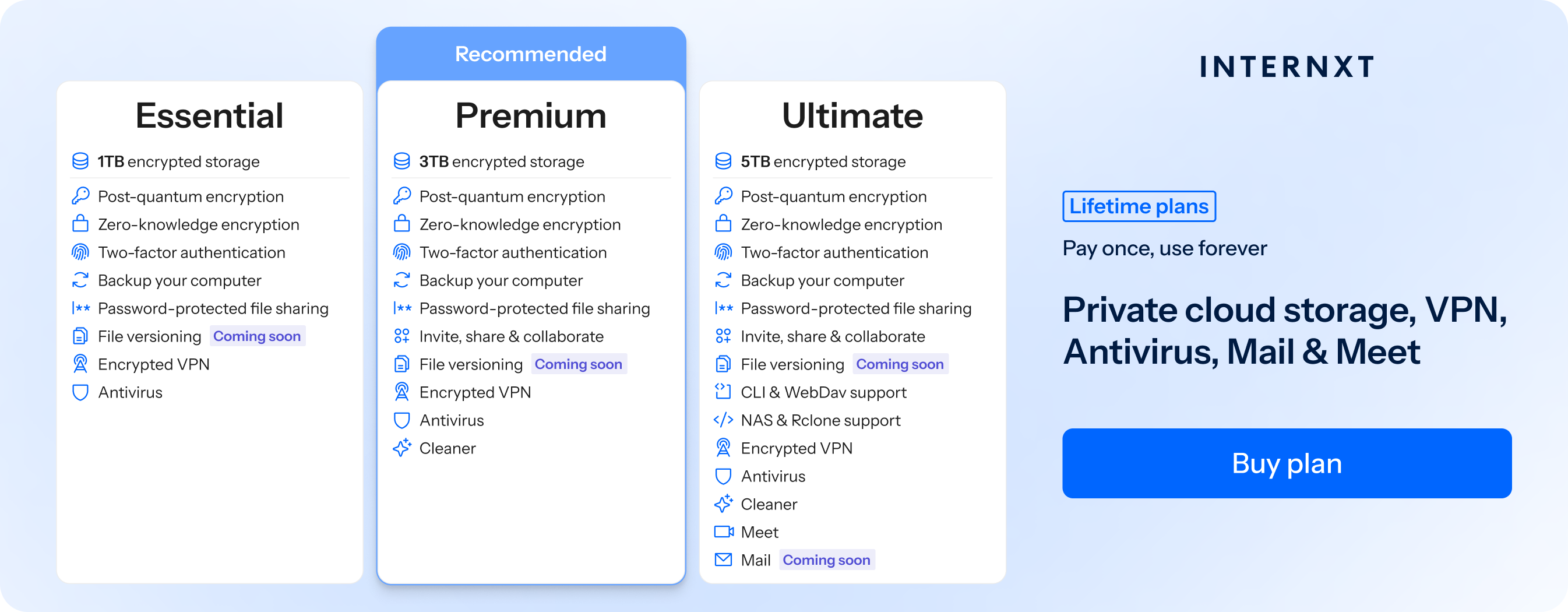
Mail is part of Internxt’s Ultimate plans, which you can get started with from €1.99/month, or avoid subscriptions completely with an Internxt Ultimate lifetime plan, which you can get for up to 85% off below.
Aside from mail and encrypted cloud storage, Internxt also offers NAS and rclone support, Meet, Mail, and Internxt Photos to automatically sync and backup your albums. The full features of Internxt are below and on our Internxt pricing page.
| Plan | Storage | Features | Annual (Paid monthly) | Lifetime Cost |
|---|---|---|---|---|
| Essential | 1TB | €1.99/month | €380 | |
| Premium | 3TB |
|
€3.99/month | €580 |
| Ultimate | 5TB |
|
€5.99/month | €780 |
| *Prices are correct at the time of writing and are subject to change. For latest prices, check https://internxt.com/pricing | ||||
Related products
Frequently asked questions
Is Outlook end-to-end encrypted?
No, not by default. Standard Outlook email does not provide end-to-end encryption between the sender and recipient. Additional technologies such as S/MIME can provide message-level encryption, but the best alternative is end-to-end encrypted email providers like Internxt Mail.
Can my employer read my Outlook emails?
If you use a work or school Outlook account, your organization controls the Microsoft 365 environment. Depending on its policies and configuration, authorized administrators may have access to tools for compliance, eDiscovery, retention, legal holds, auditing, and security investigations.
Is Outlook safe if I have a free plan?
Free Outlook.com includes security protections such as encryption, spam filtering, malware protection, and account security features. However, it is ad-supported and has additional privacy considerations compared with paid Microsoft 365 plans.