
10 Best Free File Sharing Services in 2026: Secure, Fast & Private


WeTransfer is the easiest option for most people. FileMail and Internxt Send both give you 5 GB free with no account needed. And if you're sharing something sensitive, Internxt Send is the only one on this list that encrypts your file before it leaves your device, so even Internxt can't read it.
The differences between these tools mostly come down to three things: how much you can send for free, how long the link stays active, and whether the service can access your files while they're sitting on their servers.
Best Free File Sharing Services at a Glance
| Service | Max Free Size | Can the service read your files? | Account needed? | Link expires after |
|---|---|---|---|---|
| Internxt Send | 5 GB | No | No | 15 days |
| WeTransfer | 2 GB | Yes | No | 7 days |
| FileMail | 5 GB | Yes | No | 7 days |
| File.io | 2 GB | Yes | No | Your choice |
| pCloud Transfer | 5 GB | Yes | No | 7 days |
| Send Anywhere | 10 GB | Yes | No | 48 hours |
| ToffeeShare | No limit | No (files never stored) | No | When you go offline |
| Smash | No limit | Yes | No | 14 days |
| Dropbox Transfer | 100 MB | Yes | Yes | 30 days |
| Files.com | Custom | Yes | Yes | Custom |
The column most people skip is whether the service can read your files. All of these tools protect your files from outside hackers, but most of them still hold the keys to your data on their end. That means they could technically open your files if they wanted to, or hand them over if a government asks.
Internxt Send is the only one here where that's not possible. ToffeeShare also avoids this, but differently. Your file goes straight from your browser to the recipient's without ever sitting on a server.
Here's how ten of the best free options compare on all of that.
The 10 Best Free File Sharing Services and Trending File Sharing Websites in 2026
Internxt Send
Best for: Share photos privately, documents, contracts, medical records, or anything you wouldn't want a third party to access. If you need fully encrypted cloud storage on top of file sending, Internxt Drive covers both.
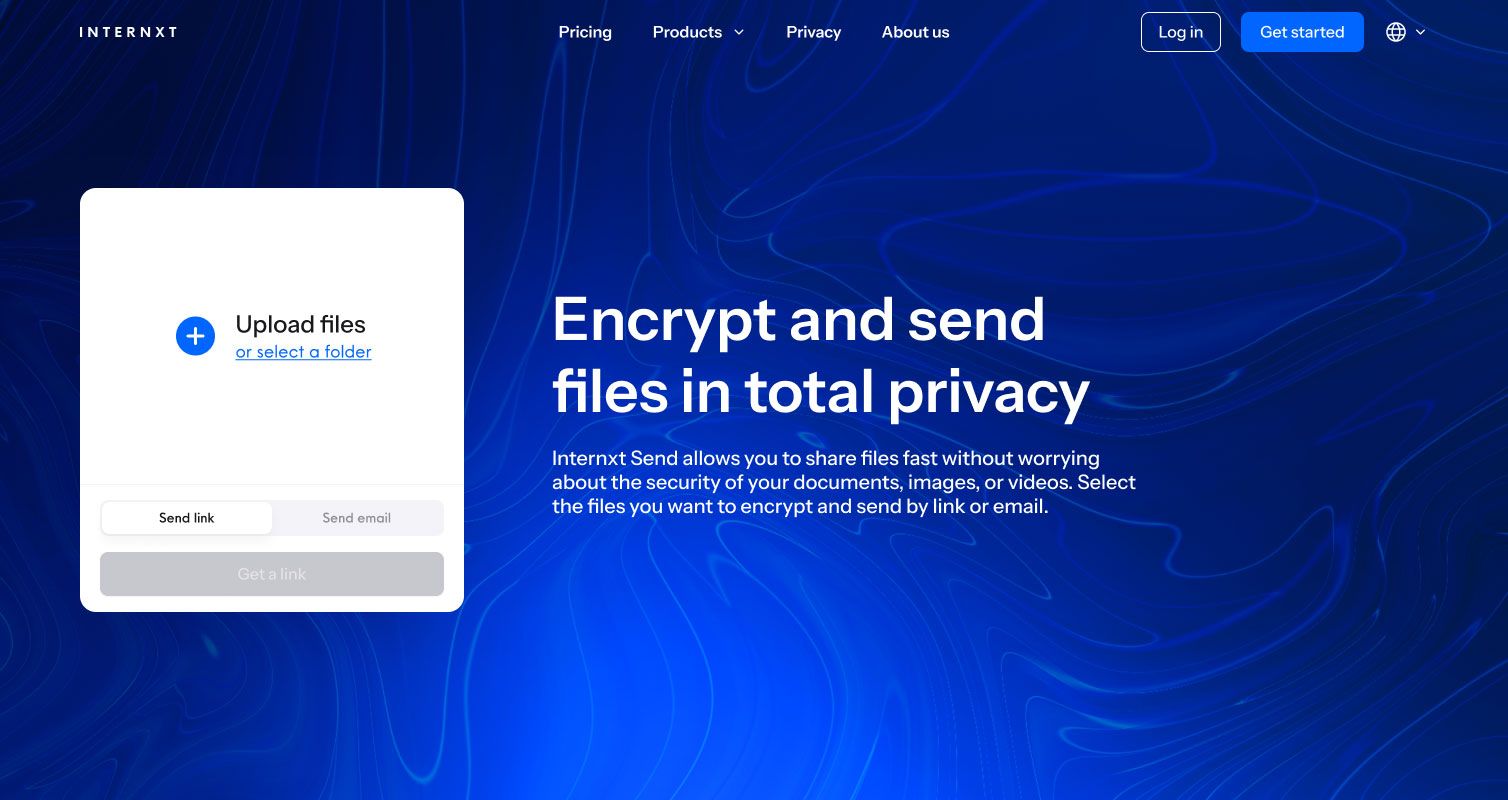
Our secure file-sharing service allows you to securely send videos for free, or any other kinds of files you want ot encrypt and send. To do so, you just need to simply go to our Send web page and drag and drop the file you wish to share to generate an encrypted sharing link.
Send is totally end-to-end encrypted and zero-knowledge, making it perfect for personal or professional use, such as file sharing for lawyers, doctors, teachers, and more.
Another smart way to transfer files or send large video files with Internxt Send is to enter the email address of the person you wish to share the file with. You can also enter a personalized note that the recipient will receive in addition to the link.
You don't need an account. There are no ads. The free limit is 5 GB per transfer and the link stays active for 15 days.
Pros:
- Free to use with no account required
- Files are encrypted before upload, so only the recipient can open them
- Independently verified by a third-party security firm (Securitum, 2024)
- Open source, so anyone can check how it works under the hood
Cons:
- 5 GB limit means it won't work for very large video files or raw camera footage
- No way to track whether the recipient opened the file
- Link expires after 15 days with no option to extend on the free plan
WeTransfer
Best for: Sending everyday files to people who aren't tech-savvy and just need something that works.
WeTransfer has been around since 2009 and is probably the most recognizable name on this list. It's the easiest file share option on this list and takes about 20 seconds to use. You don't need an account, but you do need to enter an email address.
The free limit is 2 GB per transfer, which is the lowest on this list. Links expire after 7 days.
WeTransfer is a convenient way to exchange files across the globe. Try WeTransfer if you want to use something that does not rely on a larger Big Tech platform, like Dropbox or Google Drive.
Pros:
- The simplest tool here, almost no learning curve
- Universally recognized, so recipients trust the link
- Clean interface with no clutter
Cons:
- 2 GB limit is tight if you're sending video or large folders
- WeTransfer holds the encryption keys, so they can technically open your files. It's worth reading how WeTransfer handles your data before you send anything sensitive
- Free version includes ads
pCloud Transfer
Best for: Anonymous transfers up to 5 GB, where you want a reputable service but don't need a full account
pCloud is best known as a cloud storage service, but its Transfer tool is a separate free product that lets you send files securely without creating an account. It works similarly to WeTransfer but with a higher 5 GB limit and a slightly cleaner interface.
Pros:
- 5 GB free with no account required
- No setup, works in the browser
- Option to add a personal message with each transfer
- pCloud has a stronger privacy focus than most services of its size
Cons:
- pCloud holds the key to your files, not you
- Upload speed is capped on the free tier
- Link expires after 7 days with no extension option
Like other services mentioned on this list, pCloud Transfer solves the age-old challenge of anonymously and quickly sharing huge files with people. It only takes a few clicks for your files to securely reach their destination.
FileMail
Best for: Sending large files quickly when privacy is not a major concern.
FileMail consistently ranks as one of the most used file sharing services, and its free tier holds up: 5 GB per transfer with no account needed. It works in the browser or as a desktop app, and it sends you a notification when the recipient downloads the file.
Pros:
- 5 GB free with no account, one of the highest limits here
- Download notifications so you know when files have been received
- Available as a desktop app, not just a browser tool
- Fast transfer speeds
Cons:
- FileMail stores your files on its servers and holds the keys
- Free version shows ads
- Links expire after 7 days
File.io
Best for: Sending something you only want accessed once, like a password, a private document, or a one-time transfer to a client.
File.io does something slightly different: you can set a link to expire after a single download. Once the recipient clicks it, the file is gone, which is useful for anything you only want accessed once.
Pros:
- Single-use links that self-destruct after download
- No account needed for basic use
- No ads on the free tier
- Developers can use it via an API to automate transfers
Cons:
- 2 GB limit on the free plan
- File.io holds the decryption keys on its end
- Not ideal for sharing with multiple people
Files.com
Best for: IT teams and businesses that need automated, protocol-based file transfers with compliance requirements.
Files.com is built for businesses rather than individuals. It supports older file transfer protocols that many enterprise systems still use, connects to services like Slack, AWS, and Office, and includes access controls and activity logs for compliance purposes.
There is no free plan, only a trial. If you're deciding between enterprise tools, our Dropbox vs SharePoint breakdown is a good place to start.
Pros:
- Supports legacy protocols that enterprise IT systems often require
- Connects with a wide range of business tools
- Access controls and audit logs for compliance needs
- Can work alongside your own on-site storage
Cons:
- Not free, trial only
- Overkill for individuals or small teams
- Requires technical setup
Dropbox Transfer
Best for: Existing Dropbox users sending polished deliverables to clients where the 100 MB limit is not an issue.
Dropbox Transfer creates a clean, branded download page for your files rather than just a raw link.
If you are sending work to a client and presentation matters, it looks noticeably more polished than anything else on this list. The downside is that the free tier caps you at 100 MB and requires a Dropbox account. If you want to know what that actually costs before signing up, we cover that separately.
Pros:
- Professional-looking download page, good for client work
- 30-day link expiry, the longest on this list
- Download tracking so you know when files were accessed
- Integrates with the Dropbox ecosystem if you already use it
Cons:
- 100 MB free limit is the lowest here by far
- Requires a Dropbox account to use
- Dropbox holds your encryption keys like most cloud services
Smash
Best for: Creatives sending large files like design packages or video edits where speed is less important than convenience.
Smash has no file size limit on the free plan so it is one of the best options if you want to send large files.
There's no account required, and links stay active for 14 days. Free transfers are throttled to a slow download speed, though, so large files can take a while for the recipient to get through.
Pros:
- No file size limit on the free plan
- 14-day link expiry, one of the longer windows on this list
- No account required
- Supports image and video preview before download
Cons:
- Free tier caps download speed, so large files can be slow to receive
- Smash stores your files and controls access to them
- Interface shows ads on the free plan

ToffeeShare
Best for: Sending very large files like video projects or design assets when both people are available at the same time.
ToffeeShare works differently from every other tool here. Instead of uploading your file to a server, it sends the file directly from your browser to the recipient's browser.
There is no server in the middle, which means there is no file size limit and nothing is stored anywhere.
Pros:
- No file size limit
- Files never touch a server, so there's nothing for anyone to access
- No account needed and no ads
- Transfers start immediately with no upload waiting time
Cons:
- Sender and recipient must both be online simultaneously
- If the connection drops, you have to start over
- Transfer speed depends on both people's internet connections
Send Anywhere
Best for: Sending very large files when you can coordinate timing with the recipient.
Send Anywhere gives you three different ways to send a file: a browser link, a 6-digit code the recipient types in directly, or a live device-to-device transfer through the app.
That last option has no file size limit and the file never touches a server. If you're dealing with sending a large photo dump specifically, that guide covers your best options.
Pros:
- Multiple transfer methods, including a direct device-to-device option with no size limit
- 10 GB limit on browser-based transfers, the highest of any service here that stores files
- Available on all major platforms, including mobile
Cons:
- Browser links expire after just 48 hours, the shortest on this list
- The live transfer requires both people to be online at the same time
- App interface can feel a bit cluttered

How These Services Handle Your Privacy
Most file hosting services and file sending services encrypt your data, but that alone does not tell you who can read it. Almost every service on this list protects your files from outside access, but most of them still hold the key.
If you want a deeper look at how encrypted cloud storage actually works, we cover the full picture separately. Think of it like a bank vault where the bank can open your box whenever they want. The file is locked, but not from them.
This is how each service actually handles your data:
| Service | Who holds the key to your files? | Files stored on their servers? | Independently verified? |
|---|---|---|---|
| Internxt Send | Only you | Yes, but unreadable without your key | Yes (Securitum, 2024) |
| WeTransfer | WeTransfer | Yes | No |
| FileMail | FileMail | Yes | No |
| File.io | File.io | Yes | No |
| pCloud Transfer | pCloud | Yes | No |
| Send Anywhere | Send Anywhere | Yes (browser transfers) | No |
| ToffeeShare | Neither | No | No |
| Smash | Smash | Yes | No |
| Dropbox Transfer | Dropbox | Yes | No |
| Files.com | Files.com | Yes | No |
If you're sending a presentation to a colleague or photos to a friend, any service on this list is fine.
It matters when the file contains something sensitive. Medical records, legal documents, financial information, private photos. In those cases, using a service that holds the key means you're trusting their policies, their employees, and their legal obligations to keep your file private.
Internxt Send removes that dependency entirely. The file is scrambled before it leaves your device and only unscrambles on the recipient's end. No one in between can read it, including Internxt, which was independently confirmed by a third-party security audit in 2024.
Which One Should You Use?
Here is how to match the tool to what you actually need.
You want a quick, easy file share free of charge: Use WeTransfer. It's the fastest to get started and everyone recognizes the link.
You're sending a large file and need more than 2 GB: FileMail, pCloud Transfer, or Internxt Send all give you 5 GB free with no account. Send Anywhere goes up to 10 GB.
You're sending something private, like medical records, legal documents, or financial files: Use Internxt Send. It's the only free tool here where the service cannot read your files, not just by policy but by design.
You're sending something enormous, like a video project or a full photo shoot: ToffeeShare if you and the recipient can be online at the same time. Smash if you need to send it asynchronously. If the file is pushing against any size limit, compressing it first can cut the size significantly before you send.
You only want the file accessed onceFile.io. Set it to expire after a single download and it's gone.
You're sending work to a client and want it to look professional. Dropbox Transfer, assuming you already have a Dropbox account and the file is under 100 MB.
Your company needs this for automated workflows or complianceFiles.com. It's not free, but it's built for exactly that.
Frequently Asked Questions
How do I send large files for free?
Send Anywhere handles up to 10 GB for free through the browser, and ToffeeShare has no size limit at all if both people can be online at the same time. For large files that also need to stay private, Internxt Send supports up to 5 GB with zero-knowledge encryption.
What is the best free file sharing service with no account?
Every file sharing service free of account requirements on this list: WeTransfer, FileMail, pCloud Transfer, Internxt Send, File.io, Send Anywhere, ToffeeShare, and Smash. The two that require registration are Dropbox Transfer and Files.com.
What is the best free secure file sharing service?
Among free large file transfer services and secure file transfer free options, Internxt Send is the only one that encrypts files on your device before upload, verified by an independent third-party audit in 2024. For casual sharing, any service on this list protects against outside threats well enough.
What is the best WeTransfer alternative?
FileMail matches WeTransfer's ease of use but gives you 5 GB free instead of 2 GB. If you want a WeTransfer alternative that also keeps your files private from the service itself, Internxt Send is the only free option that does that.
How do I share large files for free?
The free file transfer services with the highest limits are Send Anywhere at 10 GB, ToffeeShare with no cap at all, and Smash for unlimited async transfers. For a secure large file transfer free of charge, Internxt Send covers up to 5 GB with zero-knowledge encryption.
How do I send a 10 GB file for free?
Send Anywhere supports 10 GB transfers through the browser for free with no account required. If the file is larger than 10 GB, ToffeeShare removes the size limit entirely but requires a live session where both parties are connected.
What are the best anonymous file sharing sites in 2026?
ToffeeShare and Internxt Send are the strongest options for anonymous sharing: neither requires an account, and neither stores your file in a readable form on their servers. ToffeeShare goes a step further by never storing the file at all, sending it directly from browser to browser.
What is the best free file sharing service for documents?
For sensitive documents like contracts, medical records, or financial files, Internxt Send is the best free option because the file is encrypted before it leaves your device and only the recipient can open it. For non-sensitive documents, WeTransfer or FileMail are simpler and work just as well.
What are the best free file transfer sites in 2026?
The most used free file transfer sites right now are WeTransfer, FileMail, and Send Anywhere for general use, and Internxt Send for privacy-focused transfers. All four work without an account and do not require any software to install.
What Is the Best File Sharing App?
For most people, the best free file-sharing service is whichever one matches the size of what you're sending and how long you need the link to stay active.
If you need to send large files for free or just want a quick file sharing free option with no strings attached, the ones that actually hold up are Send Anywhere at 10 GB.
ToffeeShare with no limit, and Smash for async delivery. WeTransfer works for anything under 2 GB that needs to arrive fast.
FileMail and pCloud Transfer push that to 5 GB. Send Anywhere handles up to 10 GB, and ToffeeShare removes the limit entirely for live transfers.
For everything else, this list covers the best options available in 2026 whether you need fast delivery, large file support, anonymous transfers, or secure document sharing.
If you need somewhere to keep files permanently rather than just send them once, our free cloud storage guide is a better starting point. All of these file-sharing apps work in the browser with no software to install, and most work on mobile too.