
Best Cloud Storage for Video Editors in 2026


If you edit video, the best cloud storage comes down to three things:
- Can it handle huge files without crawling?
- Does it actually keep client footage private?
- And does the price scale with your terabytes, or are there hidden or unexpected fees?
Editing is a different animal. One 4K project can run hundreds of gigabytes. Shoot 8K or RAW and it climbs fast, and a good chunk of that footage belongs to a client who would not be thrilled to see it leak before release.
The usual services aren't built for that. They throttle your uploads, bill you per seat, and keep a copy of your encryption keys on their own servers, so "private" isn't all that private.
For editors who care about privacy, private cloud storage for video files from Internxt is the strongest pick. It's zero-knowledge with post-quantum encryption, so nobody but you can open your files. Need rock-bottom storage costs? Backblaze B2. Editing live with a team? LucidLink. It really depends on how you work.
The picks below are sorted by what each tool is actually best at, with the catch on each one spelled out, so you can skip ahead to whatever fits how you work. We'll also get into how much storage you really need and whether the cloud is any place for footage that hasn't shipped yet.
Table of contents
What do video editors actually need from cloud storage?
Short version: the stuff a normal cloud account was never built for. Big files, fast pipes, real privacy, and pricing that doesn't punish you for working in terabytes. Before you compare tools, it helps to know what you're actually shopping for.
Upload speed and bandwidth
A few things decide how upload speeds and bandwidth are important for video editors, such as whether the service throttles your uploads, whether it can run several files at once instead of one at a time, and whether it lets you keep editing while a sync chews through in the background.
If you deliver on deadlines, slow uploads aren't an annoyance; they're a missed handoff.
Encryption and client NDAs
Here's where most services quietly let you down. Plenty of them encrypt your files but keep a copy of the keys on their own servers, which means they can technically open your footage.
For client work under NDA, that's a dealbreaker. The thing you want is zero-knowledge encryption, where the keys never leave your device. It matters enough that we dig into it properly further down, in the section on keeping unreleased footage safe.
Pricing that scales with terabytes, not seats
Video eats storage, and the bill is where a lot of "cheap" services stop being cheap. Watch for two traps.
First, per-seat pricing: tools built for teams often charge by the user, so a two-person edit suite pays for capacity it'll never touch. Second, hidden egress fees, where you're charged again every time you download your own footage back out.
For editors, the honest math is cost per terabyte, plus whatever it costs to get your files in and out. A lifetime plan or a flat per-TB rate usually beats a glossy monthly subscription once your library grows.
What are the best cloud storage services for video editors?
Here's the quick comparison, then the detail on each. There's no single winner for everyone, so we've tagged each one with the job it's best at. Internxt takes the top spot for privacy and overall fit, but if your priority is raw cost or live collaboration, skip straight to those picks.
What are the best cloud storage services for video editors?
Here's the quick comparison, then the detail on each. There's no single winner for everyone, so we've tagged each one with the job it's best at. Internxt takes the top spot for privacy and overall fit, but if your priority is raw cost or live collaboration, skip straight to those picks.
| Service | Best for | Encryption | Zero-knowledge? | Jurisdiction | Free tier | Starting price |
|---|---|---|---|---|---|---|
| Internxt | Privacy and NDA client work | AES-256, post-quantum | Yes | Spain (EU) | 1 GB | Lifetime 1 TB from €379.99 |
| Backblaze B2 | Large libraries on a budget | Server-side | No | United States | 10 GB | $6 per TB / month |
| LucidLink | Live collaborative editing | Zero-knowledge (customer-managed keys) | Yes | United States | Free trial | $7 / month (100 GB) |
| MASV | One-off large transfers | Server-side | No | Canada | 15 GB / month | $0.25 per GB transferred |
| Frame.io | Review & approval (Adobe) | Server-side | No | United States | 2 GB | $15 / user / month (2 TB) |
| Blackmagic Cloud | DaVinci Resolve users | Server-side | No | Australia | Project sync | Free project sync; paid via Cloud Store/Pod hardware |
1. Internxt: best for privacy-conscious editors
Encryption: zero-knowledge AES-256, post-quantum · Jurisdiction: Spain (EU, GDPR) · Recovery: file versioning · Free: 1 GB · From: lifetime 1 TB at €379.99
If your footage is under NDA, start here. Internxt encrypts everything on your device with AES-256, the cipher NIST standardized, before it uploads, and it never holds your keys, so there's no copy of your files anyone else can open.
It's based in Spain under EU privacy law, the code is open-source and independently audited, and the lifetime plans mean you can buy a terabyte once and stop paying monthly forever. For editors sitting on client work they can't afford to leak, that combination is hard to beat.
The honest catch: Internxt is private, general-purpose storage, not a live editing filespace. It's where your projects live safely, not where two editors cut the same sequence in real time.

2. Backblaze B2: best for large libraries on a budget
Encryption: server-side · Jurisdiction: United States · Free: 10 GB · From: $6 per TB per month
When you just need to park a lot of terabytes cheaply, B2 is the value king. It's S3-compatible object storage, so it plugs into backup tools and editor-friendly apps, and the per-TB price is a fraction of the big-name clouds. Great for a deep archive of finished projects.
The catch: it's not zero-knowledge, so it's not the place for footage that has to stay private. And it's object storage, which means a bit of technical setup rather than a tidy drag-and-drop app. There can also be download (egress) fees, so factor in the cost of pulling footage back out.
If you want to avoid these egress and ingress fees, Internxt also offers S3 cloud object storage, to store and back up large video files in the cloud.
3. LucidLink: best for live collaborative editing
Encryption: zero-knowledge, customer-managed keys · Jurisdiction: United States · Free: trial · From: $7 per month (100 GB)
LucidLink does something genuinely clever: it mounts cloud storage as a virtual drive so editors can open and scrub media as if it were local, no full download first. For remote teams cutting the same project from different cities, it's a workflow unlock.
It's also zero-knowledge, with the keys managed on your side, so it's a legitimately private option too.
The catch: it's built for streaming and collaboration, not as a cheap archive, and the cost climbs quickly as you add storage and seats. It's US-based and closed-source, so if your priority is the strictest privacy posture, Internxt's EU jurisdiction and independent audits still edge it out.
4. MASV: best for one-off large transfers
Encryption: server-side · Jurisdiction: Canada · Free: 15 GB per month · From: $0.25 per GB transferred
Strictly speaking, MASV isn't storage at all, it's delivery. When you need to send a 500GB drive's worth of footage to a colorist or client without compressing it to death, MASV moves huge files fast and reliably, and you pay only for what you send.
(If big handoffs are a regular thing for you, here's how to share large video files privately.)
The catch: it's a transfer service, full stop. Don't think of it as your library. It's the FedEx of footage, not the warehouse.
5. Frame.io: best for review and approval
Encryption: server-side · Jurisdiction: United States · Free: 2 GB · From: $15 per user per month (2 TB)
Frame.io is where clients leave timecoded comments on a cut. It's part of Adobe now, so it slots neatly into Premiere and After Effects, and the review-and-approval flow is one of the strongest around.
The catch: it's a collaboration and feedback tool, not your primary storage, and it's priced per user. Use it for the review loop, keep your actual archive somewhere built for it.
6. Blackmagic Cloud: best for DaVinci Resolve users
Encryption: server-side · Jurisdiction: Australia · Free: project-library sync · From: free project sync; paid via Cloud Store/Pod hardware
If you live in DaVinci Resolve, Blackmagic Cloud lets multiple editors collaborate on the same project library, syncing the project file so a team can pass a cut around without exporting. Inside that ecosystem, it's seamless.
The catch: it's deeply tied to Blackmagic's world, and serious storage means buying their Cloud Store hardware, which is a real capital outlay. It's a studio play, not a freelancer's first cloud.
7. iCloud, Google Drive, and Dropbox: when NOT to use them
You already know these, which is exactly why they're tempting. For video work, though, they're the wrong shape.
None of them is zero-knowledge, so the provider can technically access your footage. They're tuned for documents and phone photos, not multi-gigabyte RAW timelines, and the per-plan storage gets expensive fast once you're working in terabytes.
They're fine for sharing a finished export with your aunt. For client footage under embargo, or a workflow that lives in 4K and 8K, reach for one of the picks above instead.
How much cloud storage do video editors need?
More than you think, and then a bit more on top. The honest answer is that it depends on what you shoot and how much old work you hang onto, but you can get to a real number with a quick back-of-the-napkin estimate.
Start with your format. Compressed 4K (the kind of footage most run-and-gun shooters capture) is fairly manageable. ProRes, 8K, or RAW balloon fast, often many times larger for the same minute of footage. So the single biggest lever on your storage bill is the codec, not the cloud.
Then do the math in three buckets:
- Active projects. Whatever you're cutting right now, plus the raw footage behind it. This is the stuff that needs to be fast and close at hand.
- Versions and exports. Editors always underestimate this. Multiple cuts, client revisions, graded masters, and platform-specific exports stack up quickly, often doubling a project's footprint.
- The archive. Finished work you might need again. It can live somewhere cheaper and slower, but it never really stops growing.
A rough way to size it: estimate one project's raw footage, double it to cover versions and exports, then multiply by how many projects you keep live at once. Whatever you land on, round up. Running out of space mid-deadline is the worst time to go plan shopping.
As a loose guide: a hobbyist or part-time creator is often fine in the 1 to 2 TB range, a busy freelancer tends to want 2 to 5 TB, and a studio juggling multiple client jobs can blow past 10 TB without trying. This is exactly where the pricing model matters.
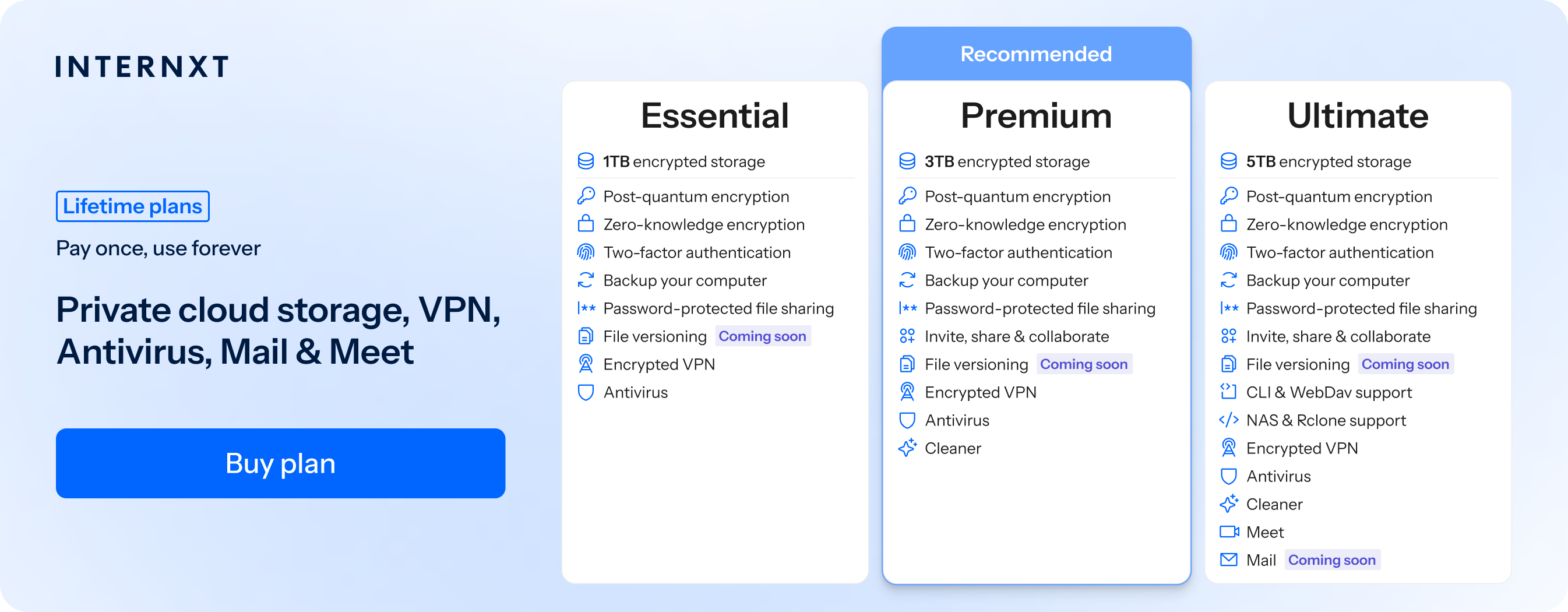
At those sizes, a one-time lifetime plan from Internxt offers the best encrypted cloud storage for video editors.
| Plan | Storage | Features | Annual (Paid monthly) | Lifetime Cost |
|---|---|---|---|---|
| Essential | 1TB | €1.99/month | €380 | |
| Premium | 3TB |
|
€3.99/month | €580 |
| Ultimate | 5TB |
|
€5.99/month | €780 |
| *Prices are correct at the time of writing and are subject to change. For latest prices, check https://internxt.com/pricing | ||||
Cloud storage vs external SSD for video editing: which is better?
Wrong question, honestly. It's not either-or. Ask around r/editors, and you'll hear the same thing: the pros who never lose a project use both, because they solve different problems.
An external SSD is about speed. Plug it in and you can edit straight off it with almost no lag, which is exactly what you want for the project you're cutting today.
The downside is that it's a single physical thing. It can be dropped, lost, stolen, or just quietly die one morning, taking your footage with it. SSDs also fill up, which brings us to the question every editor eventually types into Google.
Is 2TB SSD enough for video editing?
For one active project, usually yes. For your whole working life, not even close. A 2TB drive handles a current edit and its raw footage comfortably in most compressed 4K workflows, but it'll choke the moment you're juggling several jobs or shooting in RAW.
Treat an SSD as your fast workspace for the job in front of you, not as the place where everything lives.
The cloud covers what the SSD can't. It's your safety net if the drive fails, your overflow when local space runs out, and the only practical way to share big footage with a client or a remote collaborator. It also doesn't care if your laptop gets stolen at a coffee shop.
What is the 3-2-1 rule of video editing?
It's the backup rule every editor should tattoo somewhere: keep 3 copies of your footage, on 2 different types of media, with 1 copy stored offsite. In plain terms, that might be your working SSD, a second local backup drive, and a copy in the cloud.
If a drive dies or your studio floods, you've still got your work.
The cloud is what makes that off-site copy effortless, and if you choose a zero-knowledge provider, that off-site copy stays private, too. So the real setup isn't SSD or cloud. It's a fast SSD for today's edit, plus encrypted cloud storage as the backup and the offsite leg of your 3-2-1.
Is cloud storage safe for unreleased client footage?
It can be, but only if you pick the right kind. The word "safe" hides a big gap between two very different setups, and for client work under embargo, that gap is everything.
Most mainstream services use server-side encryption. Your footage is encrypted, yes, but the provider also keeps the keys. That's convenient (it's how they offer password resets and previews), but it means the company can technically open your files, and so can anyone who hacks them, subpoenas them, or pressures an employee.
For an unreleased trailer or a campaign under NDA, "trust us not to look" isn't a security model.
Zero-knowledge encryption closes that gap. Your files are locked on your device before they upload, and the provider never receives the key. Even the company hosting your footage can't open it.
If they got breached tomorrow, an attacker would walk away with scrambled data and nothing to read. That's the standard you want for anything you're contractually obligated to keep private.
A couple of other things are worth checking for sensitive work. Jurisdiction matters: a provider under EU law (GDPR) operates under stricter privacy rules than one in some other regions.
And an independent security audit plus open-source code means the "zero-knowledge" claim has been checked by someone other than the marketing team. If you want to weigh the field on encryption alone, we compare the best encrypted cloud storage in a separate guide.
This is the whole reason Internxt's zero-knowledge Drive tops this list for editors handling client footage. You don't have to take anyone's word that your files stay private, because the design means nobody else can read them in the first place. If leaking a project would cost you the client, that's the distinction worth paying for.
Frequently asked questions
What is the best cloud storage for video editing?
It depends on your priority. For privacy and client work under NDA, Internxt leads with zero-knowledge, post-quantum encryption. For the cheapest way to store a lot of terabytes, Backblaze B2 wins. For editing live with a remote team, LucidLink.
Which storage is best for video editing?
Most working editors use a combination: a fast external SSD for the project they're cutting right now, plus cloud storage as a backup, an off-site copy, and a way to share big files. The SSD gives you speed, and the cloud gives you safety and reach.
What is the 3-2-1 rule of video editing?
Keep 3 copies of your footage, on 2 different types of media, with 1 copy stored offsite. For example: your working SSD, a second local backup drive, and an encrypted cloud copy. If one drive fails or your studio floods, your work survives.
Is 2TB SSD enough for video editing?
For a single active project, usually yes, especially in compressed 4K. For your whole library or RAW and 8K workflows, no. Use a 2TB SSD as the fast workspace for your current edit, and keep everything else in the cloud or on backup drives.
Can I edit video directly from cloud storage?
With some services, yes. Tools like LucidLink mount the cloud as a virtual drive so you can scrub footage as if it were local. Most standard cloud storage isn't built for that, so you download files first, then edit. If real-time cloud editing matters, pick a service designed for it.
Is cloud storage safe for unreleased client footage?
Only if it's zero-knowledge. With server-side encryption, the provider holds your keys and can technically open your files. Zero-knowledge providers like Internxt lock your footage on your device and never receive the key, so nobody but you can open it, even if the provider is breached.
The bottom line for editors
There's no trophy for "best cloud storage" that fits every editor, so stop looking for one. Pick the tool that matches how you actually work. Need to move a massive drive of footage to a colorist once? MASV.
Cutting the same timeline with a team across three cities? LucidLink. Sitting on a growing archive of finished jobs? Backblaze B2 is among the cheapest cloud storage going.
But if your footage is the kind that can't leak, where a client's trust (and your next invoice) rides on it staying private, the encryption model is the part you can't compromise on.
That's why Internxt earns the top spot: zero-knowledge by default, EU jurisdiction, open-source and independently audited, with lifetime plans so you're not renting your own storage forever. LucidLink is the other genuinely private option if you need live collaboration, but Internxt edges it on jurisdiction, openness, and price.
Want storage built for video that nobody but you can open? Store your video files privately with Internxt and keep your footage yours.
Also of interest to you...