
Block Storage vs Object Storage: What You Need to Know


Block storage is a method for companies to manage files and databases by storing data in blocks for efficient and fast data access.
It is similar to object storage, but depending on your needs, you may want to know which option better meets your needs.
In this article, we will cover the following topics to help you understand:
- Block storage vs object storage
- Difference between block storage and object storage
- File storage vs block storage
- Benefits of block storage
- Block storage use cases
- When to choose block storage
We will also offer options for you to get started with managing your storage for business with Internxt.
In this article
- Block storage vs object storage definitions
- What other methods are available to store data?
- Benefits of block storage vs object storage
- Block storage use cases
- When to choose block storage vs object storage
- How Internxt can meet your storage needs
- Related articles
- Frequently asked questions
Block storage vs object storage definitions
What is block storage?
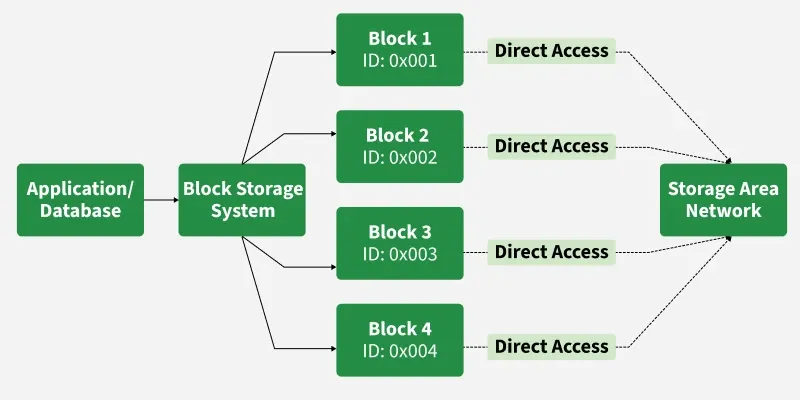
Block storage is a type of data storage that divides data into fixed-size blocks, each with a unique address.
These blocks are stored independently on physical storage, providing a direct pipeline to the data and allowing fast, low-latency access across multiple environments.
As a result, block storage is ideal for high-performance applications like databases, virtual machines, and enterprise workloads.
How block storage works
Block storage begins by breaking data into fixed/sized blocks, which represent an individual piece of data.
From there, block storage works in the following steps
- Data is divided into blocks: When a file is saved, the storage system breaks it into small, fixed-size pieces called blocks. Each block contains a portion of the data.
- Each block is assigned an address: Although the block itself does not know what file it belongs to, every block is given a unique address so the system exactly where it is stored for quick and easy access.
- Blocks are stored: The system keeps track of where blocks are saved on a storage device which can be hard drives (HDD)s, SSD, or cloud volume.
- Reading and recreating data: When a file needs to be opened, the system looks up the addresses of all the blocks that make up the file. It then retrieves each block and assembles them in the correct order to recreate the original file.
- Writing or updating data: When a file is modified, the system writes the changes to specific blocks. Some updates overwrite existing blocks, while others may write new blocks or update the block addresses.
- Ensuring consistency: The system ensures that blocks are always read and written in the correct order. This guarantees data accuracy and prevents corruption, which is essential for block storage use cases.
What is object storage?
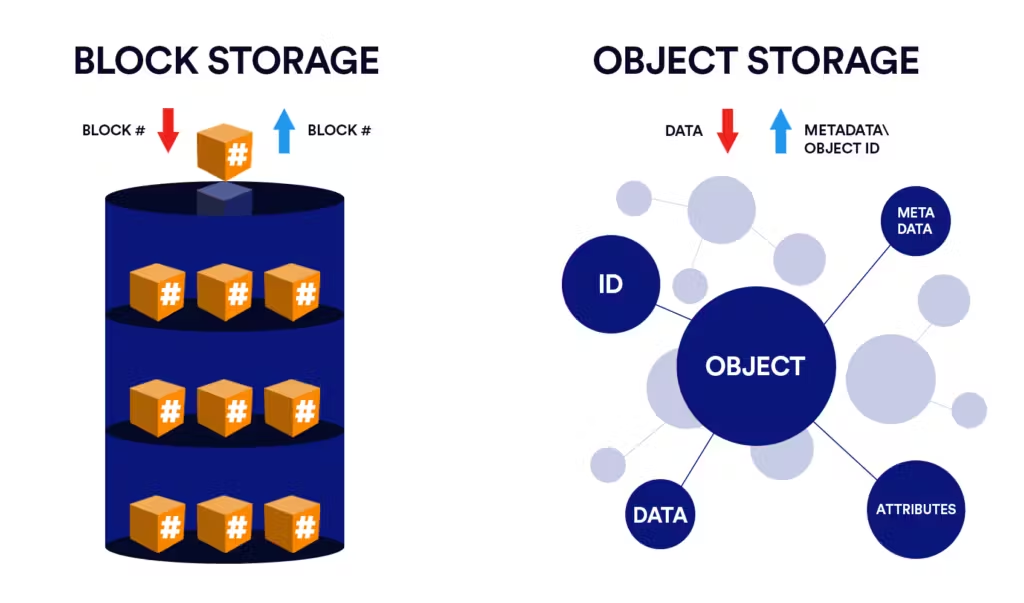
Object storage products manage data as objects containing:
- The file’s data
- Metadata
- Unique identifier(s)
Unlike block storage, which divides data into fixed-size blocks for fast, low-latency access, object storage organizes data in a flat, scalable structure, making it easier to store and retrieve large amounts of unstructured data for use cases such as video streaming.
Difference between block storage and object storage
Below you can find an overview of block storage vs object storage.
| Feature | Block Storage | Object Storage |
|---|---|---|
| Structure | Data split into blocks | Data stored as objects & metadata |
| Access | By block address | By unique object ID |
| Speed | High, low latency | Slower, optimized for large-scale storage |
| Use case | Databases, virtual machines, file systems | Backups, media, archives, storage |
| Scalability | Limited, depends on hardware | Very high, can scale to exabytes |
| Metadata | Minimal | Rich metadata for quick access |
What other methods are available to store data?
File storage vs block storage
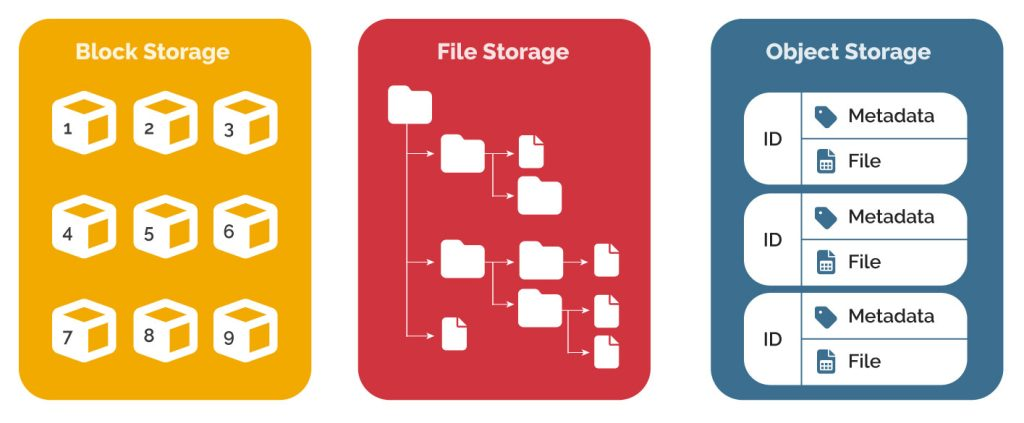
File storage is a type of data storage that organizes data in a hierarchy of files and folders, managed by a file system that allows easy access, sharing, and organization of files across users and applications.
Unlike block storage, which splits data into fixed-size blocks for fast, low-latency access, file storage adds a management layer for easier file handling but is slower for high-performance workloads.
Unlike object storage, which stores data as objects with metadata in a flat structure for massive scalability, file storage is better for structured, shared file access rather than handling large amounts of unstructured data.
For a more detailed overview of these three storage models, visit our blog article below.
Benefits of block storage vs object storage
High performance and low latency
As block storage accesses data from its address from the block directly, the system can read and write information with minimal delay to quickly access data. It simply reads or writes the block at the requested address without any additional processes.
Because block storage behaves like physical storage, such as a hard drive or SSD, applications can perform reliably even under heavy load, which is a major benefit for environments where reliable performance and speed are critical.
Control over data
Block storage works as empty blocks of space that keep track of their locations, meaning the storage system does not decide how data is handled or organized. This responsibility is handled by the operating system or application, so you have control over how data is structured, stored, and accessed.
Data integrity
Block storage works well for applications where it is very important that data stays correct and in the proper order.
When you save a file, block storage breaks it into small pieces called blocks and stores each block in a specific location. Later, when the file is needed, the system retrieves all the blocks and puts them back together exactly as they were.
This process ensures that nothing is lost or mixed up. For example, mobile banking or a business database, transactions and records must be saved and read in the correct sequence. Block storage guarantees this, so the data is always accurate and reliable.
Flexibility & scalability
There are no limitations with block storage, so it can be configured to your preferred OS, like Windows or Linux. You can add new blocks to existing ones whenever you need storage for more data.
Modification
Whenever you need to modify a file, the system identifies the block that needs to be changed and rewrites it with the new data rather than modifying the whole block. Therefore, if you’re managing a large number of files, this makes block storage a more efficient solution for data you frequently update.
Block storage use cases
Virtual machines
Virtual machines use block storage as their virtual hard drives, allowing you to run Linux on a Windows computer or vice versa.
Block storage gives these virtual machines fast access to the blocks of data they need, just like a real hard drive disk would on a physical computer
Example: A cloud provider like AWS or Azure uses block storage to host virtual machines. Each VM’s operating system and application files are stored on block storage volumes to allow fast startup and smooth operation.
Transaction workloads
PoS systems, banking, login alerts, etc, are all examples of transactional workloads that benefit from the data integrity, high-capacity, and fast speeds of block storage.
Any system that handles frequent transactions benefits from block storage because it guarantees data integrity and the correct order of operations. This is crucial for financial and booking systems.
Example: An airline booking system uses block storage to record flight reservations. Each booking is stored in specific blocks, so there is no risk of double-booking or losing passenger data.
Storage area networks (SAN)
A storage area network is a dedicated network that connects servers to block storage devices, allowing multiple servers to access shared storage at high speed as if those blocks were locally attached devices.
Examples: Data centers using SANs to host multiple virtual machines or large organizations centralizing file storage for high-performance benefit from block storage.
Containers
Containers use block storage to provide fast, consistent storage for the applications running inside them, so developers can migrate the containers easily between servers, locations, and operating environments.
Examples: A cloud application storing configuration files in block storage volumes, microservices saving temporary data for processing tasks.

Active data management
Block storage is suited for applications that need fast, low-latency access to data that is frequently read and written. This includes tasks like video editing, analytics, and virtual desktops, where specific parts of large files are accessed repeatedly. Its fast read/write performance ensures data can be modified quickly and predictably.
Example: A video production company uses block storage to store raw video files for editing. Editors can work on large 4K files in real time without delays because block storage allows quick access to specific frames and sections of the file.
When to choose block storage vs object storage
Before choosing your storage needs, you should consider the benefits, costs, and the main differences between block storage and object storage.
Choose block storage if:
- You need fast, low-latency access to data
- Applications require frequent reading and writing of data
- You need precise control over how data is organized and managed
- Data accuracy and order are critical, such as in databases or transactional systems
- You are running virtual machines or enterprise applications that demand predictable performance
- You need persistent storage for containers or workloads that modify data continuously
Choose object storage if:
- You need fast, low-latency access to data
- Applications require frequent reading and writing of data
- You need precise control over how data is organized and managed
- Data accuracy and order are critical, such as in databases or transactional systems
- You are running virtual machines or enterprise applications that demand predictable performance
- You need persistent storage for containers or workloads that modify data continuously
In summary, block storage is best for speed and precise control, while object storage is best for scalability and managing large volumes of data.
How Internxt can meet your storage needs
Internxt specialises in offering secure cloud storage with Internxt Drive, a cloud storage solution for personal, family, or cloud storage for business use.
For enterprises, Internxt offers S3 cloud object storage, an alternative to other big tech companies to manage large amounts of data.
Internxt S3 costs up to 80% cheaper than AWS, Azure, or Google Cloud, as you only pay for the storage you use, and there are no extra egress or ingress fees. You can scale the storage whenever you like, so your team always remains in budget.

As a 100% hot cloud storage solution, Internxt S3 is an affordable, secure, and compliant storage for large businesses or enterprises to access large amounts of data.
For more information, you can contact our sales team to see how Internxt meets your needs by visiting our website below.
Related articles
- What is object storage?
- AWS vs Azure vs Google Cloud
- S3 storage costs
- Top object storage solutions for enterprises
Frequently asked questions
Which is faster, block storage or object storage?
Block storage is faster for reading and writing small pieces of data because it gives direct access to each block. Object storage is slower for frequent updates but works well for storing and retrieving complete files or large datasets.
Can block storage scale like object storage?
Block storage can scale, but it is limited by the underlying hardware or storage system. Object storage is designed to scale almost without limit across distributed systems.
Can I use both block and object storage together?
Yes. Many organizations use block storage for performance-critical applications and object storage for backups, archives, or large unstructured data.
Can block storage handle unstructured data?
Block storage can store unstructured data, but it is not optimized for very large files or data that is rarely accessed. Object storage is better suited for unstructured data like videos, images, and large datasets.