
What Is Object Storage? How it works, Pricing, Definition, Solutions

Traditional cloud storage models may struggle to meet the high demands of data storage for large enterprises, leading companies to find a more effective, scalable, and quick way to access hundreds of files.
This is why the best solution to manage large amounts of data is cloud object storage solutions. In this article, we will answer what is object storage, plus the following topics:
- What is object storage?
- Object storage explained
- Benefits of object storage
- Object storage solutions
- Pricing
By the end of this article, you will have all the information you need about object storage to help make your decision for an object storage provider to manage and migrate to the cloud.
In this article
- What is cloud object storage?
- How object storage is different
- How does object storage work?
- Benefits of object storage
- Object storage solutions
- Costs of object storage solutions
- Object storage use cases
- How to choose the right object storage solutions
- Related articles
- Frequently asked questions
What is cloud object storage?
Cloud object storage is a data storage architecture that stores and manages unstructured data in units called objects.
Unlike traditional storage methods, which use a traditional folder structure to access files, files stored with object storage solutions are stored as an independent object with a unique ID and metadata that can be accessed through multiple paths.
As a result, object storage allows you to access files much quicker, as file or block storage relies on accessing files based on folder hierarchies and subfolders, so you don’t need to know or follow a folder path to access them.
Not all cloud providers offer object storage, but the most popular providers of object storage are AWS, Azure, and Google Cloud.
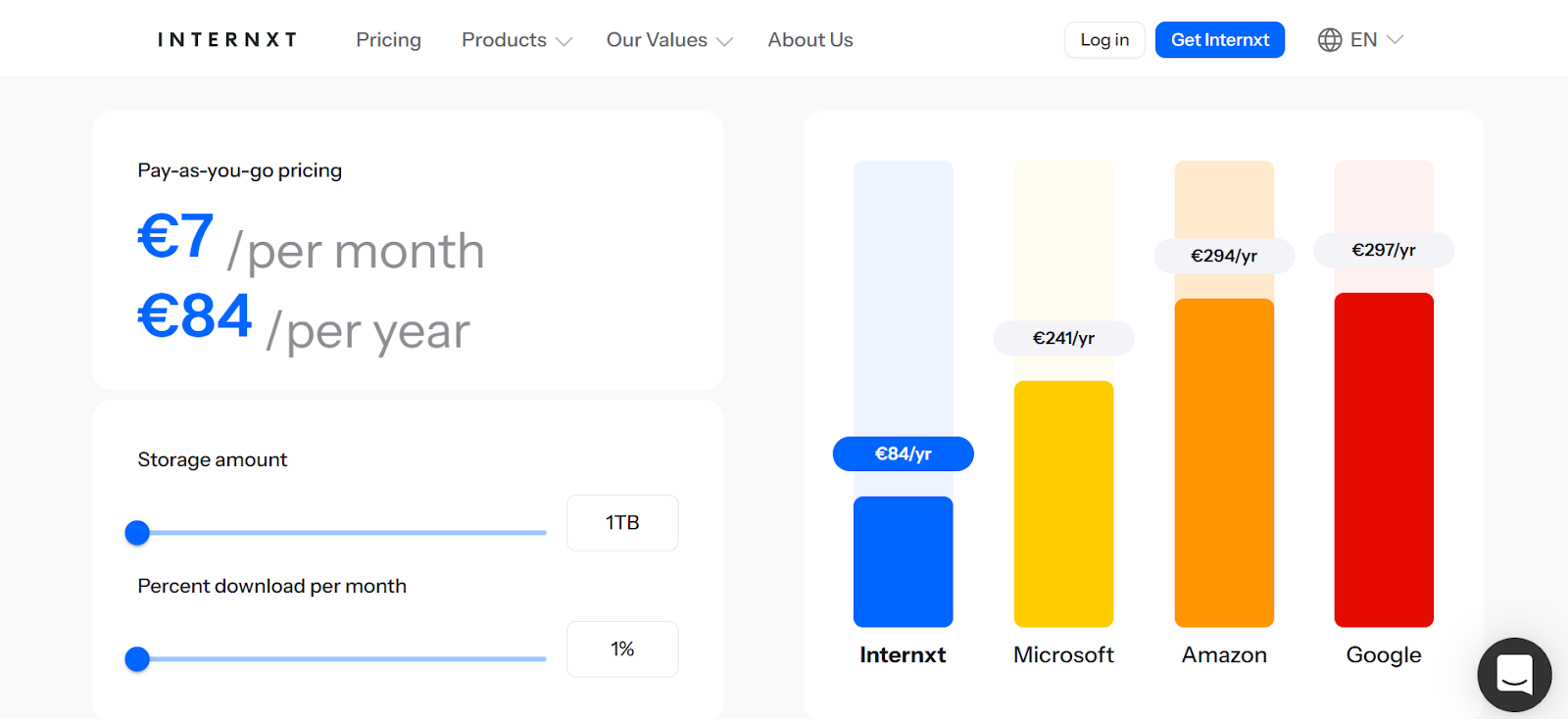
Internxt is one of the few alternatives to big tech offering object storage, and is a cheaper alternative, as pricing costs just €7 per TB. Internxt doesn’t charge egress or ingress fees, making it up to 80% cheaper than major object storage providers.
How object storage is different
To fully understand the differences between object storage and other models, we can compare it to the two other types of cloud storage, block storage and file storage.
Block storage
Block storage stores data and splits information into small, fixed-sized pieces called blocks. Each block contains only raw data, a simple sequence of bytes, and an address that tells the system where that block is stored.
Details about what the data is and how it should be organized are handled by a file system or the application using the storage. This keeps a map that tracks which blocks belong to which file and the order they should be read in.
When you access a file, the system uses this map to locate the correct blocks and reassemble them into the original data. As a result, block storage is a fast and reliable way to access data as it focuses on reading and writing blocks rather than understanding the data.
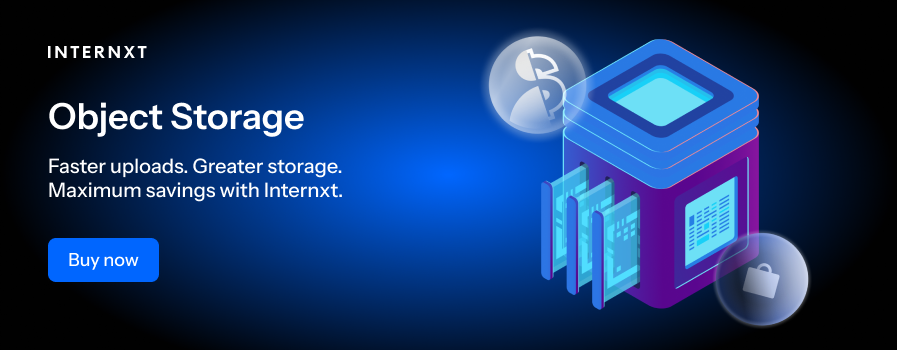
Block storage is a popular use case for operating systems, cloud data management tools and applications that need consistent performance and low latency.
File storage
Cloud storage services such as Internxt Drive. File storage saves information as files that are organized into folders and subfolders, similar to how we save files on our computer.
Each file has a name, a file type, and information about who can access it. When you open a file, the system follows the folder path, finds the file, and reads the data for you.
Object storage
Object storage works differently from the previous two examples, as files are saved as independent objects rather than being organized into folders, subfolders, or blocks.
All data includes descriptive information called metadata, and a unique identifier that the system uses to locate it. When an object is requested, the system uses this unique identifier to retrieve it directly rather than navigating through folder hierarchies.
Object storage is well-suited for cloud environments, backups, media storage, and application data where performance, durability, and scalability are more important than manual file navigation.
For more about block, file, and object storage, and which one is suitable for your needs, check out our article below.
| Feature | File Storage | Object Storage | Block Storage |
|---|---|---|---|
| Data Organization | Hierarchical folders and files | Flat structure with unique IDs | Divided into fixed-size blocks |
| Metadata | Limited metadata (name, type, permissions) | Rich metadata (custom tags, creation date, size, permissions) | Minimal metadata (block address, size) |
| Access Method | Via file paths | Via unique object ID and API | Via block address by OS or database |
| Best For | Documents, shared drives, user files | Large-scale unstructured data, backups, media files | Databases, virtual machines, high-performance apps |
| Scalability | Moderate ❌ | High ✅ | Moderate ✅ |
| Performance | Good for general use ✅ | Slower for random updates ❌ | High performance for read/write ✅ |
| Durability & Redundancy | Depends on underlying system ❌ | Automatic replication across nodes ✅ | Depends on RAID or SAN setup ✅ |
| Ease of Use | User-friendly ✅ | Programmatic/API access needed ❌ | Requires system management ❌ |
How does object storage work?
Now that we’ve answered the question of what is cloud object storage, we can look at how it works.
Storing objects
When you upload a file to an object storage system, it is stored as a single object. This object contains three parts:
- The data
- Metadata
- Unique identifier
Once stored, the storage uses the above data and ID to recognize and access the object.
Where data is stored
Objects are stored in a flat environment rather than in folders or hierarchical paths. In doing so, the system scales easily and manages billions of objects without reorganizing data, as the unique ID always points to the object.
For increased performance, durability, and redundancy, data is distributed across multiple nodes using a combination of hard disk drives and solid disk drives.
Metadata index
Metadata index is a core part of object storage and can store terabytes or petabytes of data as it tracks all objects within the storage.
This metadata can contain:
- Unique identifier (object ID used to locate the object in the system)
- Object size
- Creation date
- Modified date (timestamp of the most recent update)
- Content type (image, video, document, audio, or application data)
- Access permissions
- Replication status
- Checksum or hash (used to verify data integrity)
- Expiration or retention date
This information is stored separately from the actual data, allowing the system can quickly and efficiently locate and retrieve objects based on their metadata attributes, as it is all stored separately.
API access
Users and applications access objects through an Application Programming Interface, or API, such as Amazon S3, OpenStack Swift, or Cloud Data Management Interface (CDMI).
For object storage, an API lets applications interact with the storage without knowing where the data is physically stored.
When an object is requested, with the object ID, the following happens:
- The object storage system receives the request and looks up the object ID in the metadata index.
- The metadata index provides the location(s) of the object on the storage nodes.
- The system retrieves the object from the appropriate storage node(s).
- The object is sent back to the user or application along with its metadata.
- The API delivers the object and metadata to the requester in a format they can use.
API access allows companies to easily integrate object storage into their applications, no matter what technology or vendor they use.
Benefits of object storage
Manage unstructured data
If you have a large amount of data, object storage makes accessing this data quickly and efficiently. As we covered before, data stored in object storage is unstructured, and objects are accessed via metadata, rather than sorting through folders and subfolders.
The result is that you can access your documents, images, videos, and logs quickly and reliably, without needing to navigate complex folder structures, making data management and retrieval far more efficient.
Scalability
For businesses or enterprises, scalability is an important component when choosing the right storage provider. As your storage needs can increase or decrease over time, you need a provider that can scale with your business to avoid running out of storage.
With Internxt, you can scale your storage at any time to meet your needs. Plans are charged on a per TB basis, so if you need to increase your plan, you can simply add more TB without any additional costs.
If you need to decrease your storage, Internxt cloud object storage allows you to lower your storage plan, ensuring you only pay for the storage you need.
Disaster recovery & high availability
To ensure your data remains safe, accessible, and secure, Internxt uses redundant data storage that replicates and distributes data across multiple European servers.
Choosing Internxt to store your data means that if one server or even an entire data center experiences a failure, your information is still available from another location.
The system continuously monitors the health of servers and automatically redirects requests to operational copies of your data, minimizing downtime.
Internxt takes every measure to protect your data against hardware failures, natural disasters, and other unexpected events, ensuring your data remains safe, accessible, and reliable at all times.
Cost
Cloud storage can reduce costs by eliminating the need for expensive on-site infrastructure, maintenance, and energy consumption, while letting you pay only for the storage you actually use.
Some services, like AWS or Google Cloud, may have additional costs on top of your storage plan, which can quickly deplete your budget, such as data transfer fees.
This is why Internxt object storage offers a pay-as-you-go model for its S3 plans. You pay a fixed fee of €7 / TB, with no additional egress or ingress fees, allowing you to plan your budget and pay only for the storage you need.
For more information about S3 costs, check out our article below.
Customize metadata
To make accessing data even easier, you can customize your metadata with additional tags or descriptions to make finding, sorting, and managing large amounts of data even easier.
For example, you can customize metadata for an important video to include relevant information such as:
- Title, description, author or creator, date of creation
- Format
- Resolution
- Duration
- Access permissions
- Version number
This customization makes it simple to search, sort, and manage your cloud storage system to fit your needs.
Object storage solutions
AWS
AWS S3 is Amazon’s object storage service designed for scalable, durable storage of unstructured data, supporting a wide range of applications from backups to big data analytics.
Advantages
- Highly scalable and reliable
- Extensive ecosystem and integrations
- Compliance options
- Flexible storage classes
Disadvantages
- Costs can grow quickly with frequent access or large data transfers
- Pricing and storage class options can be complex to manage
Azure
Azure Blob Storage is Microsoft’s object storage solution for storing massive amounts of unstructured data, integrated closely with Azure’s cloud services and Microsoft applications.
Advantages
- Strong security and compliance
- Easy integration with Microsoft products
- Tiered storage for cost efficiency
- Global redundancy options
Disadvantages
- Pricing structure can be confusing
- Performance may vary across regions
- Smaller developer ecosystem compared to AWS
Google Cloud
Google Cloud Storage is Google’s scalable object storage platform, optimized for high-performance, low-latency access and integrated with Google’s analytics and AI tools.
Advantages
- Fast performance and low-latency global access
- Strong data analytics and AI integrations
- High durability and reliability
Disadvantages
- Fewer enterprise service integrations than AWS or Azure
- Advanced features may be less mature
- Limited regional coverage in certain areas
Internxt
Internxt S3 is an enterprise cloud solution for companies looking to store, access, and manage large-scale data.
It is based in Europe, and complies with multiple regulations, including HIPAA, IS0 27001 and SOC 2. Plans are fully scalable at a fixed cost with no additional charges, and all your data is protected with advanced security, redundancy, and encryption.
To learn more, you can contact the sales team on our website for more information on how Internxt can help meet your cloud storage needs.
Advantages
- Fast performance and low-latency global access
- Highly scalable and reliable
- High durability and reliability
- Pay-as-you-go model with no extra fees
- Multiple compliance
Disadvantages
- Doesn’t offer some of the advanced features of big tech companies
Costs of object storage solutions
AWS
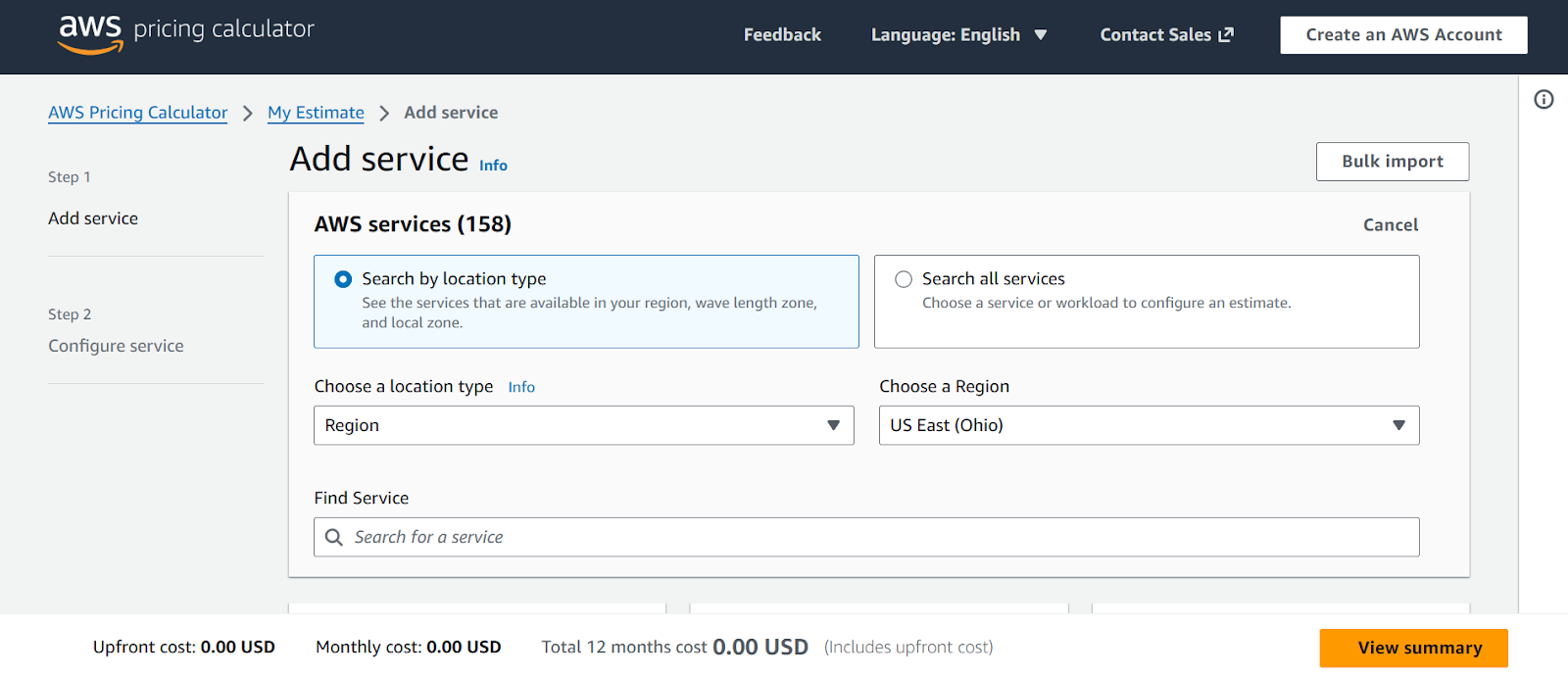
AWS offers a pricing calculator that allows you to search by location and region based on the services you need. It also has the option to chat with the sales team and view the upfront, monthly, and yearly costs to help you plan your budget effectively.
Azure
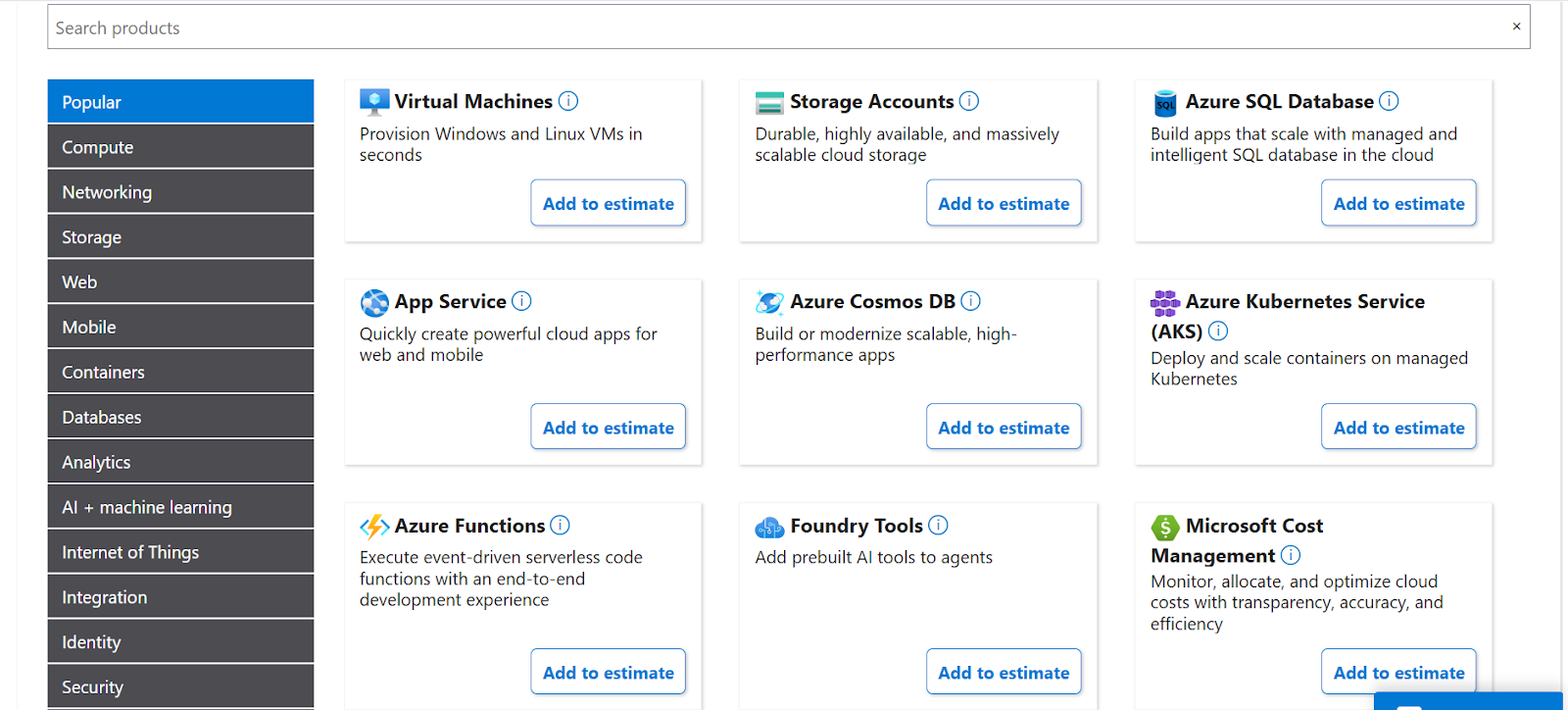
Azure offers the most in-depth pricing calculator for its object storage solutions, so if you know what you need, you can filter and pay for the services you need, or talk to a sales representative.
Google Cloud
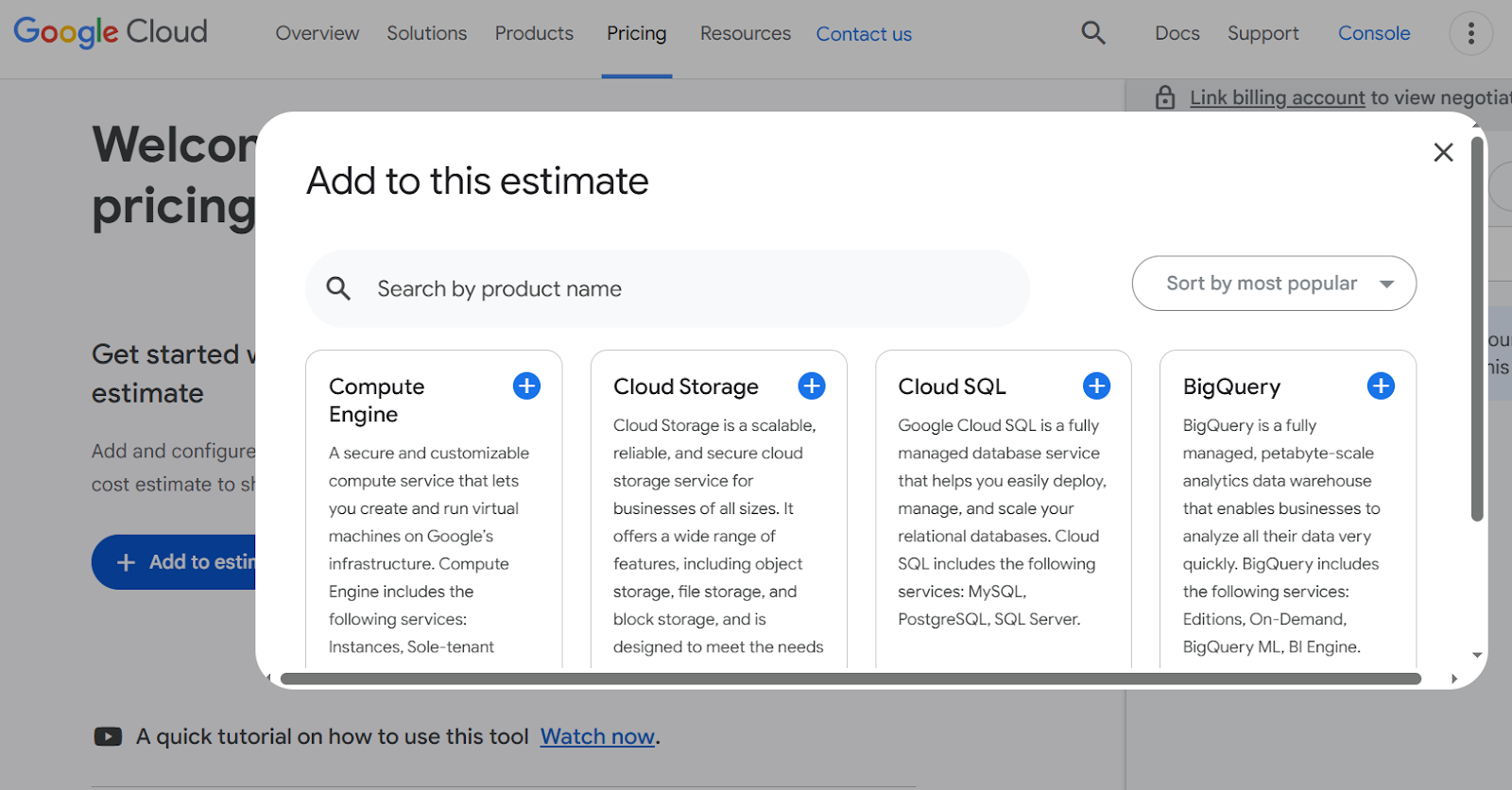
Finally, Google Cloud also offers a pricing calculator for its cloud storage or data analytics services.
Internxt
As Internxt offers a fixed rate for its object storage, you can easily calculate how much your plan will cost based on the storage you need, with no hidden charges.
To see how much you could save compared to Amazon, Microsoft, or Google, you can view this on the Internxt website, where you can also contact the live support team or contact sales for more information.
Object storage use cases
Backups and archives
Object storage solutions offer solid data backup and recovery options, ensuring you can always access data thanks to advanced security combined with redundancy. Thanks to easy customization, multiple redundancy, and accessibility, your data is protected, organized, and always available whenever you need it.
Streaming
Streaming works well with object storage because media files like videos, music, and live broadcasts can be stored and delivered globally with low latency.
Internet of Things
Due to the emergence of technologies in our home from IoT devices such as Alexa, Google Home, and smart appliances, these devices need a way to manage this data. Object storage can help handle this growing need due to its scalability, flexibility, and support for unstructured data formats.
Data analytics
Cloud object storage allows for simple centralization of large datasets from multiple sources, such as logs, customer behavior, and operational data.
This allows analysts to run queries, generate reports, and extract insights without moving or duplicating data, improving speed and efficiency for data analysis teams.
How to choose the right object storage solutions
You should choose AWS, Azure, or Google if AWS, Azure, and Google Cloud your company already relies on their ecosystems or needs advanced cloud services beyond basic object storage.
These platforms work well for complex, enterprise-scale workloads that require deep integrations with analytics, AI, machine learning, databases, and global cloud infrastructures.
If data sovereignty, cost control, and ease of use are important to you, Internxt provides a secure and affordable alternative to traditional object storage cloud solutions.
Internxt S3 is especially suitable for companies that want scalable object storage for backups, media, application data, or archives, without dealing with complex pricing models or vendor lock-in.
Related articles
- Enterprise cloud solutions
- Cloud storage for business
- Most efficient object storage products
- Open source object storage
Frequently asked questions
What is object storage used for?
Object storage is used to store large amounts of unstructured data like images, videos, backups, and logs. It scales easily and is cost-efficient for cloud environments.
Is object storage secure?
Yes. Object storage can be very secure when it includes encryption, access controls, and secure authentication. The level of security depends on how it is configured and managed.
What types of data work best with object storage?
Unstructured data, such as media files, backups, documents, and application data that don’t need frequent small edits.
What is the best object storage?
The best object storage balances security, privacy, scalability, and cost. For this reason, Internxt object storage is a scalable and affordable solution for enterprises to manage large-scale data.