
Is MEGA.nz Safe? Encryption, Security, and Privacy Explained

MEGA is a cloud storage service launched in 2013 by Kim Dotcom, offering file sharing, backups, and syncing.
It is one of the most popular cloud storage options due to its extensive feature suite and generous free cloud storage. This article examines MEGA’s features and the following topics:
- What is MEGA?
- Features of MEGA
- Pricing
- Is MEGA.nz safe?
- Privacy, safety, and security
- Alternative to MEGA
Once we have covered these topics, we also cover what the best MEGA alternative is for your online privacy and the privacy of your files.
Table of contents
- What is MEGA?
- Features of MEGA
- MEGA security
- MEGA safety
- MEGA privacy
- Is MEGA safe for your personal files?
- Security vulnerabilities of MEGA
- Alternative to MEGA
- Internxt vs MEGA overview
- Related articles
- Frequently asked questions
What is MEGA?
MEGA is an online cloud storage provider offering file sharing, backups, and syncing. It was launched on 19 January 2013 by Kim Dotcom after the shutdown of his earlier file‑sharing site Megaupload by U.S. authorities in 2012.
MEGA was later released with a strong emphasis on secure storage. However, Dotcom stepped down from the company’s leadership later in 2013, and he is no longer involved in the project.
Features of MEGA
MEGA offers up to 20GB of free cloud storage, and has expanded its product suite to include:
- • MEGA VPN for secure and private browsing
- • Command-line interface for automation and advanced workflows
- • Chat for encrypted messaging, voice, and video calls
- • Video Meetings for encrypted video conferencing
- • S4 object storage, S3-compatible for developers
- • MEGA Pass password manager included with premium plans
- • Secure file sharing with links, optional passwords, and expiration dates
This combination forms an attractive service for casual cloud storage users, developers, or enterprises. But if you’re wondering is MEGA.nz safe for your personal files, then we will investigate this further below.
MEGA security
MEGA uses many features to secure your files and data, which include:
- Encrypting files on your device before upload so only you can access them
- Two-factor authentication
- Protect shared files with password-protected links and expiration dates
- Maintain file versioning and backups to recover previous versions of files
Examples:
- Zero-knowledge encryption means nobody but you can access your files
- Password-protected file sharing
- Link expiration for shared files
- File versioning
- Recover deleted files
MEGA safety
Cloud storage safety is about protecting your files and your use of the service from accidental data loss, damage, and other problems that could affect availability or usability.
For MEGA cloud storage, the safety of your files includes measures to:
- Keep multiple copies of files in redundant data centers to prevent loss from hardware failure
- Retain deleted files and previous versions for recovery within a set time period Protect against accidental overwrites or deletions through versioning and trash recovery
- Ensure service uptime with data center infrastructure monitoring and maintenance
Examples:
- Restoring a deleted file from MEGA’s trash within the retention period
- Recovering an earlier version of a document after accidental edits
- Files remaining accessible even if one server or data center experiences a failure
- Creating a backup key in case you lose your password
MEGA privacy
Privacy in cloud storage is separate from security. For example, big tech companies like Dropbox or Google Drive offer secure cloud storage, but they are not good options if you value your privacy due to previous data breaches and GDPR violations.
So, how does MEGA hold up in terms of privacy, and is MEGA.nz safe if you want to store your files or gain more anonymity online?
Here are some of the privacy features of MEGA:
- Collect only the minimal personal data required for account creation and service operation
- Offer end-to-end encrypted communication in MEGA Chat and MEGA Meetings
- Provide users control over who can access their shared data
- Comply with data protection regulations like GDPR for EU users
Examples:
- Signing up with just an email and password, without providing unnecessary personal details
- Requesting access to, correction of, or deletion of personal data if you are an EU user
Is MEGA safe for your personal files?
MEGA has past problems regarding its privacy, both in terms of its encryption and who can actually read your data, despite claiming to be a cloud storage with zero-knowledge encryption.
Below are some things to consider about MEGA, which could be concerning if you want to store your photos, videos, or other sensitive documents.
First off, MEGA’s cofounder, Kim Dotcom, is very vocal on his Twitter / X account, publicly stating that anyone who values their privacy should avoid storing their files with MEGA. In one interview, Kim stated
“I’m not involved in Mega anymore. Neither in a managing nor in a shareholder capacity. The company has suffered from a hostile takeover by a Chinese investor who is wanted in China for fraud. He used a number of straw men and businesses to accumulate more and more Mega shares. Recently his shares have been seized by the NZ government. Which means the NZ government is in control. In addition, Hollywood has seized all the Mega shares in the family trust that was set up for my children. As a result of this and a number of other confidential issues, I don’t trust Mega anymore. I don’t think your data is safe on Mega anymore.” - Kim Dotcom
So if you were to ask Kim Dotcom is MEGA.nz safe, then he would have a lot to say. Whether you should believe him or not is up to you. Fortunately, there is other evidence about the privacy concerns of MEGA, which you can find out more about below.
Security vulnerabilities of MEGA
MEGA has been scrutinized for vulnerabilities with its type of encryption, which have been verified by independent security researchers in a report titled Vulnerability Analysis of MEGA Encryption Mechanism.
The full report can be read here
Vulnerability Analysis of MEGA Encryption Mechanism
Key findings of this report indicate that MEGA is vulnerable to at least five different attacks, summarized below, all of which could expose your files and data.
RSA Key recovery attack
MEGA can recover a user’s RSA private key in only 512 login attempts. This key is used to generate digital signatures and for authentication. With this, a cybercriminal or hacker can impersonate you and enter your account and files.
Plaintext recovery of files
MEGA is also able to decrypt node keys, which are essential for encrypting files and data, meaning MEGA could bypass these keys and access your files.
Framing attack
A framing attack involves inserting dummy files into a user’s cloud storage account that appear exactly like legitimate data. These files could lead to data loss, misinformation, or legal and financial consequences.
Integrity attack
Similar to a framing attack, an integrity attack can also alter or replace user files. But unlike a framing attack, an integrity attack is more noticeable as important files may appear modified, corrupted, or inconsistent with their original content.
GaP-Bleichenbacher attack
Weaknesses in RSA encryption can also be used to decrypt and expose RSA ciphertexts (encrypted data). If this encryption can be broken or bypassed, attackers or the service provider could gain access to encrypted content and view all the files in your account.
MEGA has since fixed these vulnerabilities and assures that it uses zero-knowledge encryption for all files. It also offers bug bounties for security experts to identify vulnerabilities in MEGA in return for a reward.
Even so, this past may make you consider choosing an alternative to MEGA if this makes you wary of using its cloud storage service.
Transparency
While some services are either fully open source, like Internxt, or proprietary software like Google Drive or iCloud, MEGA is a mix between the two. While some of its software is open source, some of it is hidden from the public.
Specifically, full server-side code, encryption key management, and backend infrastructure of MEGA are kept proprietary and closed source.
Due to the previously mentioned issues with encryption, it doesn’t bring a lot of trust if MEGA doesn’t make this code available to the public for independent security experts to verify that your data is, in fact, safe on MEGA’s servers.
No independent audits
While MEGA has been investigated and researched for its past vulnerabilities in its encryption, it still has yet to be independently audited to confirm that your files are 100% safe in MEGA's cloud storage.
Alternative to MEGA
Whereas MEGA keeps its encryption methods secret, Internxt Drive is the best alternative to MEGA, as it is a fully open-source European cloud storage company with post-quantum and zero-knowledge encryption.
Internxt has also been audited by Securitum, the same company that has audited Proton, DuckDuckGo, ING Bank, and many others.
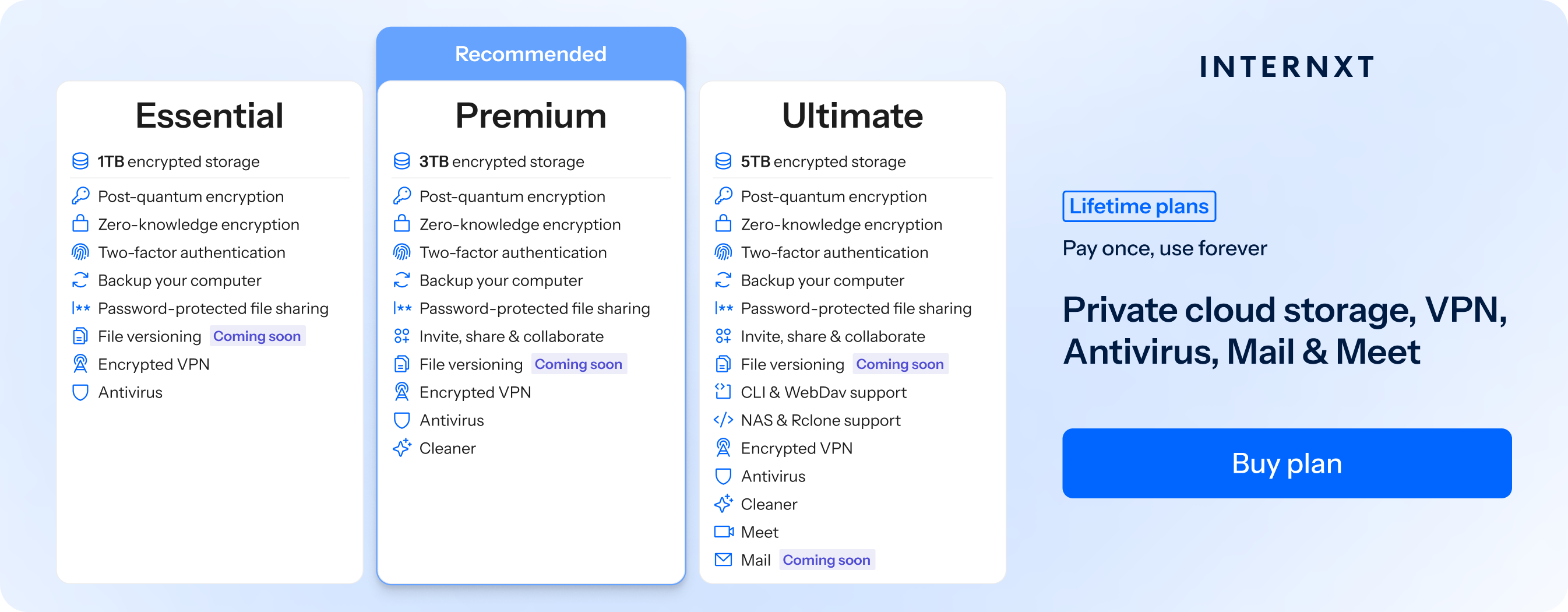
Internxt Drive secure cloud storage offers plans from 1 to 5TB on its website, with the chance to earn up to €100 when you refer a friend to Internxt.
| Plan | Storage | Features | Annual Cost | Lifetime Cost |
|---|---|---|---|---|
| Essential | 1TB |
|
€18 | €285 |
| Premium | 3TB |
|
€36 | €435 |
| Ultimate | 5TB |
|
€54 | €585 |
Internxt also offers plans for up to 100TB via stacksocial so you don’t have to worry about full cloud storage. However, these plans only include the basic Drive product, but you can upgrade your lifetime plan to get all the features of an Internxt plan included.
For the best secure cloud storage and a full product suite to protect your privacy online, check out the features of all our plans below, and visit our website to choose from any annual or lifetime plan.
Internxt vs MEGA
| Feature | Internxt | MEGA |
|---|---|---|
| Zero-knowledge encryption | ✔ | ✔ |
| Post-quantum encryption | ✔ | ✘ |
| Independently audited | ✔ | ✘ |
| Fully open source | ✔ | ✘ |
| S3 storage | ✔ | ✔ |
| VPN | ✔ | ✔ |
| Antivirus | ✔ | ✘ |
| Meet | ✔ | ✔ |
| ✔ | ✘ | |
| Lifetime plans | ✔ | ✘ |
| Compliance | GDPR, ISO 27001, SOC 2, HIPAA | New Zealand privacy laws, ISO 27001, SOC 2, HIPAA |
Related articles
Frequently asked questions
What is MEGA?
MEGA is an online cloud storage service offering file sharing, backups, and syncing. It was launched in 2013 by Kim Dotcom but has since evolved to include Chat, S4, VPN, and more.
What is the best alternative to MEGA?
The best alternative to MEGA is Internxt because it is fully open source, uses zero-knowledge and post-quantum encryption, is independently audited, and follows strict EU privacy laws.
Is MEGA open source?
No. Some client software is open source, but server-side code, encryption key management, and backend infrastructure are proprietary and closed source.
Is MEGA.nz safe for personal files?
MEGA uses encryption, two-factor authentication, password-protected links, link expiration, file versioning, and backups. However, past vulnerabilities and closed server-side code raise privacy concerns.