
Understanding Long-Term Cloud Migration Cost Savings

Whether you’re a small start-up or a large-scale enterprise, data storage and backups are a necessity for a business to run smoothly.
While many businesses may need on-premises storage for maximum control, this can be expensive, so if you’re wondering about the cloud migration cost savings when using a company like Internxt S3, this article will cover everything you need to help migrate or store data in the cloud.
This transition not only improves financial efficiency but also allows companies to scale resources more easily, respond faster to demand changes, and focus more on core business activities rather than infrastructure management.
First, we will cover the differences between on-premises vs cloud storage, the costs, benefits, and savings if you store data in the cloud.
Table of contents
- On-premises vs cloud storage
- Benefits of cloud migration
- What cloud migration cost savings can you expect?
- How to migrate to the cloud
- What is the best cloud storage to migrate to?
- Frequently asked questions
- Related articles
On-premises vs cloud storage
On-premises storage means that all hardware and infrastructure are physically located within your own facilities and managed by your team or company.
This management can cover:
- Servers: these run applications, manage access to data, and handle requests from users and systems.
- Storage devices: this is the hardware that stores data and can include hard drives or storage arrays, where all files, databases, and backups are physically kept.
- Networking equipment: networking devices include routers and switches that connect servers and storage systems, allowing data to move.
- Backup systems: solutions that create copies of data and store them separately, so information can be restored in case of failure, loss, or cyber incidents
Unlike cloud storage, your organization is responsible for purchasing, installing, maintaining, securing, and ensuring all of these devices are updated correctly. On-premises storage is used by organizations needing strict control, high security, or compliance with specific and strict regulations.
Cloud storage is a system where data is stored on servers managed by a third-party provider and accessed through the internet. The provider handles maintenance, updates, and infrastructure management.
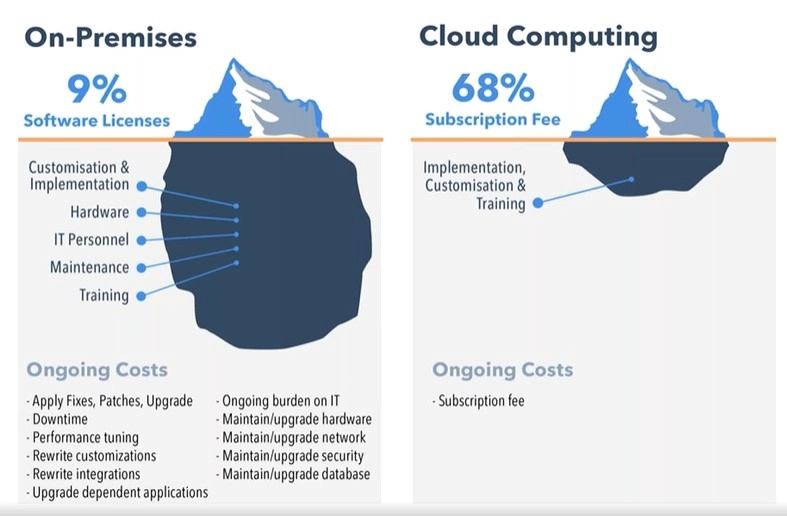
Cloud storage, especially object storage, is commonly used for its convenience, scalability, and reduced need for internal IT management. You can pay based on usage, reducing upfront costs and allowing flexible scaling.
Below you can find the average costs of setting up on-premises storage, not including future costs, highlighting the cloud migration savings you could benefit from when considering your cloud storage requirements.
| Cost Category | Item | Average Cost (€) | Notes |
|---|---|---|---|
| Initial Hardware | Server | €3,000 – €8,000 | Core system |
| Storage | 20–50 TB drives | €2,000 – €6,000 | HDD/SSD mix |
| Networking | Switches/cabling | €500 – €2,000 | Internal network |
| Power | UPS | €300 – €800 | Backup power |
| Software | Server licenses | €800 – €1,200 | OS + tools |
| Setup | Installation | €500 – €2,500 | One-time |
| Facility | Server room | €1,000 – €5,000 | Cooling + space |
| Annual Costs | |||
| Electricity | Power | €200 – €1,000 | Yearly |
| Cooling | Air conditioning | €200 – €800 | Yearly |
| Maintenance | Support | €500 – €1,500 | Repairs |
| Hardware replacement | Parts | €200 – €1,000 | Failures |
| IT staff | Admin | €20,000 – €60,000 | Main cost |
| Total initial | €8,000 – €25,000 | ||
| Total annual | €21,000 – €65,000 | ||
| Total (5 years) | €40,000 – €120,000+ | ||
Benefits of cloud migration
Cost efficiency
Cloud migration cost savings start by reducing the need for large upfront investments in hardware and infrastructure.
If your organization switches to a pay-as-you-go model, such as Internxt S3, you only pay for the storage you use, with no additional egress or ingress fees.
Scalability and flexibility
Cloud services offering object storage allow businesses to scale resources up or down based on demand. This flexibility is especially useful during peak usage periods or rapid growth, as companies can quickly adjust without needing to install new hardware or overcommit resources in advance.
Improved performance
Cloud providers operate on high-performance infrastructure with optimized networks and global data centers. Internxt, for example, offers 100% hot cloud storage, allowing for rapid access to data with reduced latency thanks to our geographically distributed data centers.
Enhanced security
Leading cloud providers invest heavily in security measures such as encryption, identity management, and continuous monitoring. With Internxt, your data is encrypted in transit and at rest, and is supported by the HTTPS protocol and server-side encryption with customer-provided encryption keys (SSE-C).
While the security is handled by the cloud provider, there are still security best practices your company should follow when handling accounts and data. That being said, by migrating to the cloud, the security risks are far fewer than on-premises solutions, which require constant monitoring, updates, and specialists.
Disaster recovery and backup
Cloud solutions make it easier to implement reliable backup and disaster recovery strategies. When you store your data with Internxt S3, it is replicated across multiple locations, ensuring business continuity even in the event of hardware failure, cyberattacks, or natural disasters.
Accessibility and collaboration
One of the other important benefits of cloud migration is that cloud-based systems can be accessed from anywhere with an internet connection. As a result, remote work, real-time collaboration, and productivity become much easier when using the cloud.
Automatic updates and maintenance
Cloud providers handle routine updates, patches, and system maintenance. This reduces the burden on internal IT teams and ensures that systems stay up to date with the latest features and security improvements.
Sustainability
Cloud storage uses, on average, 30% to 60% less energy than on-premises storage for equivalent workloads. Your organization can therefore lower its overall energy consumption, reduce its carbon footprint, and save money.
To learn more about Internxt’s sustainability mission, visit our website.
What cloud migration cost savings can you expect?
Depending on the amount of data you store and other factors, you can expect greater cloud migration savings if you switch to cloud storage over an on-premises model.
The table below shows the average costs of using on-premises storage, which may also increase over time as storage demands grow.
| Cost Category | On-Premises Storage (1 PB) | Object Storage (€7/TB/month) |
|---|---|---|
| Monthly Storage Cost | €25,000 – €50,000 | €7,000 |
| Annual Storage Cost | €300,000 – €600,000 | €84,000 |
| Hardware (Upfront) | €300,000 – €600,000 | €0 |
| Maintenance & Support | €50,000 – €150,000 / year | Included |
| Power & Cooling | €20,000 – €80,000 / year | Included |
| IT Staff | €50,000 – €200,000 / year | Included |
| Total Year 1 Cost | €420,000 – €1,030,000 | €84,000 |
| Total 5-Year Cost | €1,500,000 – €3,500,000+ | €420,000 |
| Cost per TB (5 years) | €300 – €700 | €84 |
What is the best cloud storage to migrate to?
Internxt S3
Internxt S3 is a European object storage solution for businesses and enterprises, offering a hot cloud storage solution for teams to access large amounts of data.
Unlike the major object storage providers such as AWS, Azure, or Google Cloud, Internxt offers a pay-as-you-go payment model of €7/TB/month, so you can scale your storage and plan your budget effectively without worrying about unexpected costs, as Internxt has no egress or ingress fees.
To ensure your data is secure, Internxt implements end-to-end encryption and is compliant with GDPR, ISO 27001, SOC 2, and HIPAA, offering extensive data protection and security for all industries.
For added security, all data is replicated and distributed across multiple European servers with technology that guarantees 99.999999999% (11 9s) of data durability for each object, ensuring you can always access your data.
To learn more about Internxt and our cloud migration cost savings, you can visit our website and fill out a form to contact one of our experts. We will get back to you as quickly as possible so you can start securing your data easily with Internxt.
Cloud migration cost savings with Internxt S3
Whether you want to start storing data with Internxt or migrate to our object storage solution, choosing Internxt offers many security, privacy, and financial benefits with an S3 subscription.
You can start with just 1TB of data for a fixed monthly price of €7. Should you need more storage in the future, you can easily add (or reduce) your storage based on your needs and budget.
If you want to store 10 TB and later upgrade to 50 TB, you can view the cloud migration cost savings from the table below.
| Cost Category | On-Premises Storage | Internxt S3 (€7/TB/month) |
|---|---|---|
| Initial Storage (Year 1) | 10 TB | 10 TB |
| Monthly Cost (10 TB) | €200 – €500 | €70 |
| Annual Cost (10 TB) | €2,400 – €6,000 | €840 |
| 5-Year Growth | 10 TB → 50 TB | 10 TB → 50 TB |
| Monthly Cost (50 TB after 5 years) | €1,000 – €2,500 | €350 |
| Annual Cost (50 TB after 5 years) | €12,000 – €30,000 | €4,200 |
| Hardware Costs | €5,000 – €15,000 upfront | €0 |
| Maintenance, Power, IT | €1,000 – €5,000 / year | Included |
| Total 5-Year Cost | €15,000 – €60,000+ | ~€12,600 |
| Cloud Migration Savings with Internxt | ~20% – 80% lower total cost over 5 years | |
There is no limit to how much data you store with Internxt. You can upgrade your plan to however much storage you need and pay for the terabytes you store, no data transfer fees, just a flat fee of 7€ per month.
Get started with Internxt for the best and most efficient object storage provider available!
Frequently asked questions
What is cloud migration?
Cloud migration is the process of moving data, applications, and IT resources from on-premises systems to cloud infrastructure.
How can cloud migration reduce company costs?
Cloud migration reduces company costs by removing the need for expensive hardware, data centers, maintenance, and large IT staff, replacing them with flexible pay-as-you-go pricing.
What is the advantage of cloud providers handling infrastructure updates and maintenance?
Systems stay secure, up to date, and reliable without requiring internal teams to manage hardware repairs, patches, or infrastructure upgrades, which are handled by the cloud provider.
Is cloud migration expensive?
Initial costs can vary, but many businesses save money over time due to reduced hardware, maintenance, and operational expenses.
How long does cloud migration take?
It can take anywhere from a few weeks to several months, depending on the size and complexity of the systems being moved.